Audit and resume agent sessions
| Section | Muse Code |
| Time to complete | ~35 min |
| Model | muse-spark |
| Harness | Muse Code (the muse CLI) |
Summary
This recipe shows how to replay any agent session exactly as it ran, and how to use the export as audit evidence. You run a task that includes one action the harness has to approve, export the session, and walk the exact sequence of actions and approvals from the export. It ends with a color-coded ledger built from the exported records.
Muse Code journals every model call, tool run, and approval to an append-only log before it happens, so the session is itself the record. muse export projects that log into a single self-contained JSON document that is full-fidelity, offline, and byte-deterministic. Hand that document to a reviewer and it answers what the agent did and who allowed each action.
The same log makes an interrupted run restartable. muse resume reads it back to rebuild state, treats an effect whose terminal record already committed as done, and flags an effect that was announced but never confirmed so the agent verifies actual state before retrying. The last part of this recipe kills a run mid-task and finishes it without repeating a side effect.
Screenshots and captured output are from an actual Muse Code run; because the model is non-deterministic, your results may differ. The audit properties are deterministic: the log is append-only and the export is a pure function of the log bytes.
When do you use the export?
- A reviewer or security partner asks what an agent did in a session and who authorized each side effect.
- You need a portable, offline copy of a run: no live process, no network, no database.
- You want to diff two runs, or feed a run into your own tooling, and you need a stable schema.
Understand the audit contract
The harness records the intent to act before it acts. Each side effect lands in the log as an intent record carrying its authorization decision, and only then does the effect run. The log is append-only, so the order you read is the order things happened. Nothing externally visible happens without a durable record written first.
| Step | Step description | What lands in the log |
|---|---|---|
| 1. PROPOSE | A task is proposed and accepted | A proposed record lands, then an accepted record |
| 2. REVIEW | The action is checked against approval policy | An approval.review requested record lists the available choices |
| 3. DECIDE | Policy or a reviewer allows the action, or denies it | A decision_applied record carries the authorizer in decision_source |
| 4. INTENT | The intent to act is recorded, with its decision | A side_effect_intent record carries policy_decision, for example allow:policy or allow:llm_judge |
| 5. RUN | The effect starts, only after the intent lands | A tool_batch.effect.started record follows the intent |
| 6. RESULT | The task closes | A tool_batch.effect.terminal or completed record ends the sequence |
Invariant: the intent, and the authorization it carries, is durable before the effect is externally visible.
Steps 4 and 5 also carry the restart guarantee. A crash between them leaves an intent with no terminal record, which is what Resume after a crash reconciles.
Read a session top to bottom and you see what the model decided, what it ran, what needed review, who allowed it, and what came back. The export holds all of that in one JSON object.
Find where the log lives
Muse Code writes one append-only log per session, to a date-stamped path such as this:
bash
Each line is an envelope: {sequence, recorded_at, record_type, durability, payload_type, payload}. The interesting content is in payload.event.kind (a task-lifecycle or runtime event) or the payload_type (a stream fact such as approval_wait.effect.started). Subagents and observers write their own logs under .../<session-id>/subagent/<child-id>/.
Export a session
muse export takes one session and writes one JSON document. On an interactive terminal with no session named, it opens the same picker muse resume uses so you can choose the session; --last, --session, and --out each skip the picker. A piped or redirected export is non-interactive and takes the most recent session.
Without --out, the document goes to trajectory-<timestamp>.json in the current directory and stdout carries one line: the absolute path written.
bash
The document is export_schema_version: 1 and self-contained. The top level carries:
exporter_version: the build that produced the documentsession_build: the build that ran the sessionsession_terminated_abnormally: whether the log recorded an orderly endsessions: one summary per streamevents: one element per log line, in orderdiagnostics: a block of tolerance counters
Two properties make it an audit artifact:
- Offline: it reads one local file and writes one local file. No network, and it never modifies the log.
- Byte-deterministic: the same log bytes and flags produce a byte-identical document, so a hash pins a run.
bash
Try it on the sample project
Build a small green sample, then run a task that includes one action the harness has to review.
bash
Quokkascale and Frobnitz-9 are invented, so a correct answer can only come from this file.
Launch Muse Code with approvals on. This is the default: approval and the sandbox are on unless you pass --yolo. Trust the workspace when prompted so project rules load.
bash
Run a task that edits, verifies, and deletes
Give the model a normal coding task, then one action that trips the approval policy. In Muse Code's default on-request mode, ordinary tool calls and in-workspace writes are allowed by static policy; a command the policy classifies as dangerous (such as rm -rf) escalates to a reviewer.
First, the edit and verify:
In check_costs.py, add a second tier named Frobnitz-12 with rate 0.0625 per compute-unit, and a monthly_cost_frobnitz12 function mirroring the existing one. Then run python3 check_costs.py to confirm it still prints. Make a precise in-place edit.
Muse Code reads the file, makes the edit, and runs the script to confirm. Then, the action that needs review:
Delete the file stale_cache.txt by running exactly: rm -rf stale_cache.txt
The rm -rf is classified as dangerous, so it doesn't run under static policy. It goes to review. In the dogfood build the reviewer is an LLM judge that stands in for the interactive prompt a user would answer (Allow once, Always allow in this workspace, or Reject). The judge approves, and only then does rm run.
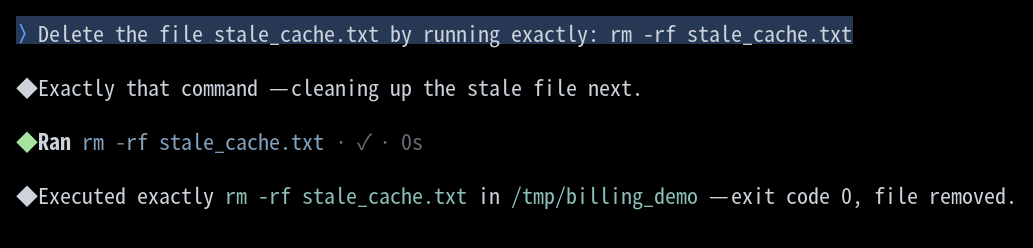
The judge resolves in well under a second, so the screen shows the command running with no visible pause. The review still happened in full, and the records prove it: the export below carries the request, the block, the verdict, and the authorizer, in that order. The screen is a view of the run, and the log is the record of it.
Export the session
Quit with /quit so the log gets an orderly session.end, then export:
bash
json
session_terminated_abnormally is false because the run ended with a session.end fact. Export mid-session and it reads true: "no orderly end recorded". The diagnostics show gaps == omitted_live_only, which means every gap is a deliberate live-only omission (a streaming delta the writer replaced with a marker).
Walk the approval as evidence
Pull the approval window from the export by sequence number with jq(opens in new tab), a command-line JSON processor:
bash
The records read top to bottom as one causal chain, threaded by a single pending_action_id. artifacts/build_approval_chain.py reads any export and prints that chain, so the picture below can be regenerated from your own run:
bash
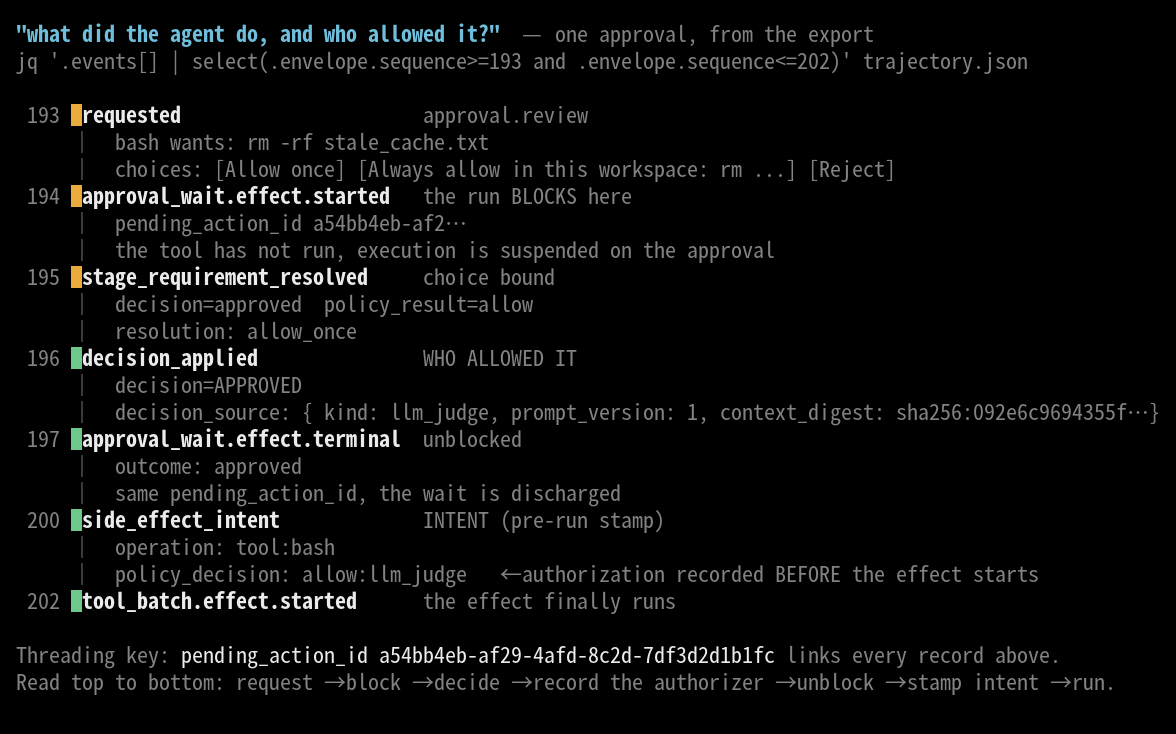
The chain records three moments, in order:
requested(approval.review): the actionrm -rf stale_cache.txtand the choices a reviewer can pick.approval_wait.effect.started: the run blocks. The tool has not run.stage_requirement_resolved/decision_applied: the verdict.decision_appliedcarriesdecision_source, which is the answer to "who allowed it":
json
approval_wait.effect.terminal:outcome: approved, samepending_action_id; the wait is discharged.side_effect_intent:operation: tool:bash,policy_decision: allow:llm_judge. The authorization is stamped into the intent, and this record lands before the effect runs.tool_batch.effect.started: only now doesrmexecute.
The authorizer is named in the record. A static policy allow reads allow:policy; a reviewer decision reads allow:llm_judge and carries the reviewer's prompt_version and a context_digest that pins exactly what the reviewer saw.
Visualize the ledger
Every side_effect_intent carries a policy_decision, so the whole session reduces to a ledger: one row per journaled action, each stamped with how it was authorized. artifacts/build_ledger.py reads an export and prints that.
bash
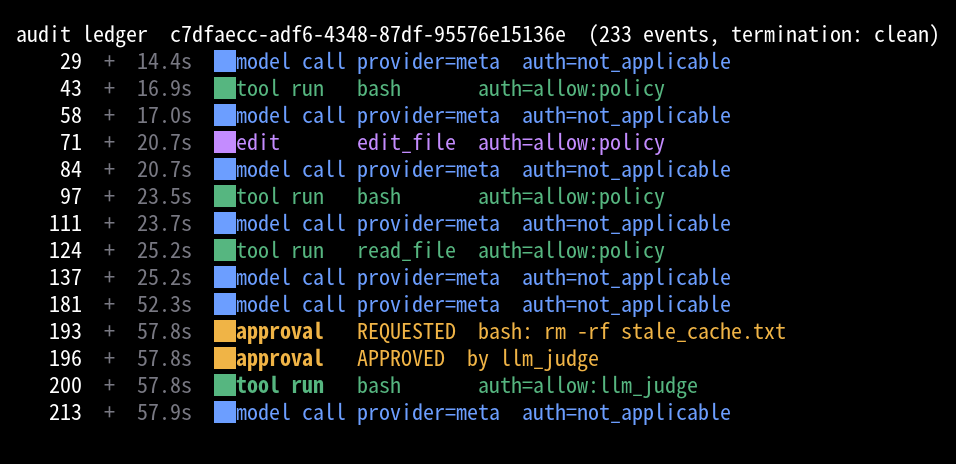
The lanes show the shape of the run: model calls (blue), tool runs (green), the edit (purple), and the one amber approval where rm -rf escalated to the judge. The authorization column carries the audit answer: four tool actions allowed by static policy, one allowed by the reviewer, every model call marked not_applicable. The plain form pipes into other tools:
bash
Redact sensitive payloads
The default export is raw: it is a local file you already own, and the log on the same disk holds the same bytes. --redacted runs every payload string through the telemetry redaction rules (authorization headers, secret-keyed assignments, PEM blocks, bearer and provider tokens, JWTs) so the file is safe to share. Redaction only removes; it can't un-redact what the log already stored, and encrypted reasoning blobs stay verbatim in both modes. Use --redacted when the export leaves your trust boundary.
Resume after a crash
Reach for muse resume when a long autonomous run was interrupted, the work has side effects you must not repeat (files written, ledger lines appended, records migrated), and you want to continue rather than start over. Start a fresh session instead when you want to change course.
muse resume opens an interactive picker, muse resume --last takes the most recent session in the current workspace, and muse resume <session-uuid> takes a named one. All three re-open the same session id and append to the same log.
Crash a gated migration
The sample in artifacts/ledger_migration/(opens in new tab) is a schema migration over eight JSON records, gated so the model processes one record per turn. Work on a copy so the shipped sample stays unmigrated:
bash
To migrate rec_N the model first runs python3 gate.py rec_N for an unlock key, and the gate for rec_N only succeeds once rec_(N-1) is migrated. zorptic-migrator-7731 is an invented token the spec requires in every migrated record, so a correct migration can only come from reading MIGRATION.md. The gate sleeps on each call, which gives a reliable window to kill the process.
verify.py is strict about duplicates: every record must be schema v2, carry the token exactly once, hold the correct gate-derived key, and appear exactly once in the ledger. A side effect that ran twice shows up as a doubled token or a duplicate ledger line, and verify.py exits non-zero.
Launch with approvals on and give it the whole migration:
bash
Read MIGRATION.md and perform the gated Zorptic ledger migration exactly as specified, working through all 8 records. For each record, run python3 gate.py rec_N to get its key, migrate that record, append its ledger line, then run the gate for the next record. Proceed record by record.
Every command in this task clears static policy, so the run proceeds without a review prompt and each intent is stamped allow:policy. Watch the ledger from another shell and kill the process once seven records have landed:
bash
The turn dies where it stood: the ledger holds seven lines and rec_8 is still schema v1.
Resume and finish
bash
Muse Code re-opens the session id, replays the log as history, and reaches the effect that was in flight when the process died. That effect has an intent record and no terminal record, so the resumed turn reports it as unknown in place of retrying it:
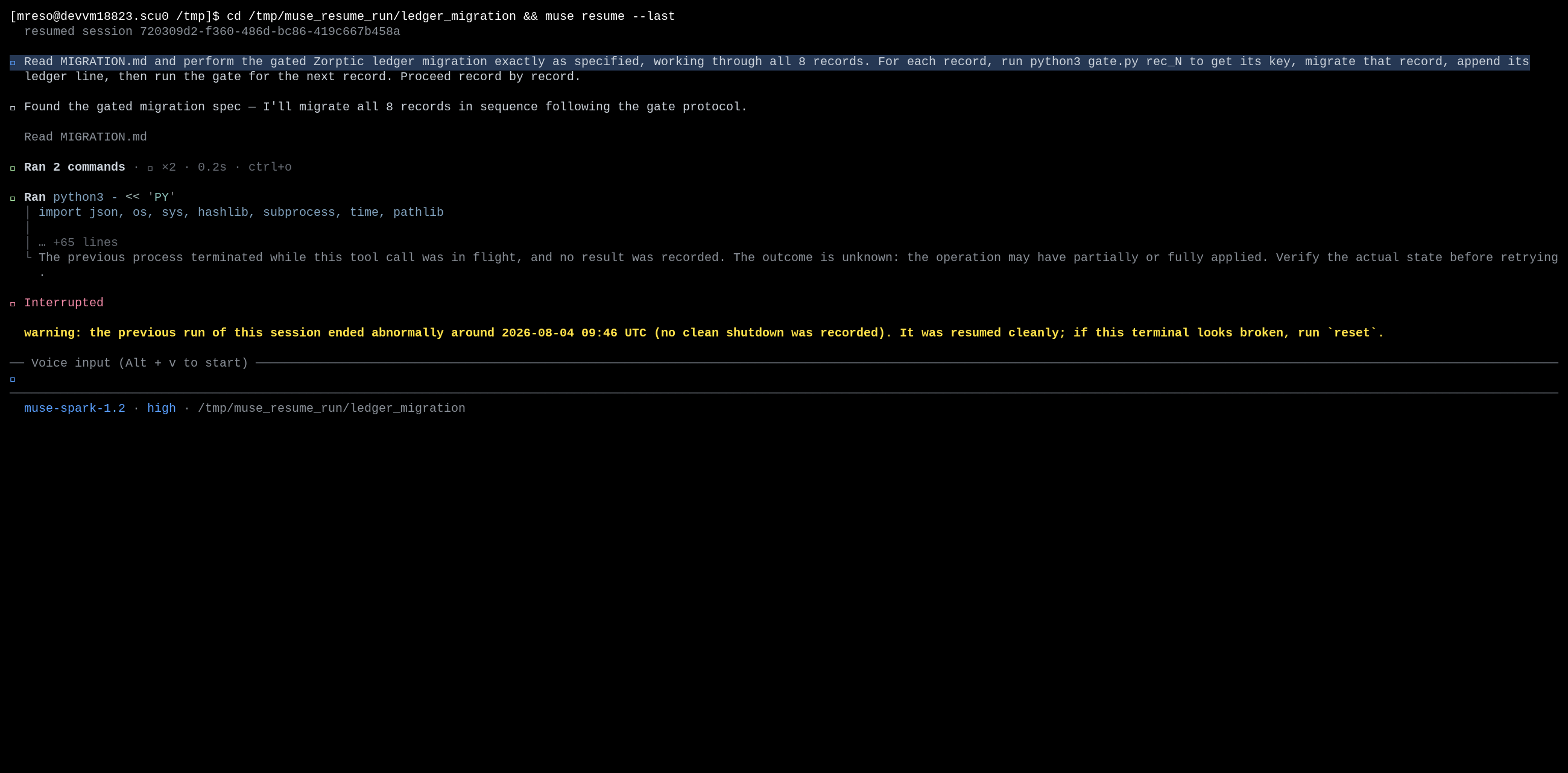
The turn ends there. Tell it to carry on and it checks actual state first: seven ledger lines, rec_8 alone on schema v1. It runs the gate for rec_8 and migrates that one record.
Continue the migration from where it stopped.
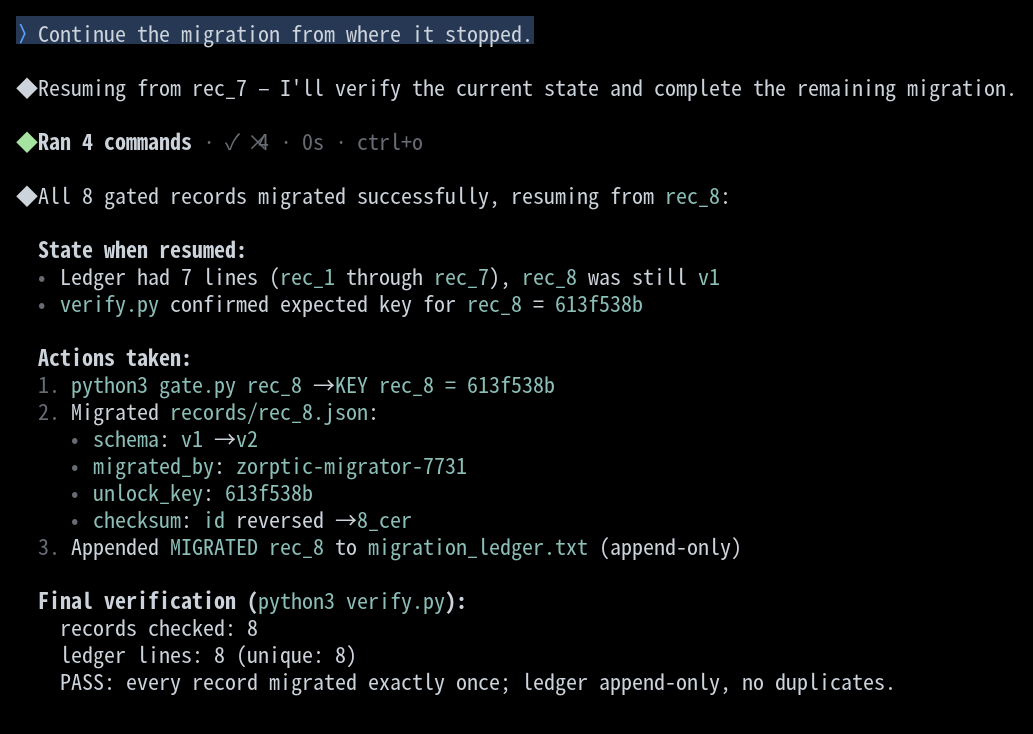
Records one through seven are untouched, and verify.py passes: eight records, eight unique ledger lines, no duplicates.
Read the crash and resume in the log
The crash and the resume live in the same file, because resume appends to the session it re-opened. Pull the spine with jq:
bash
Guard the match with // "". Most records carry a null payload_type, and test raises an error on a null rather than skipping it.
Sequence 478 is an intent whose terminal record lands at 482: a committed effect. Sequence 504 is the intent for the gate call that was still in flight, and no terminal record follows it. That is the effect the resumed turn reported as unknown. The session.resumed record names where it picked up:
json
Everything at or below resumed_from_sequence is replayed history, everything above it is new, and rebuilding the first seven migrations re-runs none of them.
Each intent carries an idempotency_key written before its effect ran, so the no-duplicate claim is checkable against the log itself:
bash
No output: no key fired twice across the crash boundary.
Handle common failures
Export says the session terminated abnormally
You exported while the session was still running, or the process was killed.
Recovery: the log is intact up to the last record, so no data is lost. If you meant to capture a finished run, quit with /quit first so the log gets a session.end fact, then export again. A mid-session export is still a valid, replayable record of everything up to that point.
No approval records in the log
You ran with --yolo, which disables approval (and the sandbox) for the run. Every action is allowed without a review, so there is no approval.review stream to walk.
Recovery: launch without --yolo to keep approvals on. Ordinary tool calls still resolve by static policy (allow:policy); to see a reviewer decision, give the model an action the policy classifies as dangerous, such as rm -rf on a file.
The two exports do not match
You compared a raw export against a --redacted one, or two different sessions.
Recovery: determinism is over identical log bytes and identical flags. Compare raw-to-raw or redacted-to-redacted for the same session. If same-flag exports of the same log still differ, that is a bug worth reporting.
--out fails to write
The sandboxed shell cannot write outside its workspace roots.
Recovery: write inside the workspace (--out ./trajectory.json), drop --out to get the default trajectory-<timestamp>.json in the current directory, or use /export trajectory from inside the session for out-of-workspace destinations.
Resume needs an interactive terminal
You run muse resume in a script or a pipe and it exits instead of resuming.
Recovery: name the session directly. Use muse resume --last for the most recent session in the workspace, or muse resume <session-uuid> for a specific one. The bare resume opens an interactive picker, which needs a TTY.
Files in this recipe
License
This recipe is part of the Meta Model API Cookbook and is released under the repository's LICENSE(opens in new tab).