Bundled skills
| Section | Muse Code |
| Time to complete | ~25 min |
| Model | muse-spark |
| Harness | Muse Code (the muse CLI) |
Summary
Muse Code ships with a small set of opinionated, trusted playbooks built in. This recipe drives four of them end to end: /plan, /grilling, /grill-with-docs, and /taste. All four are on by default, so a rough one-sentence idea has a path through planning, pressure-testing, and implementation.
All four load their full instructions only for the turn you invoke them on. The TUI marks the moment with a Loaded skill <name> · built-in line, so you can see exactly which turn a skill shaped.
Screenshots and captured output are from an actual Muse Code run; because the model is non-deterministic, your results may differ.
Compare the four skills
Every skill here is a first-party skill in the muse-core plugin, enabled by default. Run muse skills list and each one shows up as built-in.
| Skill | Invoke with | What it does | Stops to ask you? |
|---|---|---|---|
plan | /plan | Grounds a plan in your files, names the key decisions, and stops for approval. | Yes, at the end |
grilling | /grilling | Interviews you one decision-forcing question at a time until the design is sharp. | Yes, every question |
grill-with-docs | /grill-with-docs | Same interview, plus it writes settled decisions into your project docs. | Yes, every question |
taste | /taste | A flat checklist of visual defaults to avoid, so generated UI stops looking AI-made. | No |
Each one is explicit-invocation only. Muse Code doesn't run /plan because a task looks complex, or /grilling because a request is underspecified. You ask, and the skill runs. That boundary is written into each skill's own description, so an ordinary "implement this" request stays an ordinary implementation.
When do you use each one?
/planwhen the work has decisions to make before code: an API to design, a migration to sequence, a PR to split. You want the approach and the tradeoffs settled before anyone writes a line./grillingwhen you have a rough idea and want it pressure-tested. The skill plays the skeptic, one question at a time, so the assumptions that would cause problems later surface now./grill-with-docswhen that interview produces decisions worth keeping. The answers become durable project knowledge instead of chat scrollback that disappears./tastewhen you are generating a UI and you don't want the purple gradient, centered hero, three-card grid look that reads as AI-made.
Understand the bundled-skill contract
All four follow the same loading path. A slash shortcut invokes one skill for one turn; the harness loads that skill's full instructions and applies them to the current turn only.
| Step | Step description | Muse Code mechanism |
|---|---|---|
| 1. CATALOG | Every skill is available without costing context | At session open, skills load as summaries only |
| 2. INVOKE | Name the skill you want | The slash shortcut is /plan, /grilling, /grill-with-docs, or /taste |
| 3. LOAD | The full instructions arrive for this turn | The read_skill tool pulls the skill's SKILL.md |
| 4. APPLY | The skill shapes the turn you invoked it on | The instructions scope to the current user turn |
Boundary: a skill runs on explicit invocation only, loads its full body only on demand, and applies to that turn rather than the whole session.
At session open the harness loads only skill summaries, so the context stays small. When you invoke one, the read_skill tool pulls the full SKILL.md and the model applies it to that turn. The TUI marks the moment with a Loaded skill <name> · built-in line.
Try it on the sample project
The sample is a scratch project with invented domain terms. Create it and run Muse Code against it:
bash
Glimber and SnorkelLedger are invented, so a correct answer can only come from these files.
/plan: a grounded plan that stops for approval
Launch Muse Code and ask it to plan the missing feature:
bash
Muse Code loads the plan skill and reads ledger.py and the git log to ground itself. It then writes a decision-complete plan: goal, success criteria, the key decisions with a recommended choice for each, an ordered work plan, and a validation plan. It saves the plan to .agents/plans/ and stops with Approve, request changes, or cancel?. No code changed.
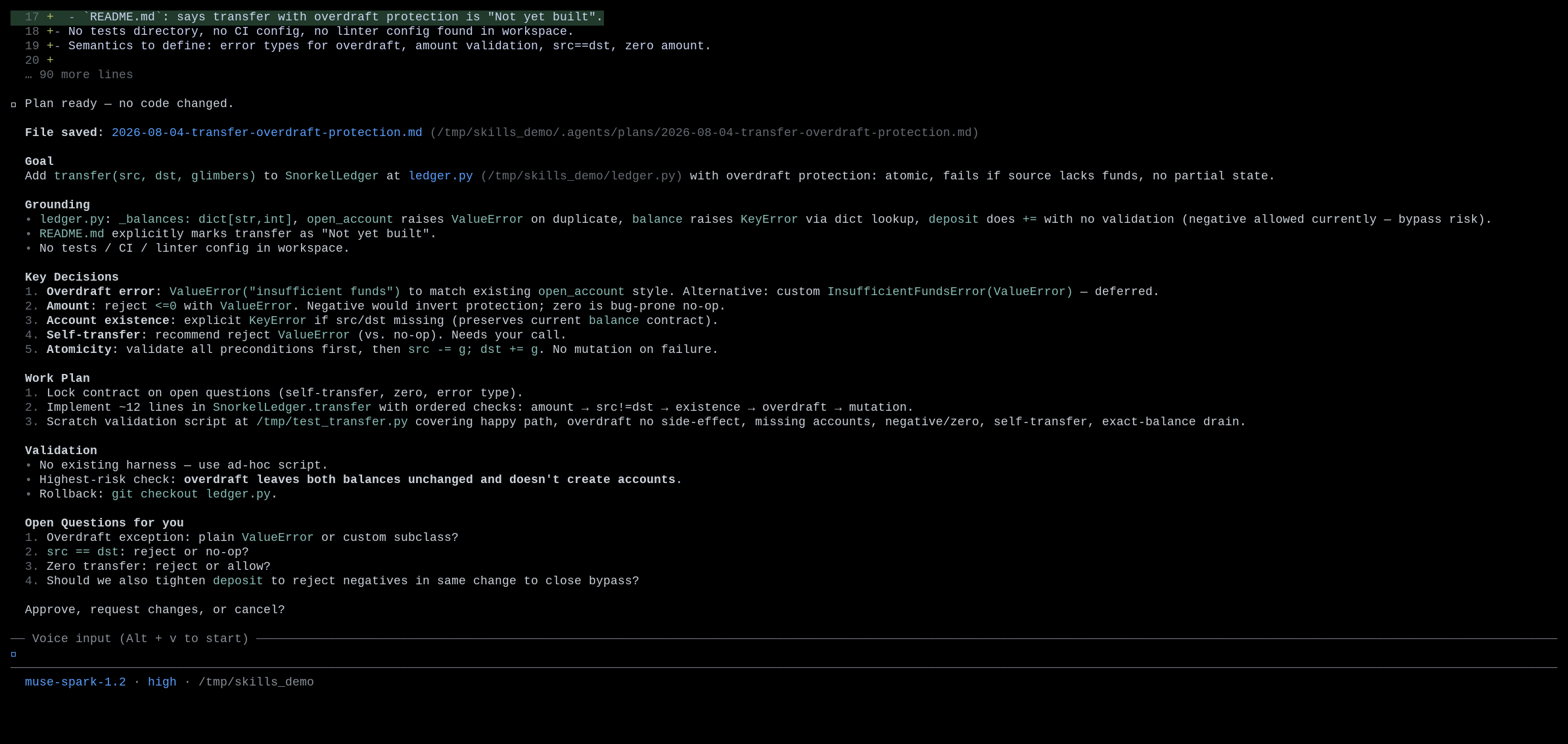
Notice what the plan caught by reading the code: deposit does no amount validation, so a negative transfer would bypass overdraft protection. A plan should surface that kind of decision before you build.
/grilling: one decision-forcing question at a time
Use /grilling when you want your own idea interrogated rather than a finished plan written for you. Start a fresh session and invoke it:
bash
The skill inspects the workspace, then asks exactly one question. Because the answer fits a few mutually exclusive choices, it uses a structured prompt with the recommended option first:
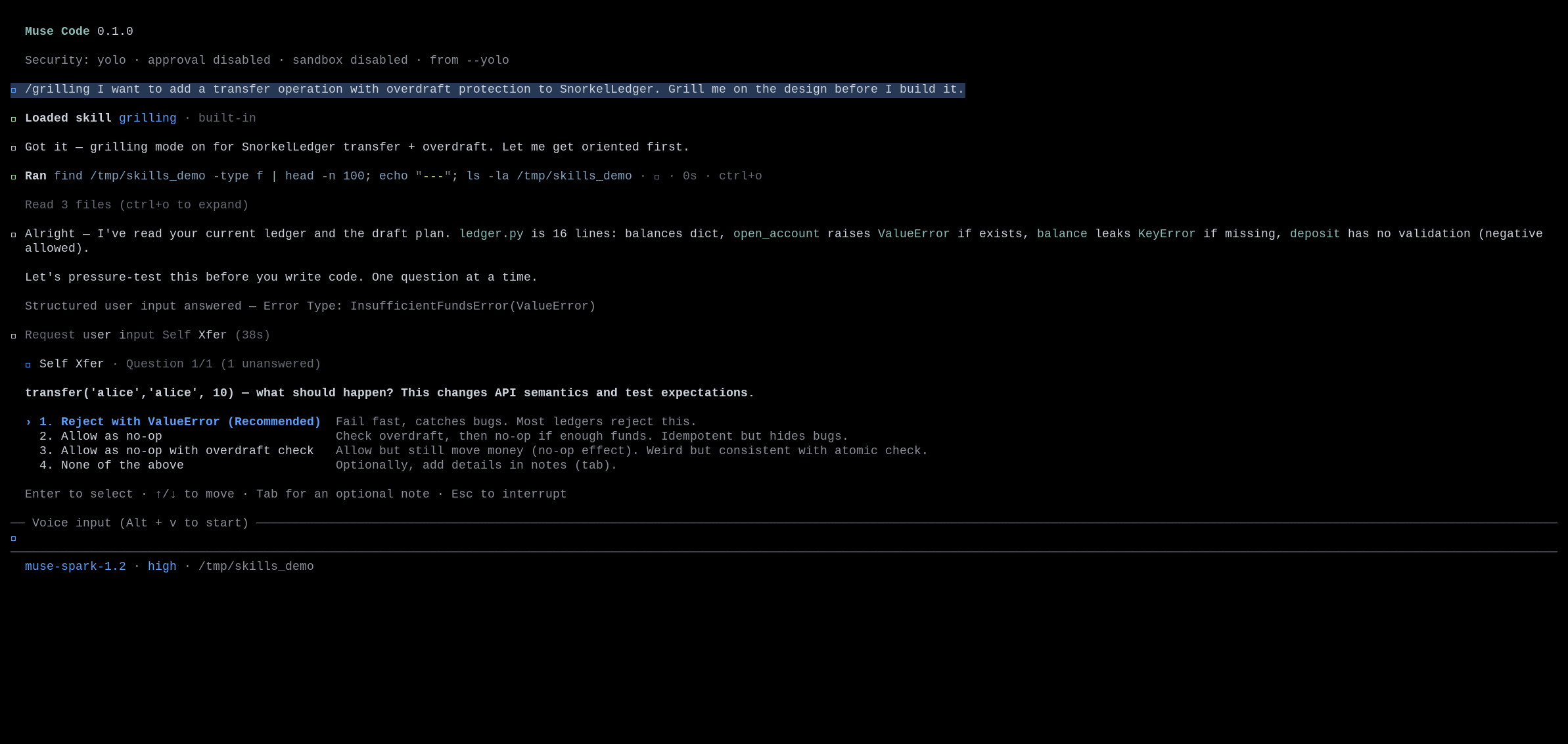
Answer it and the interview continues to the next hard edge. The questions present tradeoffs rather than open-ended prompts, and they are grounded in your code. One of them flags the same negative-amount overdraft bypass, because the skill read deposit before asking. The interview continues until goals, non-goals, constraints, risks, and validation criteria are clear, and the skill doesn't start implementing until you leave the flow.
/grill-with-docs: the same interview, written down
Decisions from /grilling live only in the transcript. Use /grill-with-docs when they are worth keeping. Give the project a home for durable decisions first:
bash
Then run the interview and tell it where the answers should land:
bash
It asks the same style of one-at-a-time question. The difference shows up after you answer: it reads docs/DECISIONS.md and writes a structured decision record covering the decision, the rationale, and the alternatives it rejected, then keeps interviewing.
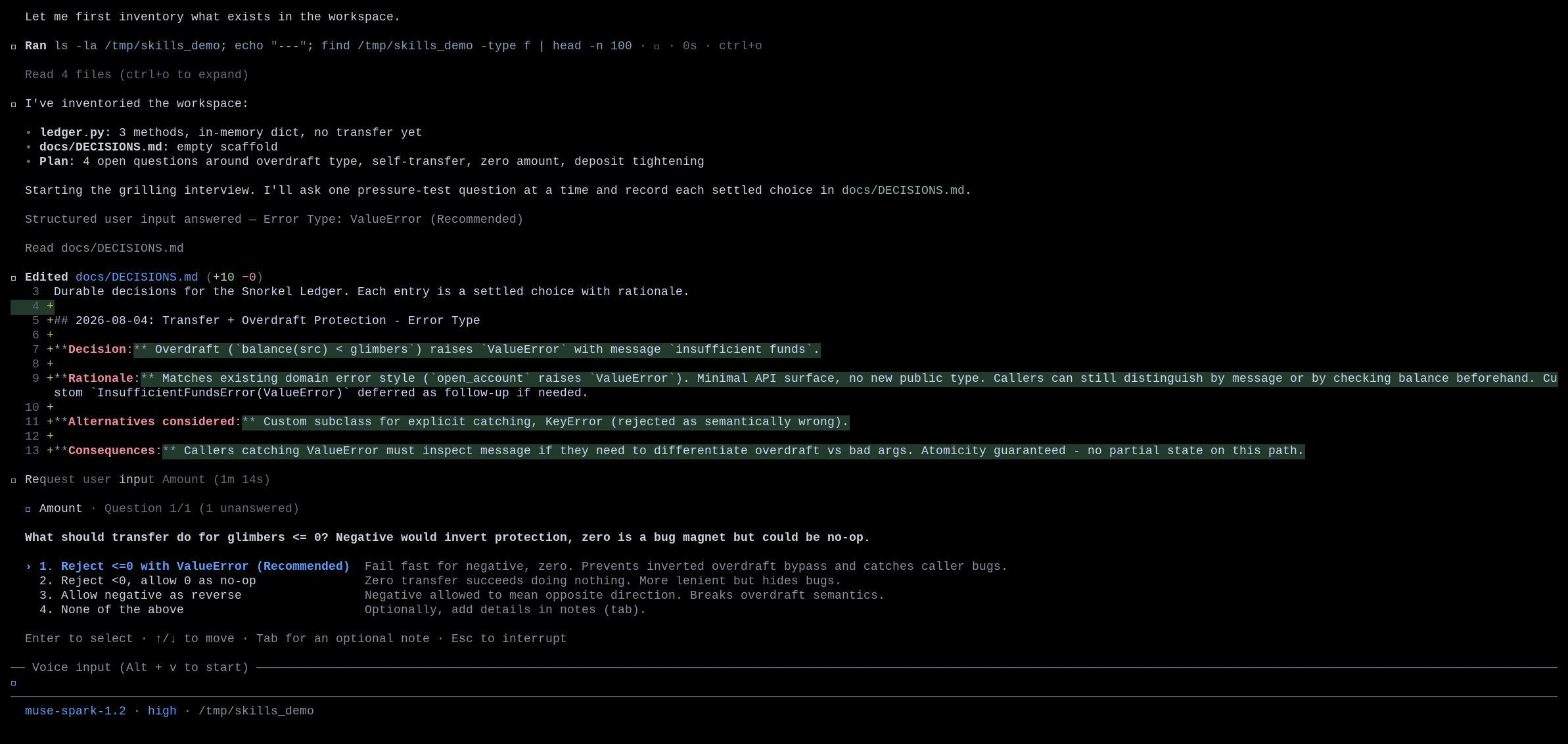
When you are done, the durable knowledge is on disk rather than in the chat:
bash
markdown
The skill only writes answers you settled or facts it verified from the workspace. It doesn't invent architecture or file speculative tasks.
/taste: UI that doesn't look AI-made
The last skill is a filter rather than an interview. /taste is a flat list of visual defaults to avoid: the purple-to-blue hero gradient, the centered eyebrow-headline-two-buttons hero, the identical three-card feature grid, Inter everywhere, rounded-2xl on every element. Stacking those is what reads as machine-made.
Try it on a small landing page. Run Muse Code in a fresh project with a design brief:
bash
Muse Code builds the page and, as it finishes, reports which defaults it avoided and what it chose instead. It uses an asymmetric grid in place of a centered hero, editorial numbered rows in place of a three-card grid, a warm espresso-and-clay palette in place of purple, and a type hierarchy in place of one weight of gray body text.

Open the result in a browser and the difference is visible. The page reads as something a person would plausibly design:
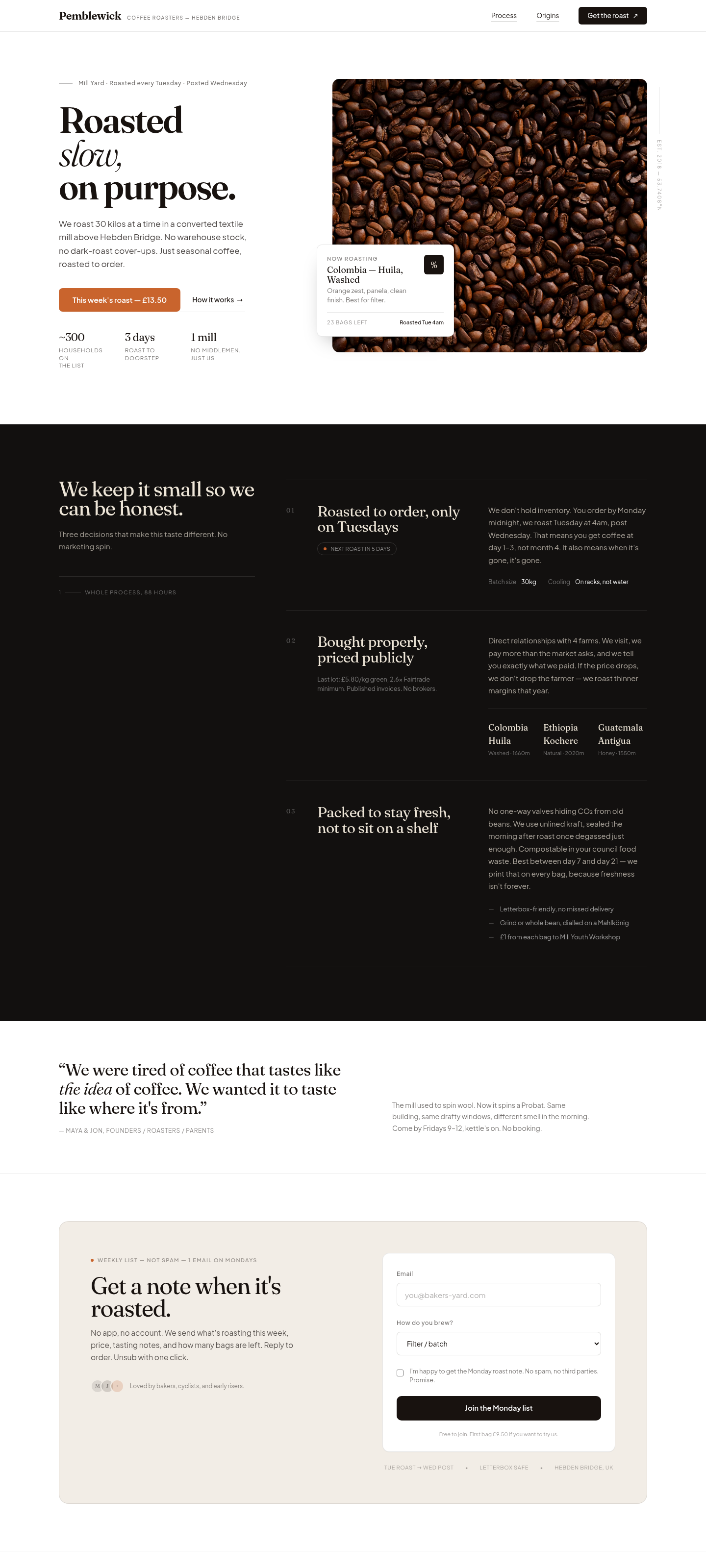
/taste never prescribes a specific look. It only removes the defaults that mark a page as machine-generated. An explicit request from you or from another skill overrides the checklist, which supplies defaults rather than rules.
Handle common failures
The skill does not fire on an ordinary request
You ask Muse Code to "implement transfer" and expect it to plan first, but it writes the code.
Recovery: ask for the plan explicitly: /plan, or "plan this before you build it." Every bundled skill here is explicit-invocation only, and plan in particular says not to plan ordinary implement, fix, or refactor requests. Task complexity alone is not a trigger.
/grilling asks in prose instead of structured choices
You expect the tappable multiple-choice prompt and instead get a plain chat question.
Recovery: answer in prose and the interview continues. The structured prompt (request_user_input) is used only when the answer fits two or three short, mutually exclusive choices. When the question needs a long or free-form answer, or when the host doesn't expose the structured input, the skill deliberately falls back to a chat question.
/grill-with-docs has nowhere to write
The skill runs the interview but does not know where durable decisions should live, and asks you.
Recovery: name an existing convention (a decisions log, an ADR directory, a glossary, or a spec), either in your prompt ("record decisions in docs/DECISIONS.md") or when the skill asks. It won't invent a documentation destination on its own. Once you name one, it writes settled answers there as the interview proceeds.
/taste produced something that ignores your brand
You had a specific look in mind and the page does not match it.
Recovery: put your brand, palette, or reference in the prompt or an AGENTS.md. /taste only removes defaults and doesn't impose a style, so it defers to an explicit style request. The checklist applies only when nothing else is specified.
License
This recipe is part of the Meta Model API Cookbook and is released under the repository's LICENSE(opens in new tab).