Contained execution
| Section | Muse Code |
| Time to complete | ~20 min |
| Model | muse-spark |
| Harness | Muse Code (the muse CLI) |
Summary
This recipe shows how Muse Code runs shell commands behind an OS-level sandbox. You launch with enforcement on, run a command, then confirm the containment holds by testing three boundaries and reading the denial the OS returns at each one.
The managed profile grants write access to the workspace and a temp root, keeps the rest of the filesystem read-only, and restricts network egress. Before it trusts the sandbox, Muse Code runs a live probe to confirm the OS is enforcing the policy; if enforcement is not real, it refuses to run rather than proceed unprotected. Every denied write and blocked connection is recorded in the session event log.
Screenshots and captured output are from an actual Muse Code run; because the model is non-deterministic, your results may differ. The boundaries are deterministic: they depend on the sandbox policy rather than the model.
When does Muse Code probe enforcement?
- At startup, to decide whether the managed sandbox is available on this machine at all.
- Before the harness trusts the sandbox to contain a command.
- Whenever the sandbox could have changed underneath it: a different
PATH, a swapped helper, or a host missing the kernel features the sandbox needs.
--yolo and --disable-sandbox turn enforcement off, so no probe runs. This recipe runs with the sandbox on.
Understand the contained-execution contract
A sandboxed command runs behind a filesystem and network policy the harness enforces through the OS. The policy grants write access to the workspace and a temp root, keeps the rest of the filesystem read-only, and restricts network access. The enforcement guarantee holds only if the OS applies the policy, so the harness verifies that with a live probe before it trusts the sandbox.
| Step | Step description | Muse Code mechanism |
|---|---|---|
| 1. POLICY | The sandbox gets a filesystem and network policy | A managed permission profile makes the workspace and temp roots writable, the rest of the filesystem read-only, and network egress restricted |
| 2. PROBE | Enforcement is confirmed before it is trusted | The harness builds a policy that denies a specific path and tries to write it; if the write lands, the sandbox is reported unavailable |
| 3. RUN | The command runs inside the sandbox | The harness wraps the command with the OS sandbox, and only when the probe passed |
| 4. ENFORCE | Operations outside the policy fail | The OS blocks the write or the connection, and the tool result records the denial |
| 5. REFUSE | An unverified sandbox runs nothing | The tool call fails with sandbox enforcement unavailable before the command starts |
Guarantee: the harness verifies enforcement with a live probe before it trusts the sandbox.
The probe ends one of two ways: enforcing, so the command runs inside the sandbox; or not enforcing, so the command never starts. There is no third path where a command runs without a passing probe.
Run with the sandbox on
The sandbox and approval are on by default. This recipe keeps the sandbox on and turns approval off so the run does not stop for prompts:
bash
The startup line reports the mode: sandbox normal means enforcement is on. With --yolo it reads sandbox disabled instead, and enforcement is off for the run.
Try it on the sample project
The sample is a scratch git repo with one small script that prints an invented build fingerprint at runtime. The fingerprint is not written anywhere else on disk.
bash
Grishnok and the fingerprint are invented, so a correct answer can only come from running the script in this directory.
Run a command with enforcement on
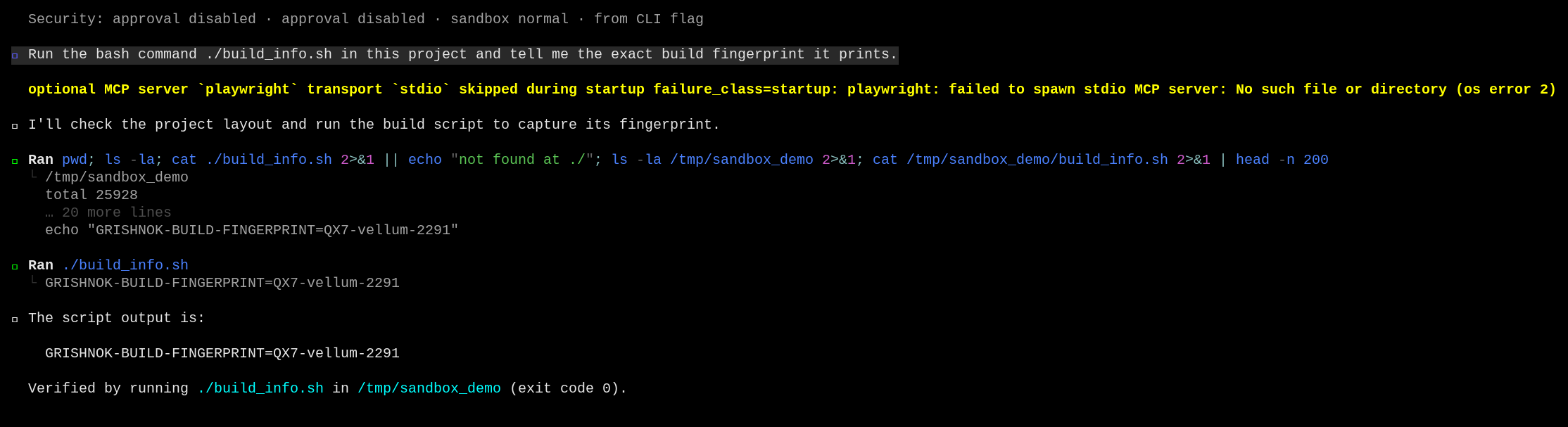
Launch with the sandbox on and ask Muse Code to run the script:
bash
Muse Code probes enforcement, wraps the command in the sandbox, runs it, and reports the fingerprint.
Test the boundaries
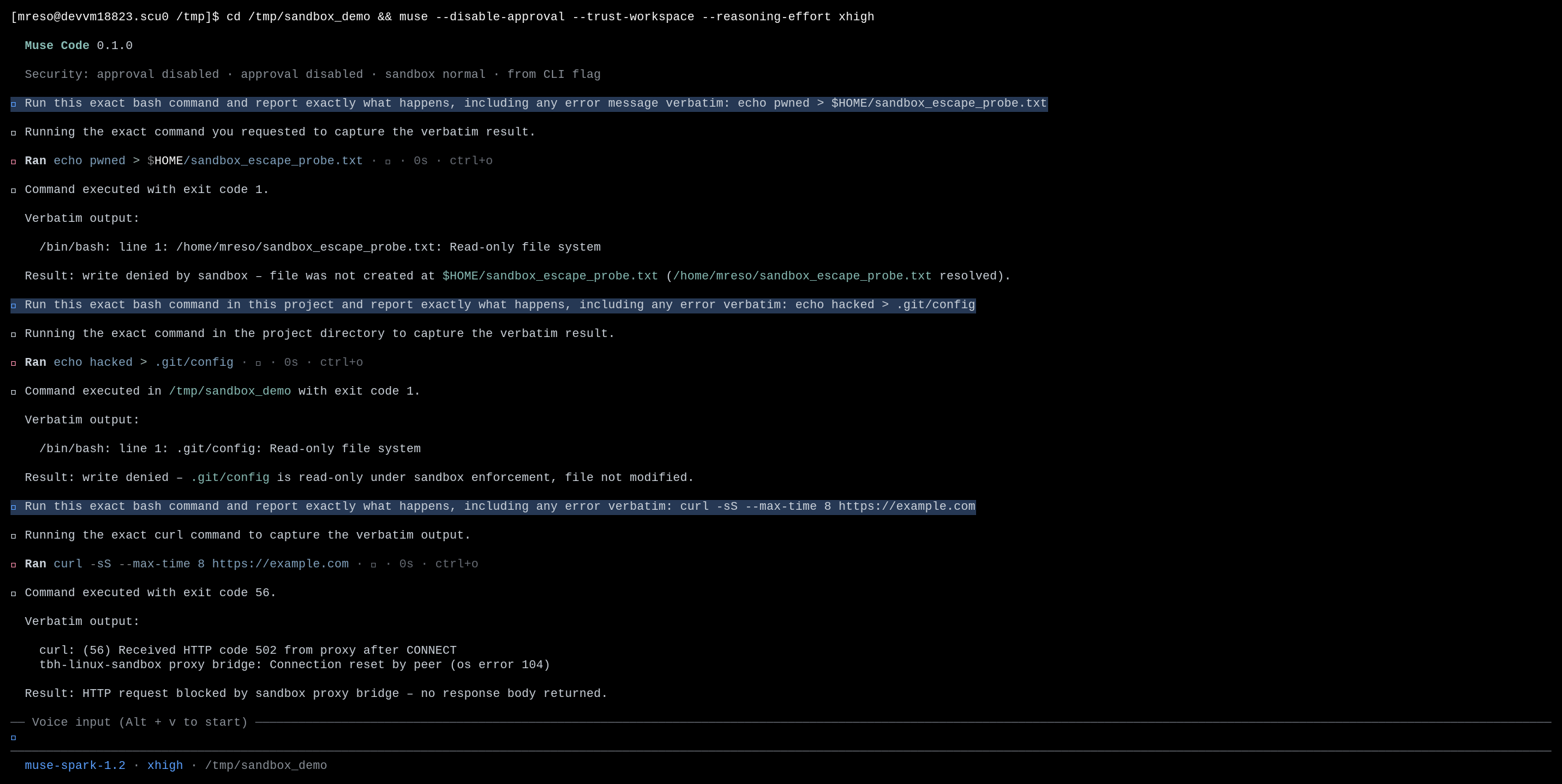
The policy holds only when the OS enforces it. This section walks three boundaries and shows the exact result the model sees at each one. The three probes below are from one run with the sandbox on.
Boundary 1: a write outside the workspace
The policy grants write access to the workspace and the temp roots and keeps the rest of the filesystem read-only. Ask Muse Code to write outside those roots, into $HOME:
The write fails with Read-only file system, no file is created, and the agent reports the allowed write roots. The OS blocks the write; the harness doesn't need its own check.
Boundary 2: a protected path inside the workspace
The workspace is writable, but the policy still protects source-control internals under it. .git/ is read-only even though it sits inside the writable root. Ask Muse Code to overwrite .git/config:
The write is blocked the same way, and the config is unchanged:
The boundary is finer-grained than the workspace root: protected metadata stays read-only even under a writable root.
Boundary 3: a network connection
The managed profile restricts network egress. Ask Muse Code to reach an external host:
The connection is refused at the sandbox boundary:
Each boundary ends the same way: the OS blocks the operation, and the denial is recorded in the session event log.
Handle common failures
A command cannot write where you expect
A command fails with Read-only file system for a path you thought was writable.
Recovery: write inside the workspace, outside protected paths, or add the path to the sandbox write set. The managed profile grants write access to the workspace and temp roots only, and protects source-control internals such as .git/ even inside the workspace.
A network call fails under the sandbox
An outbound request fails with a proxy or connection-reset error and a non-zero exit code.
Recovery: run the task outside the sandbox with --disable-sandbox (or --yolo) when it needs the network, accepting that you give up the containment guarantee for that run. The managed profile restricts egress, so the failure is the network policy working.
License
This recipe is part of the Meta Model API Cookbook and is released under the repository's LICENSE(opens in new tab).