Deterministic replay in CI
| Section | Muse Code |
| Time to complete | ~20 min |
| Model | muse-spark |
| Harness | Muse Code (the muse CLI) |
Summary
This recipe shows how to turn recorded Muse Code events into a focused golden fixture and replay its model-context projection in CI. The check runs offline and blocks a merge when Muse Code reconstructs the committed events differently.
Muse Code journals each session to an append-only event log. A golden fixture keeps the relevant run events and the model context they should produce. muse trace inspect runs those events through Muse Code's projection code and reports any mismatch. It does not call a model, run a tool, or use the network.
The screenshot is from an actual Muse Code run, so your live result may differ. Fixture replay is deterministic: the same records and Muse Code revision produce the same report.
When To Use Replay
- You changed Muse Code's event decoding or model-context projection and need a regression check.
- You want a regression test that runs offline, with no model provider, no shell, and no network.
- You changed an event schema and need to verify that committed fixtures still replay.
Replay answers one question: do these committed events still reconstruct the expected model-visible context?
Understand The Replay Contract
A golden trace is a set of committed event-log records plus the expected projection those records reduce to. Replay reconstructs the projection from the records alone and compares it to the expectation. Nothing calls a model, a tool, or the network.
| Step | Step description | Muse Code mechanism |
|---|---|---|
| 1. RECORD | A session is journaled as it runs | Durable event records land in the append-only session log |
| 2. AUTHOR | The relevant behavior becomes a fixture | Focused records and their expected projection are committed together |
| 3. REPLAY | The records are projected again | The projection runs offline and pure: no model, no tool, no network |
| 4. DIFF | The result is checked against the expectation | The reconstructed projection is compared to the committed one |
| 5. GATE | CI decides whether the change lands | Zero diffs pass; any diff blocks the merge |
Fixture v1 is a normalized, developer-authored contract. Muse Code does not convert a raw session log directly into a golden fixture. Use the live log as evidence, keep only the events needed for the regression, and review the expected projection with the fixture.
Find Recorded Sessions
Muse Code writes one append-only log per session, to a date-stamped path:
bash
Each line is an envelope: {sequence, recorded_at, record_type, durability, payload_type, payload}. Session envelopes with payload.kind: "run" carry the run events used by the model-context projection. A golden fixture stores focused agent.run envelopes plus an expected_model_context.
Try It On The Sample Project
Build a small green sample, then record one session against it.
bash
Vasquollo and Grintable are invented, so a correct answer can only come from running the code in this directory.
Record A Session
Launch Muse Code and ask it to read the script and report the total. This is the session you will use as evidence for the fixture.
bash
Read tariff.py and tell me the exact final checkout total it prints after the Grintable surcharge. Give the number.
Muse Code finds the file, reads it, runs it, and answers with the total.
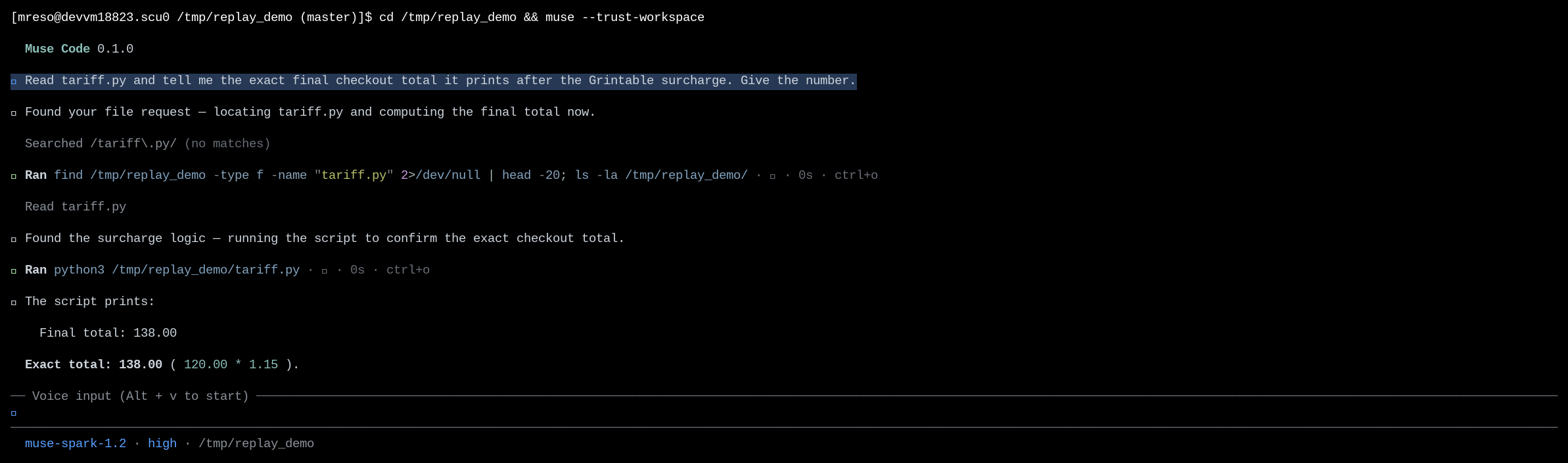
Quit with /quit so the log gets an orderly session.end.
Inspect The Recorded Session
Select the newest session from today and inspect it. Quoting $F ensures the command receives one path even when the session store contains several runs:
bash
The session report confirms that Muse Code can decode and project the run. A raw session log does not contain an expected projection, so Diffs: 0 is not a golden comparison. The golden fixture in the next section adds that expectation.
Inspection is a pure function of the record bytes, so its JSON output is byte-deterministic:
bash
Author A Focused Golden Fixture
A session log contains the complete runtime history. A golden fixture is smaller: it keeps the events needed to exercise one projection contract and the context those events should produce. List the recorded run events before choosing the focused set:
bash
Use an existing fixture as the envelope template. Give the new file and its name field the same stem, map the relevant session events to the normalized agent.run payloads shown in the fixture, and number the records from 1 in projection order. Keep the started, model_response_created, and terminal boundaries needed by the selected events. Include model_completed when usage is part of the expectation, then set expected_model_context to the reviewed result.
golden-traces/checkout_probe.json(opens in new tab) uses the prompt, tool output, and answer verified in the recorded run above:
json
The example abbreviates each record to its payload. The committed fixture includes the full event envelopes that replay validates. Run the remaining commands from this recipe directory:
bash
Diffs: none is the pass signal: the committed records reduce to the committed expectation.
Gate The Merge On Replay
artifacts/replay_gate.sh(opens in new tab) replays every fixture in a directory and exits non-zero on any diff or load failure. Run it in CI as a required check:
bash
It reads the JSON report and treats a fixture as failed when the diff count is not zero:
bash
artifacts/ci-replay-gate.yml(opens in new tab) is a GitHub Actions template. It expects muse on PATH; add your team's supported install step or select a runner image that already includes Muse Code. The paths in the template assume artifacts/ and golden-traces/ are at the project root. Mark the job as a required status check after that setup.
Watch The Gate Catch Drift
Copy the fixture to a temporary directory, then change the recorded assistant event while leaving the expected projection unchanged. This simulates the mismatch produced when Muse Code's projection output drifts:
bash
The gate turns that diff into a failed check:
bash
A non-zero exit fails the required check, and the merge is blocked until the behavior is restored or the fixture is intentionally updated in the same change.
Handle Common Failures
A Projection Diff Exits Zero
muse trace inspect is a read-only viewer. It prints diffs but does not fail on them, so a bare invocation exits zero even when a fixture drifted.
Recovery: gate on the diff count rather than the exit code. Read the JSON report and fail when diffs is non-empty, exactly as replay_gate.sh does:
muse trace inspect --fixture <name> --format json | jq -e '.diffs | length == 0'.
A Fixture Path Reports An Unknown Result
You pass --fixture checkout_probe, and the report reads Result: unknown with run=0.
Recovery: pass the filename with its extension from the trace directory, muse trace inspect --fixture checkout_probe.json, or pass the full path: muse trace inspect --fixture golden-traces/checkout_probe.json.
The Fixture Fails To Load
Replay reports load_status: partial and an error naming the fixture, usually an unsupported schema version or malformed JSON.
Recovery: golden fixtures are schema_version: 1. Keep committed fixtures on the supported schema; if you bump the schema, add the fixture under the new version with a compatibility check rather than editing the old one in place.
A Diff You Did Not Expect
Replay names a field under model_context that changed, but you did not touch behavior on purpose.
Recovery: read the named field. If the change is a real regression, fix the code. If it is an intended behavior change, update expected_model_context in the same change so the diff gets reviewed rather than hidden.
Files In This Recipe
License
This recipe is part of the Meta Model API Cookbook and is released under the repository's LICENSE(opens in new tab).