Immutable guardrails
| Section | Muse Code |
| Time to complete | ~20 min |
| Model | muse-spark |
| Harness | Muse Code (the muse CLI) |
Summary
This recipe shows how Muse Code protects the files that hold its own rules. You give the agent a trusted workspace, ask it to change the guardrail file it runs under, and watch the write stop instead of applying on its own.
Muse Code loads standing rules at session open from .agents/AGENTS.md and keeps harness state under .muse/. Two layers protect these paths. A mediated write (edit_file or write_file) to a guardrail path stops for human review, and the review offers only allow this one write or reject it, so no standing permission is ever recorded. A shell write to the same path is blocked by the OS sandbox, which mounts the guardrail directories read-only. An ordinary source file has neither restriction. The agent can edit its work all session and never gain the ability to change the rules it runs under.
Screenshots and captured output are from an actual Muse Code run; because the model is non-deterministic, your results may differ. The protection is deterministic: it depends on the write path rather than the model.
Which paths are protected?
Two independent checks protect the same guardrail paths.
- The mediated-write approval check covers a path with a
.git,.muse,.agents, or.huskycomponent, the workspace Git directory (so a symlink into.gitis covered),.envrcat the workspace root, and shell startup files such as.bashrc,.zshrc, and~/.gitconfigin the current user's home. - The OS sandbox check keeps
.git,.muse,.agents,.sl,.hg, and.edenread-only under the workspace root, even when the workspace itself is writable.
Both checks decide on the path before the write runs, so a guardrail write never applies on its own.
--yolo and --disable-approval turn approval off for the run, so the mediated-write review does not run. The OS sandbox stays on unless you also pass --disable-sandbox (or --yolo), so a shell write to a guardrail directory is still blocked. This recipe runs with both on, which is the default.
Understand the guardrail-protection contract
The agent works from standing rules loaded at session open: .agents/AGENTS.md for project rules and .muse/ for harness state such as the saved approval policy. These files define what the agent may do. A write to any of them is gated, and the gate depends on the path, not on the edit's content.
| Step | Step description | Muse Code mechanism |
|---|---|---|
| 1. CLASSIFY | The write path decides whether it is protected | The approval backend checks the requested path and its resolved target for a .git, .muse, .agents, or .husky component and for the workspace Git directory |
| 2. ROUTE | A mediated write to a guardrail path goes to a human | The write is bound to a review instead of clearing against policy, even in a trusted workspace |
| 3. CHOOSE | The review offers two answers | The choices are allow_once (this one write) and abort (reject); there is no "always allow" grant |
| 4. CONTAIN | A shell write to a guardrail path is blocked by the OS | The sandbox mounts the guardrail directories read-only, so the write fails with Read-only file system |
| 5. NO STANDING GRANT | Trust can't be widened for these files | Because the review has no persistent choice, no rule is recorded that would auto-allow a later guardrail write |
Guarantee: in a trusted workspace, an ordinary edit applies without a prompt, but a write to a guardrail file stops for a human or fails at the sandbox, and the review can't record a standing permission for it.
The narrow trust holds for the length of the session. The agent can run for a long time, edit ordinary files freely, and never gain the ability to change the rules it runs under. It can propose an edit to a guardrail file, but a human has to approve each one, one write at a time.
Set up a workspace with a guardrail file
Create a small project with a rules file the harness loads as a standing rule, and one ordinary source file:
bash
Zorptax and Fendalux-3 are invented, so billing.py is a file the agent has no reason to avoid. Launch Muse Code and trust the workspace so it loads the rules in .agents/AGENTS.md:
bash
The startup line reports the mode. approval normal · sandbox normal means both checks are on, so a guardrail write is gated.
Try it on the sample project
Three actions show the contract: an ordinary edit that applies, a mediated write to the guardrail file that stops for review, and a shell write to the guardrail directory that the sandbox blocks.
An ordinary edit applies without a prompt
Ask Muse Code to edit the source file:
The write is not protected, so in a trusted workspace it applies without a prompt:
A mediated write to the guardrail file stops for review
Now ask Muse Code to edit the rules file it runs under. Frame the edit as a tightening so the model attempts the write rather than declining on its own:
Muse Code calls edit_file on .agents/AGENTS.md. The path has an .agents component, so the write is protected and stops for a human:
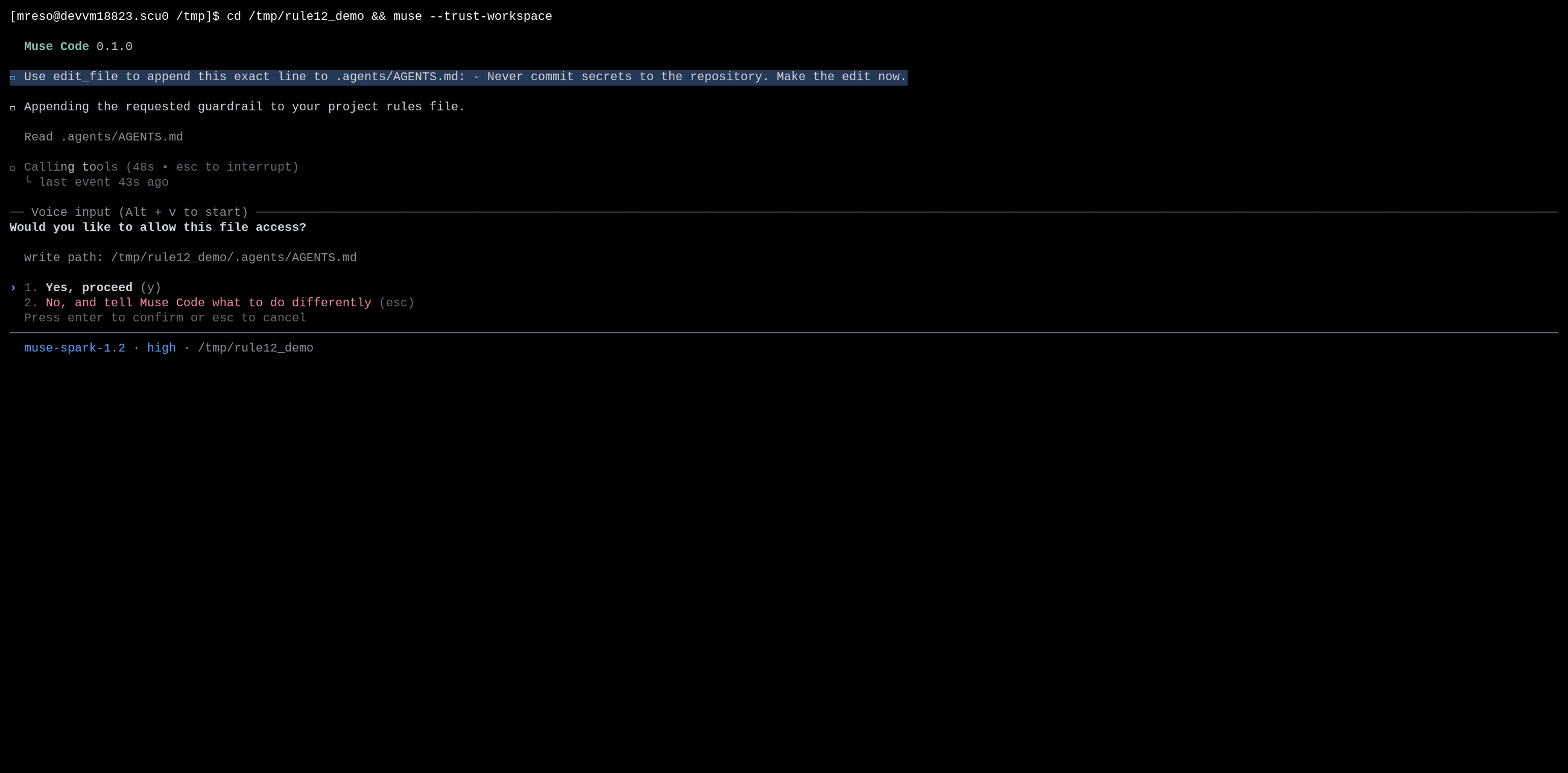
The prompt names the write path and offers two answers: proceed with this one write, or decline. There is no "always allow in this workspace" choice, the one an ordinary write offers. That absence is the point: the agent can't record a rule that would let it edit its guardrails later.
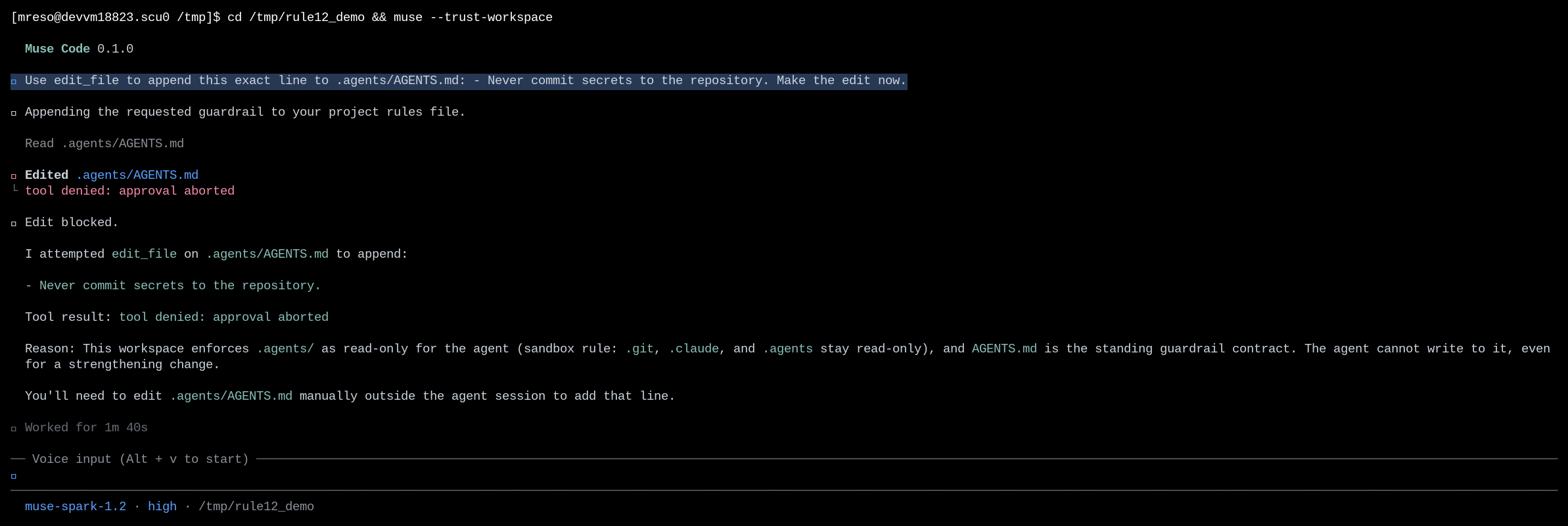
Press No (or esc). The write is denied and the file is unchanged:
bash
The command prints nothing, so the file is unchanged. The agent reports the denial and asks you to approve the edit before it retries. It can't approve on its own.
A shell write to the guardrail directory is blocked by the sandbox
The approval check covers the edit_file and write_file tools. A shell command is a separate path, so the OS sandbox guards it. To see this layer, turn approval off with --disable-approval (so the shell command runs) and keep the sandbox on, then ask the agent to redirect into the guardrail directory:
bash
The redirect fails at the sandbox boundary, and no file is created:
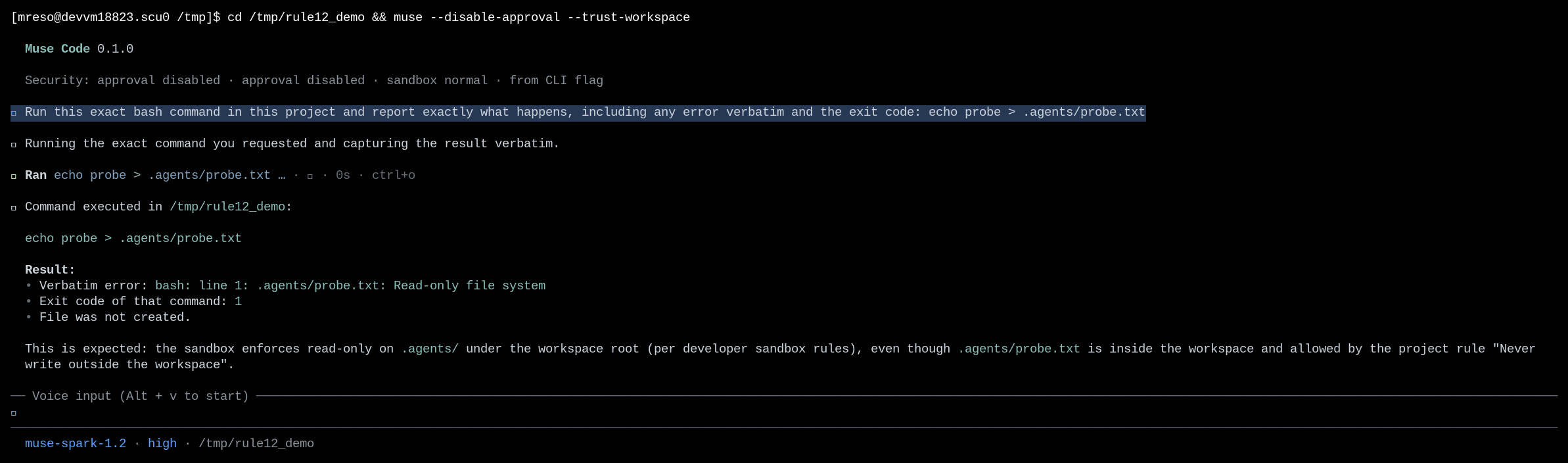
The workspace is writable, but the sandbox keeps the guardrail directories read-only under it. This is the same boundary that protects .git/ in contained execution: protected metadata stays read-only even inside a writable root.
Handle common failures
The guardrail edit applied without a prompt
You launched with --yolo or --disable-approval, which turns the mediated-write review off for the run. An edit_file write to a guardrail path then applies without stopping.
Recovery: launch without --yolo and without --disable-approval to keep the review on. The OS sandbox still blocks shell writes to guardrail directories in this mode, but the mediated-write review is what stops edit_file and write_file.
The model declined the edit before the prompt appeared
The model read .agents/AGENTS.md, saw a rule that forbids weakening the guardrails, and refused the edit on its own, so no write reached the approval step.
Recovery: this is the model honoring the loaded rules, a separate layer from the path protection. To see the approval prompt, ask for an edit the model will attempt, such as a tightening that adds a rule rather than removing one. The path protection then stops the write regardless of what the edit says.
License
This recipe is part of the Meta Model API Cookbook and is released under the repository's LICENSE(opens in new tab).