Perception grounding
| Section | Use cases |
| Time to complete | ~10 min |
| Model | muse-spark-1.3 |
| Language | Python |
Ever wondered what in your fridge is actually good for you? This recipe takes a photo of your fridge, sends it to Muse Spark in a single API call, and gets back an interactive HTML page with color-coded dots on each food item. Green means "eat up," red means "maybe skip this one." Hover over any dot for the full story - why it's recommended (or not), a health score, and a nutrition breakdown.
This is perception grounding in action - the model doesn't just recognize what's in the image, it knows where each item is and generates a pixel-accurate interactive overlay. One API call, one image in, one interactive HTML file out.
Screenshots throughout are from an actual run; because the model is non-deterministic, your results may differ.
What you get
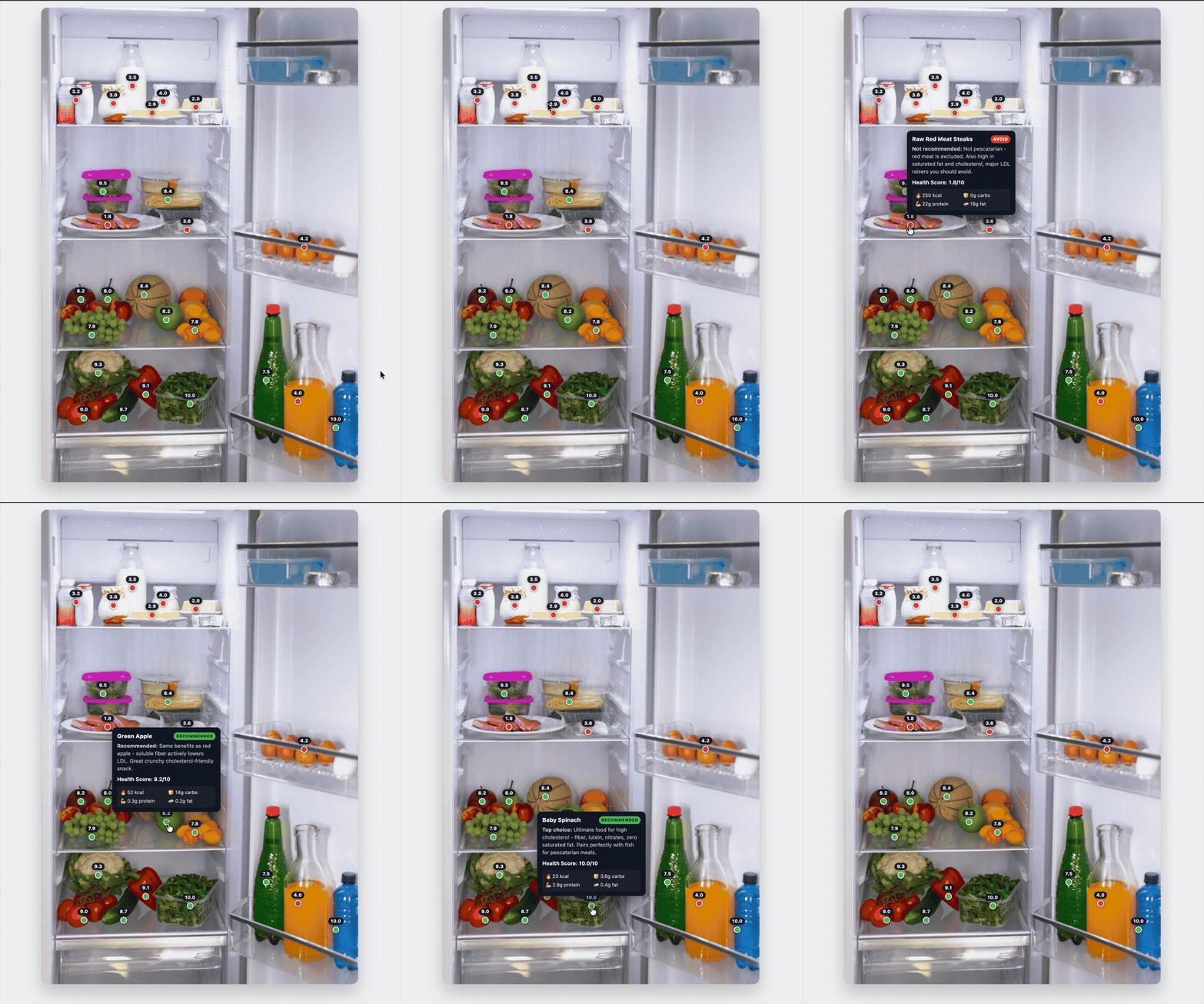
The model generates a self-contained HTML file where:
- Each food item gets a colored dot placed right on top of it
- Green dots for recommended foods, red dots for foods to avoid
- A health score (out of 10) floats above each dot, always visible
- Hover over any dot to see: item name, personalized justification, calories, carbs, protein, and fat
- Tooltips are smart about positioning - they stay within the image frame even for items near the edges
How it works
The script sends your image to Muse Spark via the Responses API with vision. The model does everything in one shot: identifies food items, estimates their pixel locations, classifies them based on your dietary needs, and generates the complete HTML with interactive overlays. No external models, no multi-step pipelines - just one API call.
Setup
bash
Quick start
bash
You'll see streaming dots in the terminal as the model generates the HTML, then a summary with token count and file size.
Try a different dietary context
The prompt is fully customizable. Some ideas:
bash
The default prompt
Sample output
The examples/ folder includes a pre-generated HTML file you can open right away without running anything:
bash
Files
| File | Purpose |
|---|---|
perception_grounding.py | Main script: image + prompt -> interactive HTML overlay (single API call) |
requirements.txt | Python dependencies |
examples/food_in_fridge.jpeg | Sample fridge photo |
examples/food_in_fridge_grounded.html | Pre-generated HTML overlay you can open in any browser |
examples/food_in_fridge_grounded.gif | Demo of the interactive HTML overlay |
Environment variables
MODEL_API_KEY- requiredMODEL_NAME- model name, defaults tomuse-spark-1.3MODEL_BASE_URL- API endpoint, defaults tohttps://api.meta.ai/v1