Staged approvals
| Section | Muse Code |
| Time to complete | ~20 min |
| Model | muse-spark |
| Harness | Muse Code (the muse CLI) |
Summary
This recipe shows how Muse Code reviews a compound shell command by stage. You will create a small workspace, ask Muse Code to run one command, and reject the destructive stage.
The sample command has three stages:
bash
Muse Code parses the command before it runs. It checks each stage against policy. In this command, wc -l report.log and echo cleaning resolve automatically. rm -rf report.log goes to review because rm -rf is on the dangerous list.
The command runs only after every stage is allowed. If you reject one stage, Muse Code denies the entire command and runs nothing.
Screenshots and captured output are from an actual Muse Code run; because the model is non-deterministic, your results may differ. The policy behavior shown here is deterministic.
When does a stage go to review?
- The command contains an unmatched stage on the dangerous list:
rm -forrm -rf, including when wrapped insudoorsetsid. This holds in on-request and untrusted modes. - In untrusted mode, any stage that no policy rule you granted covers. The read-only allowlist does not apply in this mode, so even
lsprompts until a rule covers it.
A stage resolves without a prompt in three cases:
- An allow rule you granted already covers it. In untrusted mode this is the only way a stage clears.
- In the default on-request mode, no rule has forced review or denial, and the stage is provably read-only:
ls,cat,wc,grep, and a small fixed set. - In the default on-request mode, no rule has forced review or denial, and the stage is not on the dangerous list.
Understand the staged-approval contract
A compound command gets one decision per stage, not one for the whole line. The harness parses it into an ordered list of stages, resolves each against policy, and blocks on the first stage it cannot clear. You answer for that stage; the command resumes at the next unresolved stage or, if you reject, the whole action is denied.
| Step | Step description | Muse Code mechanism |
|---|---|---|
| 1. PARSE | The compound command is split into stages | The parser produces an ordered list, each stage carrying its own argv and an argv_complete flag |
| 2. RESOLVE | Each stage is judged on its own | The engine checks each stage against policy and the read-only allowlist, then resolves it to known_safe, to a policy allow, or to unresolved |
| 3. REVIEW | The first stage that cannot clear blocks | The prompt names the stage whose resolution is unresolved |
| 4. DECIDE | Answer for that stage | You choose: allow once, allow in this workspace, or reject |
| 5. RUN | The command runs as one unit | Muse Code executes the original text, unchanged, once every stage is satisfied |
Take wc -l report.log && echo cleaning && rm -rf report.log. It resolves into three stages:
| Stage | Command | Resolution |
|---|---|---|
| 1 | wc -l report.log | known_safe, cleared automatically |
| 2 | echo cleaning | known_safe, cleared automatically |
| 3 | rm -rf report.log | unresolved, held for review |
Fail-closed: in untrusted mode, a parse error or a dynamic stage never auto-allows. In the default on-request mode, an incomplete stage that isn't dangerous is auto-allowed and sandbox-contained. In on-request and untrusted modes, an unmatched dangerous stage holds. A rejected stage denies the whole action.
Read the stages top to bottom and you see the command's risk before any of it runs. The two safe stages resolve on their own; the destructive stage holds. Reject it and report.log is still there, because the command runs as one unit only after every stage clears.
The parser marks a stage argv_complete = false when it cannot read the stage completely: a variable-assignment prefix, a command substitution, or a redirect that isn't read-only. An incomplete stage cannot resolve to known_safe. In untrusted mode, it goes to review unless a rule covers it. In on-request mode, a non-dangerous incomplete stage can still clear through the sandboxed fallback described above.
Grant exactly the trust you intend
Trust in Muse Code is scoped, and each scope is a different durability. You grant the narrowest one that fits the task.
| Scope | Choice in the prompt | What it covers | Where it lives |
|---|---|---|---|
| One action | Allow once | this exact stage, this once | nothing persisted |
| Workspace | Always allow in this workspace: <prefix> ... | an argv prefix, keyed to this workspace root | approval-policy.json |
| Reject | Abort the entire command | denies the whole action | nothing persisted |
A shell stage always offers Allow once and Reject. When the stage has a permitted persistent prefix suggestion, it also offers the workspace grant. The policy model has a fourth, session-scoped durability that holds until you quit. It is offered for non-shell tool actions such as a filesystem or network subject, not for shell stages, where an exact-raw match is too brittle and a prefix rule is the useful grant.
The workspace grant records an argv-prefix rule scoped to one workspace. Approving cargo test ... in one workspace binds that rule to the workspace's canonical root. It doesn't apply to another project, and it doesn't cover a different prefix. Within one effect, the most specific rule wins. Across effects, a deny overrides a prompt, and a prompt overrides an allow, regardless of specificity. An allow cannot override a deny.
A prefix grant is offered for a stage that parses to a complete, static argv with a permitted prefix suggestion. Stages whose useful prefix is an interpreter or wrapper do not offer a persistent prefix, because everything after the interpreter is arbitrary code. That list covers python, bash, sh, node, perl, ruby, php, env, sudo, and a bare git, among others.
Set up a regulated workspace
Two things make a workspace regulated: approval is on, and trust is explicit.
Approval and the sandbox are on by default. Launch Muse Code without --yolo and it runs in on-request mode, where a stage on the dangerous list escalates. On first entry it asks whether to trust the workspace at all; trust loads project-local skills, rules, and hooks, so it is its own grant.
bash
Grofflaxon and Vantablast-7 are invented, so a correct answer can only come from this file. On launch Muse Code asks about trust:
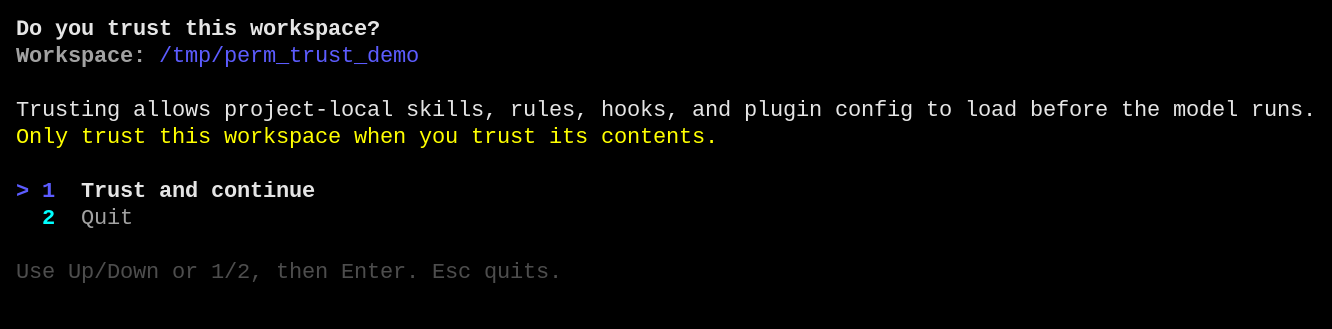
Choose Trust and continue. The decision is recorded per workspace root in trust.json, so you answer once per project, not once per session.
For a stricter posture, launch in untrusted mode (muse --approval-mode untrusted), where any action without a matching allow rule prompts, not only the dangerous ones. The mode is a startup choice on the approval backend; this recipe uses the default on-request mode so the safe stages resolve on their own and the destructive one holds.
Try it on the sample project
Give the model one compound command whose first stages are safe and whose last stage is destructive. Ask it to run the command verbatim so the whole chain reaches the policy engine as one action.
Watch the command halt mid-chain
Muse Code parses the command into three stages. wc -l report.log and echo cleaning are read-only, so they resolve to known_safe without a prompt. rm -rf report.log is classified as dangerous, so it holds. The command stops at stage 3 of 3 and asks you:
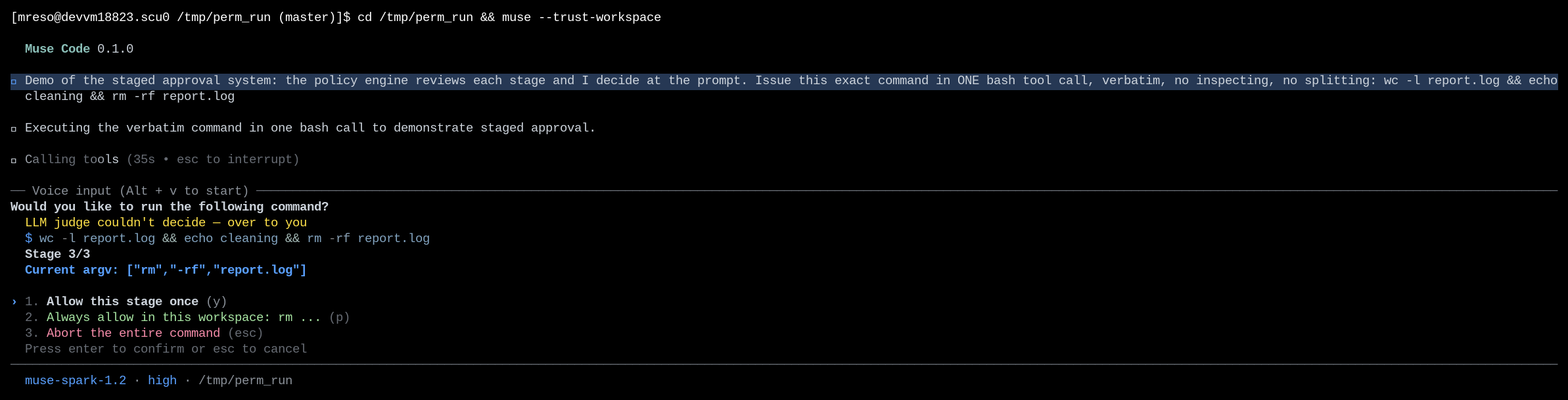
The prompt shows the full command, the stage counter (Stage 3/3), and the exact argv under review (["rm","-rf","report.log"]). The choices are the three trust scopes: allow this stage once, always allow the rm prefix in this workspace, or reject the whole command. rm -rf is dangerous by policy, so the prefix grant would be a poor choice here; Allow once is the narrow answer.
Reject it and confirm nothing ran
Press Reject. The whole action is denied and the command does not run:
The safe stages did not run either, because the command executes as one unit only after every stage clears. report.log is untouched:
bash
That is the fail-closed property: one rejected stage denies the entire action.
Read the event log
Muse Code is event-sourced; every review is journaled. Find the session log and pull the approval window:
bash
For the rejected run this prints the three stages with wc and echo at known_safe and rm -rf at unresolved. The decision that closed the review is a decision_applied record:
bash
Because the review aborted, there is no side_effect_intent with a tool:bash operation for the command. The effect was never authorized, so it was never recorded as about to run. When you allow the pending stage instead, the command-level side_effect_intent carries policy_decision: allow:approved. Stage-level provenance stays in the approval event's stage_evidence, where auto-cleared stages show their own resolutions.
Handle common failures
The command never staged; it ran without a prompt
You launched with --yolo, which disables approval and the sandbox for the run.
Recovery: launch without --yolo to keep approval on. In the default on-request mode, read-only stages still resolve on their own. To see a stage held, give the model a command with a dangerous stage such as rm -rf on a file, or use untrusted mode to hold every unmatched stage.
License
This recipe is part of the Meta Model API Cookbook and is released under the repository's LICENSE(opens in new tab).