Control Apple Chess with Voice
| Section | Muse Voice Transcribe |
| Time to complete | ~10 min |
| Model | muse-voice-transcribe-1.0 |
| Language | Python |
| Platform | macOS with Apple Chess |
Watch the 50-second Voice Chess demo(opens in new tab)
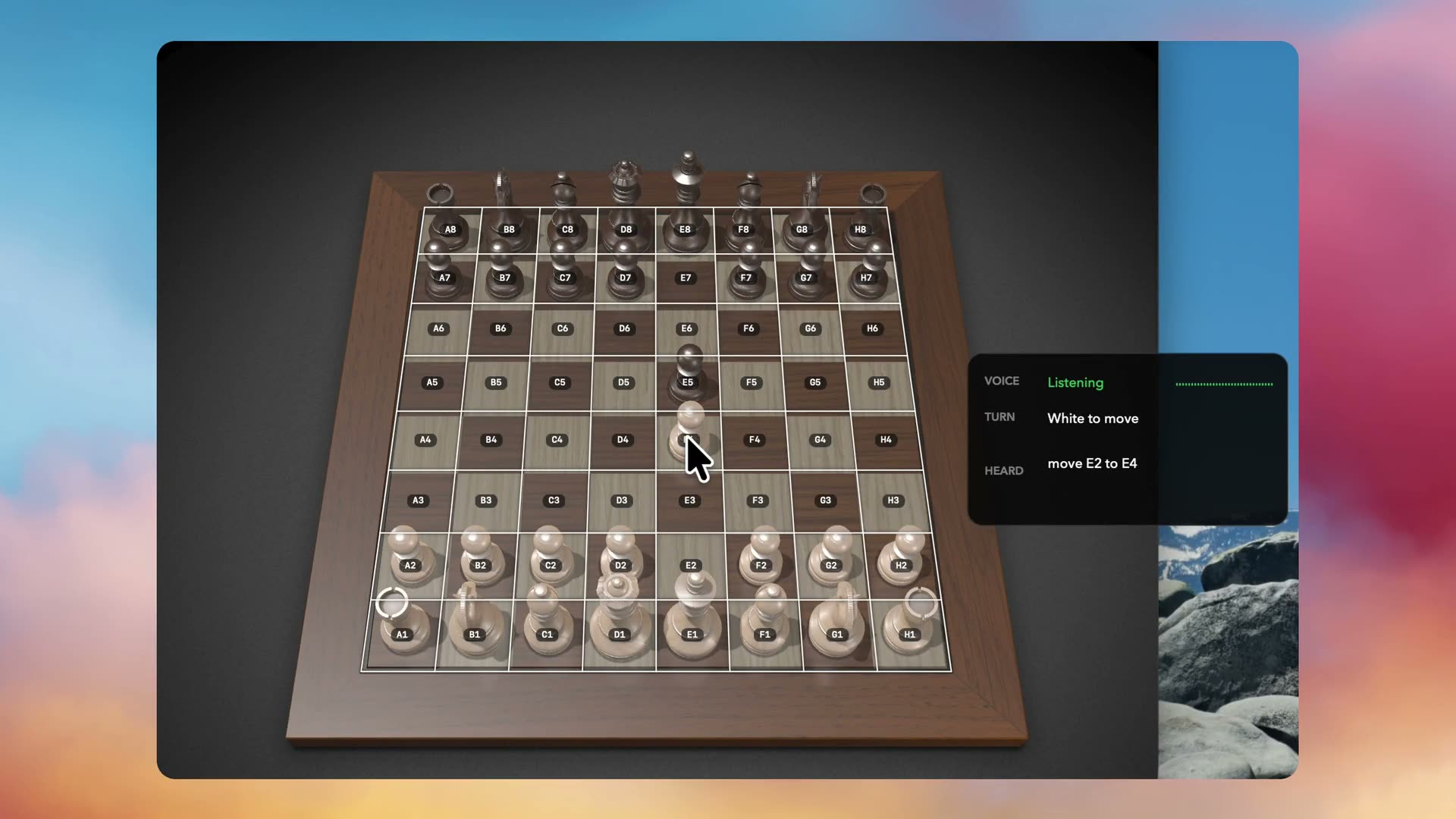
Voice Chess turns a spoken utterance such as Move E2 to E4 into a validated Apple Chess action. Muse Voice Transcribe supplies speech-turn detection, vocabulary biasing, and partial transcripts for a responsive voice experience. A deterministic local parser then accepts only the exact move grammar, with no second model request, and a macOS computer-use layer validates Chess through the Accessibility API, posts only the two approved clicks, and confirms that the move occurred.
Execution is automatic and there is no wake phrase. Start with
--dry-run, speak in a quiet environment, and keep one Apple Chess game window visible.
Setup
Create a Meta Model API key at dev.meta.ai/api-keys, then run:
bash
MODEL_API_KEY is the only credential source. Allow the terminal or Python host under System Settings > Privacy & Security > Microphone, Accessibility, and Screen Recording. Screen Recording is used to discover the Chess window; no screenshot is captured. If macOS asks you to restart the host, reopen that terminal before continuing.
The recipe uses the fixed public contract muse-voice-transcribe-1.0 at wss://api.meta.ai/v1/asr/realtime. Realtime transcription access may be limited during rollout.
Run
Voice Chess activates Apple Chess itself, launching it only when it is not already running. Validate commands and the board without posting native input first:
bash
Then enable execution and say one move:
bash
text
An always-on HUD reports VOICE, TURN, and HEARD, and a passive overlay draws the labeled grid once the board is validated. Stop with Control-C; stopping Voice Chess never quits Chess.
Command Grammar
text
A case-insensitive full match, with an optional trailing period. Files are A through H, ranks are 1 through 8, and the two squares must differ. Everything else is rejected and executes nothing: the parser does not repair spacing, convert spoken ranks such as E two, or lift a move out of surrounding words.
Requirements and Safety
- Use one visible, non-minimized Apple Chess game window with White at the bottom and the standard board layout. Black-at-bottom and auto-rotating Human-vs-Human boards are rejected.
- Only the exact
com.apple.Chessprocess is acquired, and its PID is fixed for the run. Quitting or restarting Chess requires restarting Voice Chess. - Partial, stale, duplicate, and superseded transcription events cannot authorize a move, and microphone frames observed during a move are dropped.
- Every move is revalidated immediately before input and confirmed afterward. Any failed check posts nothing, and native input is never retried automatically.
- Transcripts are sent only to Muse Voice Transcribe. Window metadata, Accessibility state, coordinates, and input events stay on the machine.
Troubleshooting
If the board cannot be validated, the terminal reports one bounded warning such as window_ambiguous, unsupported_orientation, or screen_capture_permission. Check the window requirements above; for screen_capture_permission, grant Screen Recording to the terminal or Python host and restart it.
If the ASR startup event reports classification="tls_verification_failed", point Python at the system certificate bundle for that invocation:
bash
Tests
bash
License
This recipe is part of the Meta Model API Cookbook and is covered by the repository LICENSE(opens in new tab).