
curl -fsSL https://dev.meta.ai/install.sh | bashMeet Muse Spark 1.2
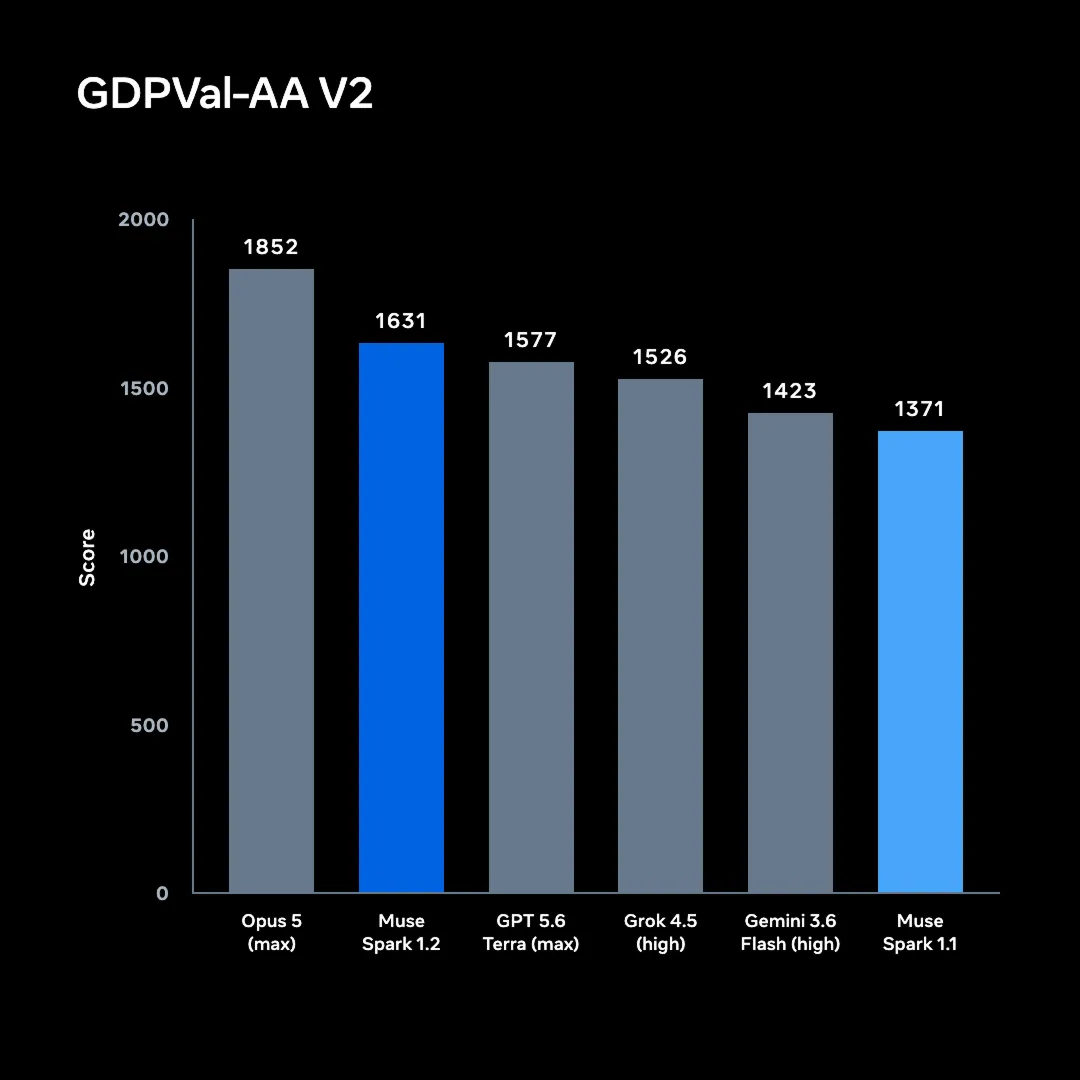
Muse Spark 1.2 is a moderate improvement over Muse Spark 1.1 and optimized for the work that coding agents get handed most, such as multi-file refactors, long debugging sessions and tasks that run well past a single prompt. Muse-spark-1.2 is now available across Muse Code, Meta Model API, and OpenRouter through today's expanded global access.
Three areas where we've seen the biggest improvement:
- Co-trained with the harness. Muse Code was in the training loop from day one, so tool calls succeed and plans execute cleanly. Crucially, we trained across multiple harnesses, so while the model is at its best in Muse Code, it still generalizes to other coding agents you already use.
- Built for long-horizon work. Trained on whole-repository generation and other long-running tasks, it uses planning, goal conditioning and context compaction to hold direction over hours, plus asynchronous and parallel tool calls, so work continues while results are still pending.
- Whole-project context. A 1M-token window holds dependency graphs, legacy code and thousands of files in one session.
Here's how Muse Spark 1.2 stacks up against the models in its class:
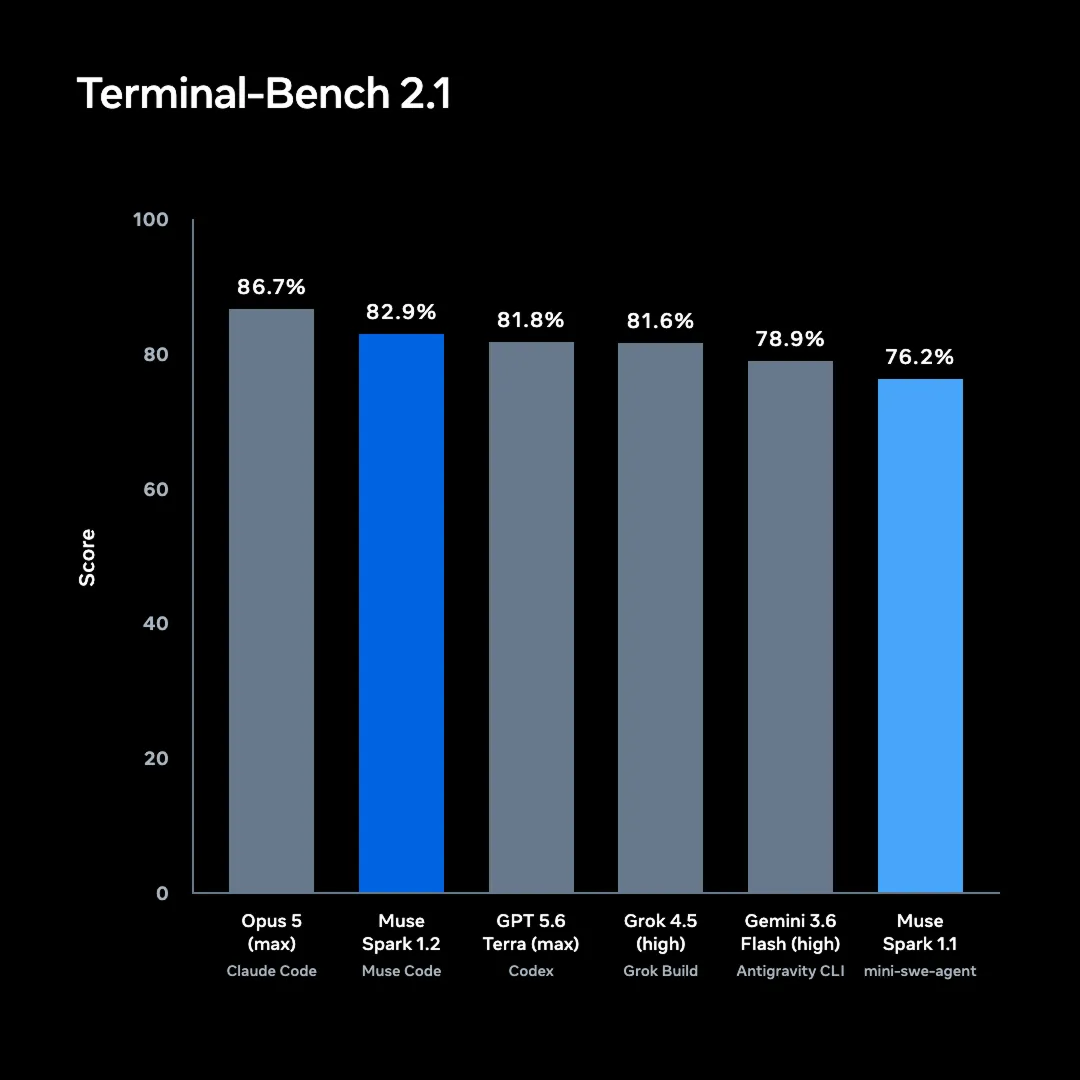
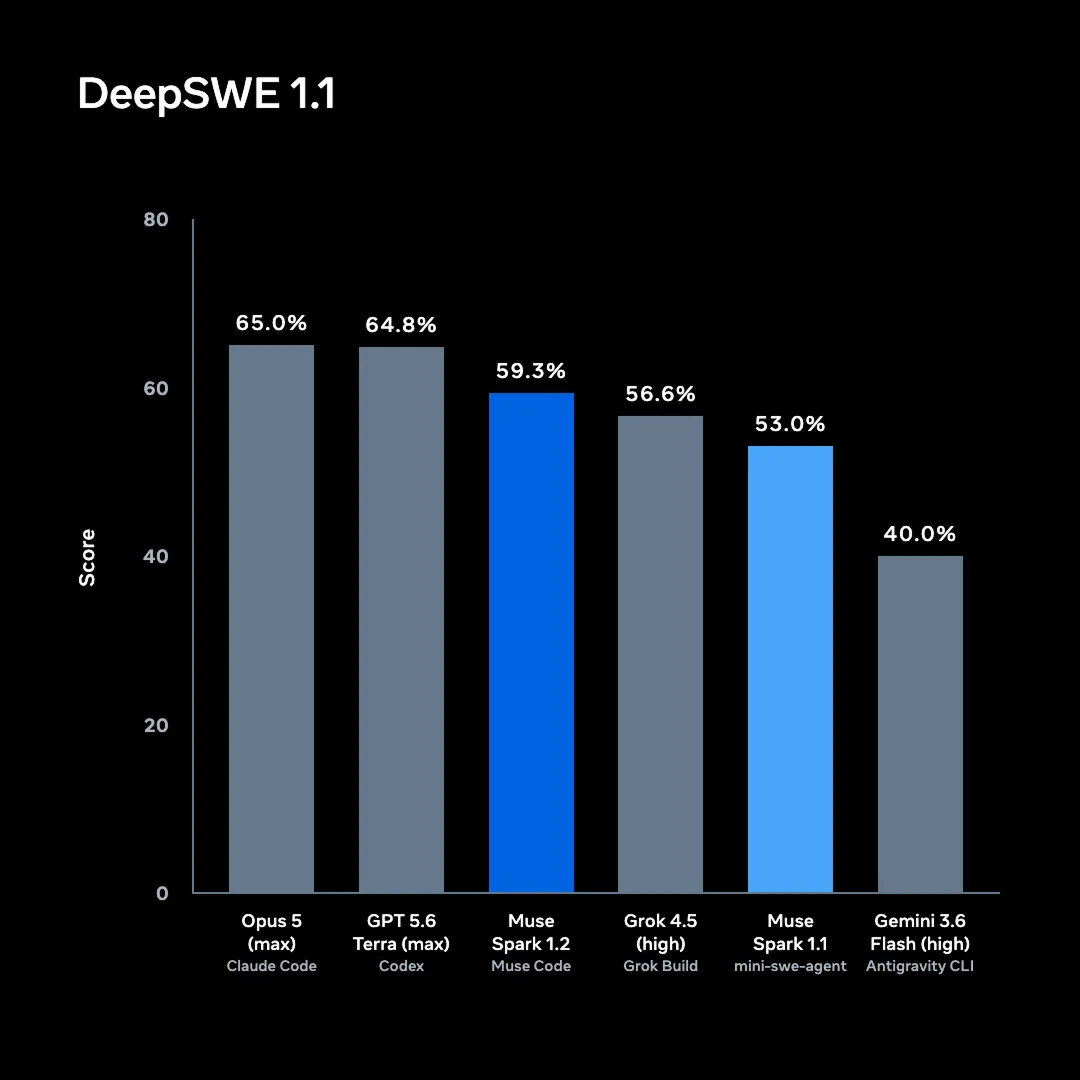
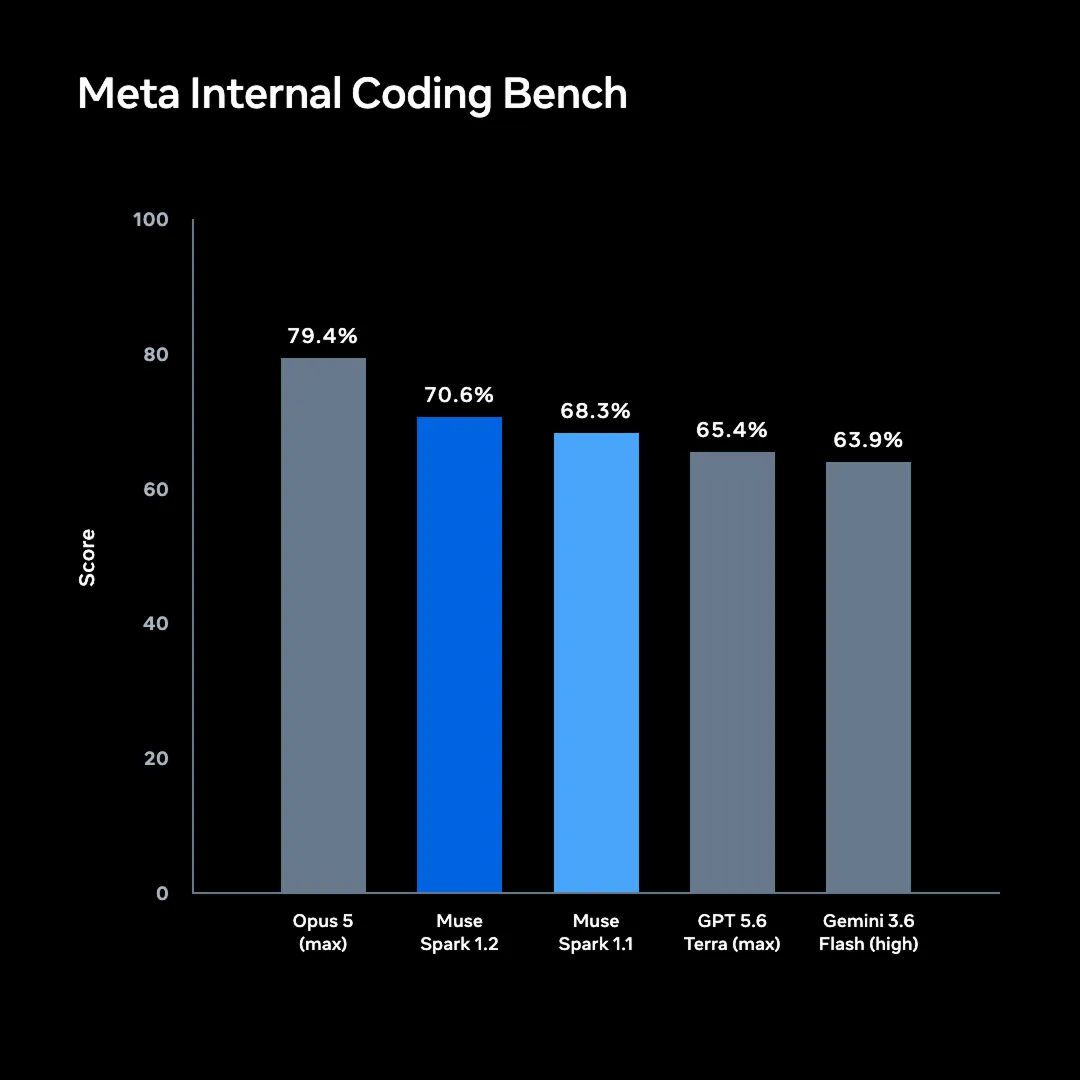
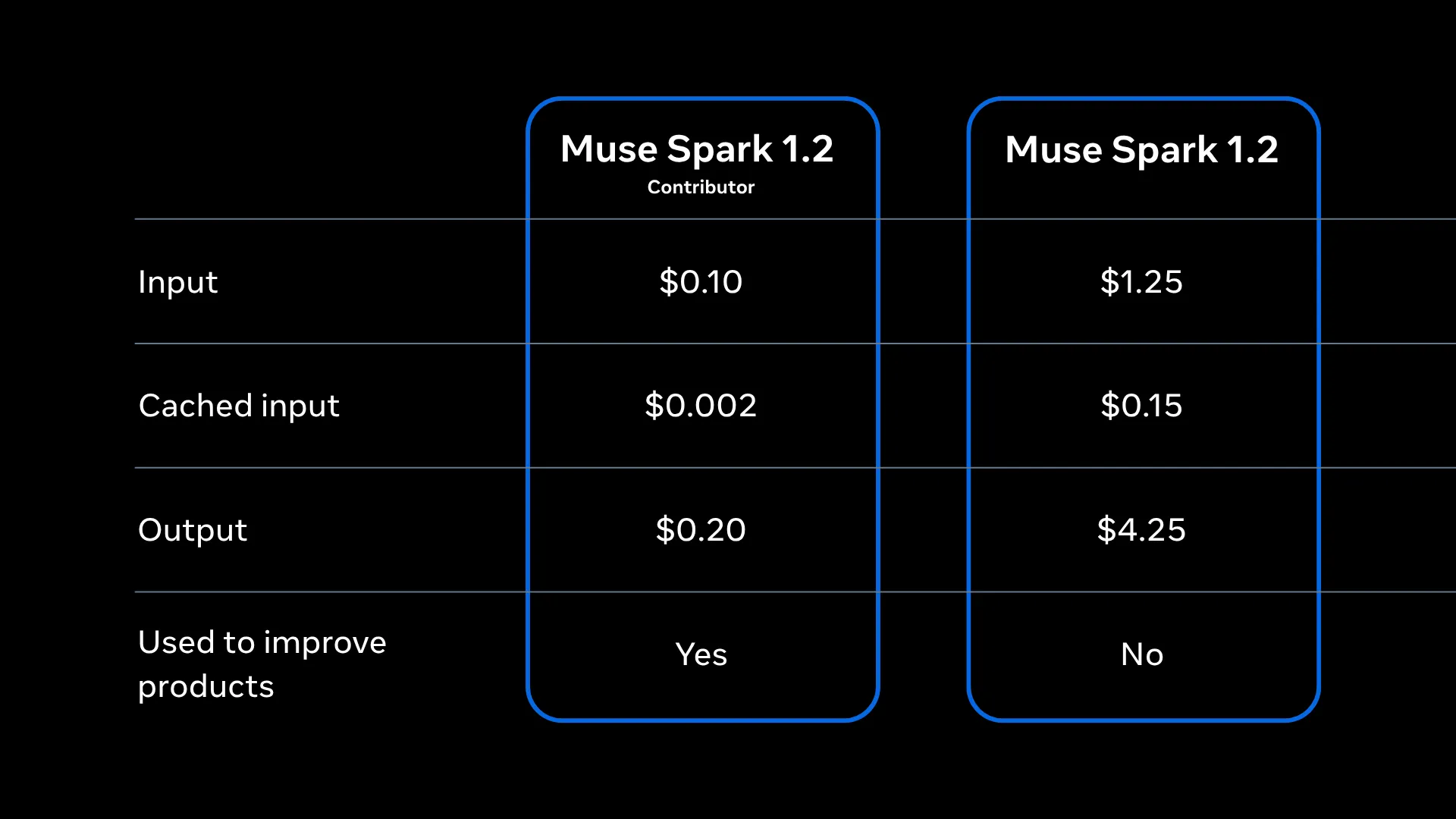
Muse Code starts on a contributor tier with rate-limiting by tokens in a rolling 5-hour window rather than by request count, so you can use the agent day to day. Pricing is determined by model ID, so developers can pick the right tier based on their needs:
model to muse-spark-1.2-contributor: rate-limited by tokens in a rolling 5-hour window, not by request count. Available in select countries.model to muse-spark-1.2: standard Model API pricing
When you need more tokens, swap the model to muse-spark-1.2 to run on standard Model API pay-as-you-go pricing: $0.15 / 1M cached input, $1.25 / 1M input, $4.25 / 1M output. We're also beginning to accept requests for zero data retention. Contact Meta sales to request this.
Try it on the sample project
The sample lives in bastion_breaker/ in meta-models cookbooks on GitHub. It is a playable game with a pure-simulation core (game/engine.py, no pygame) so the rules are testable without a window and a thin pygame render layer on top.
shell
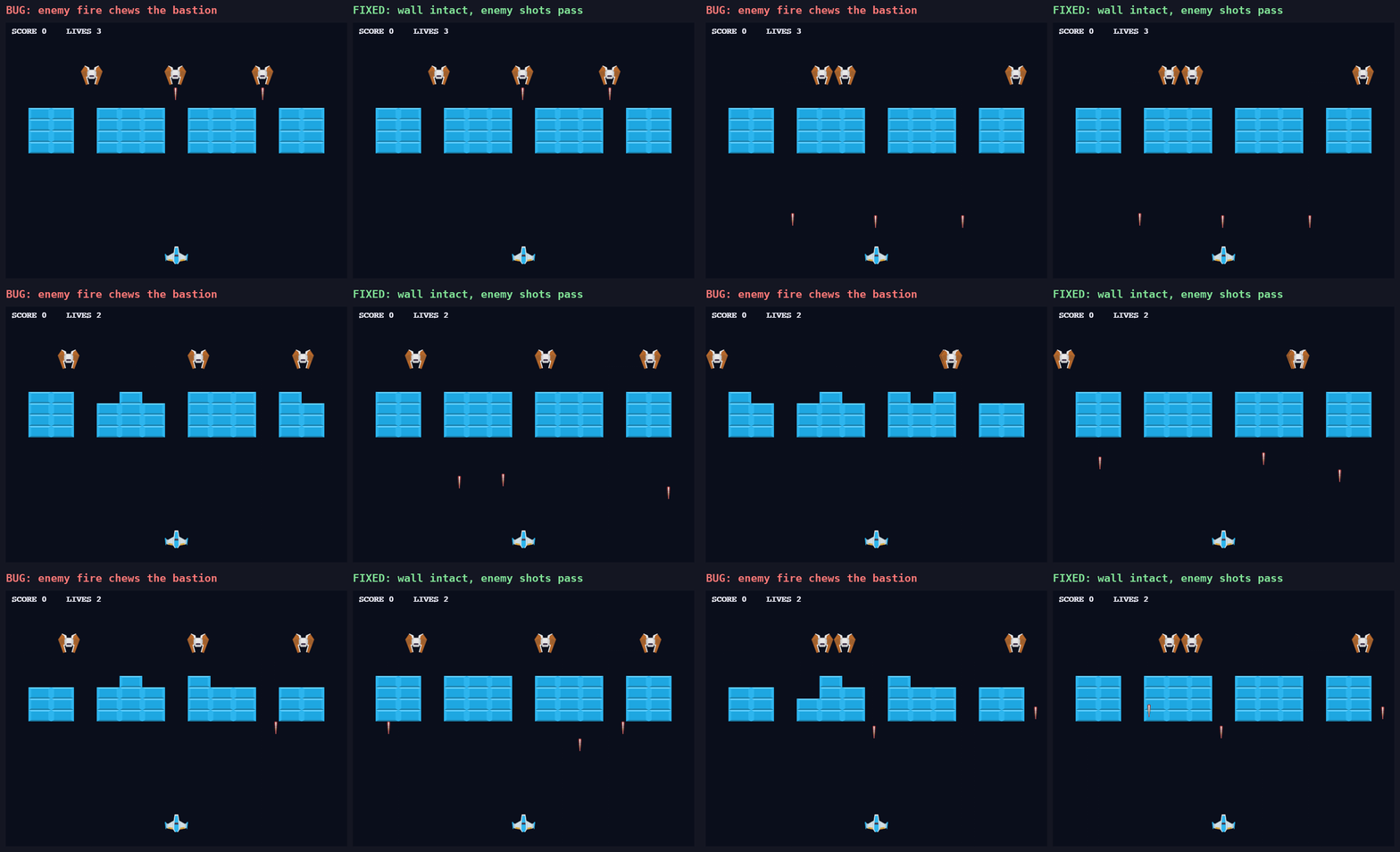
The world rule under test: the player breaks one brick per shot; the enemies hide behind the brick bastion and must not break it. The sample ships with that rule broken on purpose. tests/test_rules.py has three checks, and exactly one fails on the shipped code.
The failure is visible on screen too: the enemy's own fire chews notches out of the wall it is supposed to hide behind (left). The fixed build keeps the wall intact and lets enemy shots pass through (right).
So the full list of features is:
- Fix the enemy-laser-destroys-bricks bug
- Add high-score persistence
- Make bricks multi-colored by row
- Add a brick-shatter particle effect
- Add a combo multiplier
- Add a power-up drop from broken bricks
Spawn the fanout
Then hand the parent the whole batch in one prompt, each feature will automatically be taken care of by its own subagent:
The parent spawns six children. On this host the concurrency limit works out to four, so four run immediately; tasks 5 and 6 are admitted, queue and start as slots free.
Each child gets its own worktree and branch and subagent_status returns the roster:

The isolation is real on disk and the runtime creates each worktree under .muse/worktrees/ in detached-HEAD state, checked out from the parent's HEAD with no manual git worktree command. In the recipe's run, the child that fixed the bug passes the full suite inside its own worktree while the parent's master still fails that same test, untouched. The lifecycle is visible in the event log: each worktree walks operation_requested → prepared → lease_active → workspace_scope_activated, carrying its base_commit, base_ref: HEAD, and cleanup_policy: remove_if_clean.
Read the results
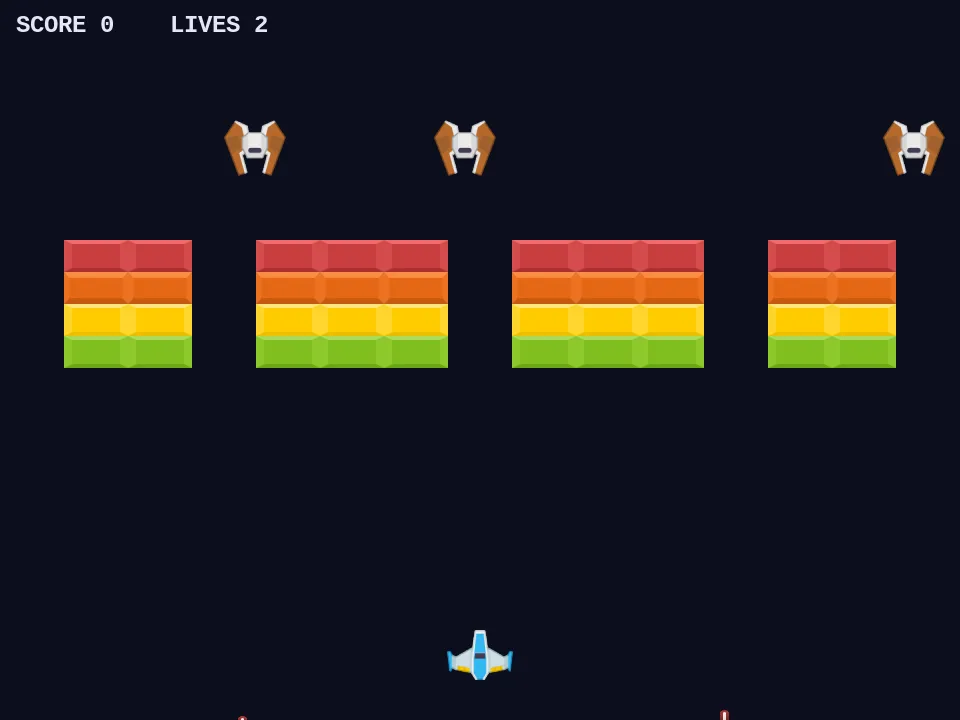
When a child finishes, its result drains back to the parent automatically once the parent's turn is idle, or you can block on one with subagent_wait. Each child commits its work on its own branch, so the parent can review or merge them one at a time. Here is the multi-colored-bricks feature (task 3) running with the bug already fixed in that same worktree:
TL;DR: one prompt fans a batch of tasks out to parallel subagents, each in its own git worktree and you steer or stop any of them from a single command center (Cookbook: Agent fan-out).
A paved road: bundled skills
Muse Code ships with a small set of opinionated playbooks so even a rough one sentence idea can get you going fast. The bundled skills include:
/taste: an anti-slop filter: a flat checklist of visual defaults not to use, so generated UI stops looking machine-made./grilling: interviews you one decision-forcing question at a time until the design holds up./grill-with-docs: the same interview, but it writes the settled decisions into your project docs as durable decision records, not chat scrollback./plan: grounds a plan in your real files, names the key decisions with a recommendation for each, saves it to.agents/plans/and stops for approval. No code changes.
All four are explicit-invocation only. Muse Code won't reach for /grill just because a design looks shaky. And a skill loads its full instructions only for the turn you invoke it on; the TUI marks it with a Loaded skill <name> built-in line, so you can see exactly which turn a skill shaped.
In the full recipe, we walk through a demo where /plan reads the actual code before planning, and catches that an unvalidated deposit would let a negative transfer slip past the overdraft protection being designed. Exactly the kind of decision that needs to be surfaced before you build instead of after.
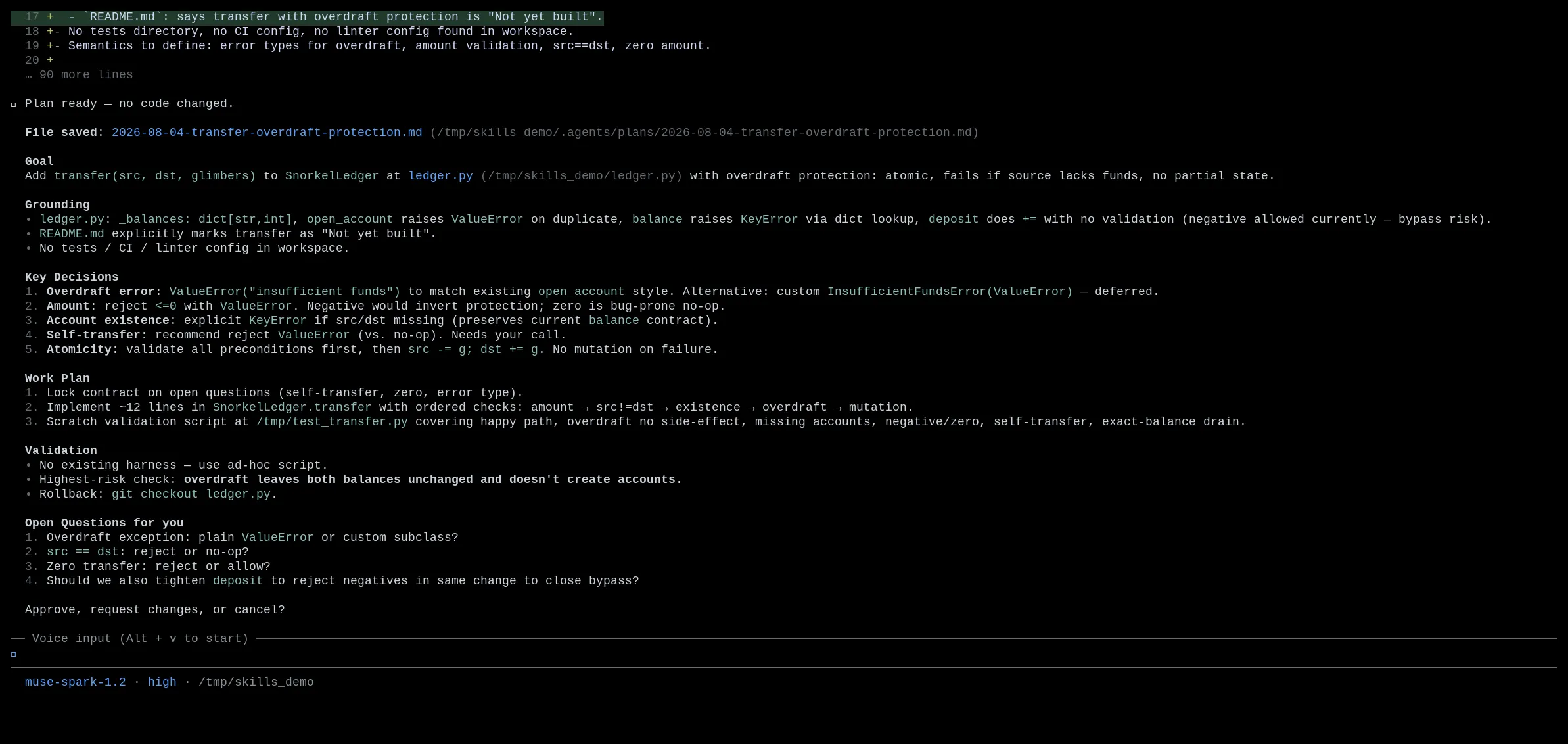
TL;DR:/plan, /grilling, /grill-with-docs, and /taste ship built in, fire only when you ask and scope to the turn you invoke them on (Cookbook: Bundled skills).