Muse Glimmer: an open-weight model built for local agents

A 30-billion-parameter open model from Meta Superintelligence Labs, released under Apache 2.0, tuned for the tool-use loop and optimized to run on a single GPU
This week, we released Muse Glimmer, a 30-billion-parameter open-weight model optimized for always-on agent workflows on a Mac or a single consumer GPU. Agents built on it handle sequential tool calls, multimodal reasoning and understanding, with no API key and no per-token cost. Muse Glimmer is also released under Apache 2.0, the most permissive license we've used for an open model.
This post covers what Muse Glimmer does and how to start building with it. The training recipe and the full architecture are covered in the Meta research blog.
TL;DR
- Muse Glimmer overview
- Tool calling holds up over long sequences. The model invokes tools with precise schemas across many sequential calls without degrading partway through a workflow, which is the failure mode that turns a promising demo into an unreliable agent.
- Scaffold compatibility. We're spotlighting OpenClaw as a reference integration in this blog, but the model works across other agentic orchestration patterns with day-one partner support.
- It recovers instead of halting. When a tool call fails or returns something unexpected, Muse Glimmer diagnoses the error and retries. Long-horizon runs are mostly a story about what happens after something goes wrong.
- Download from Hugging Face: link
- Key documentation
- Get the model – Download and deploy
- Get the most out of Muse Glimmer – Prompting guide
- Quantization brings it down to size – Quantization
- Speculative decoding keeps it responsive – Speculative decoding
- Deployment guides
- Deploy with vLLM: Deploy with vLLM for high-throughput, low-latency inference with an OpenAI-compatible API endpoint.
- Deploy with llama.cpp: Run on your machine with llama.cpp, a C/C++ inference engine that supports CPU, mixed CPU/GPU and full GPU execution.
- Deploy with ExecuTorch: Run on mobile phones, tablets and edge devices with ExecuTorch, an on-device inference framework.
How Muse Glimmer performs
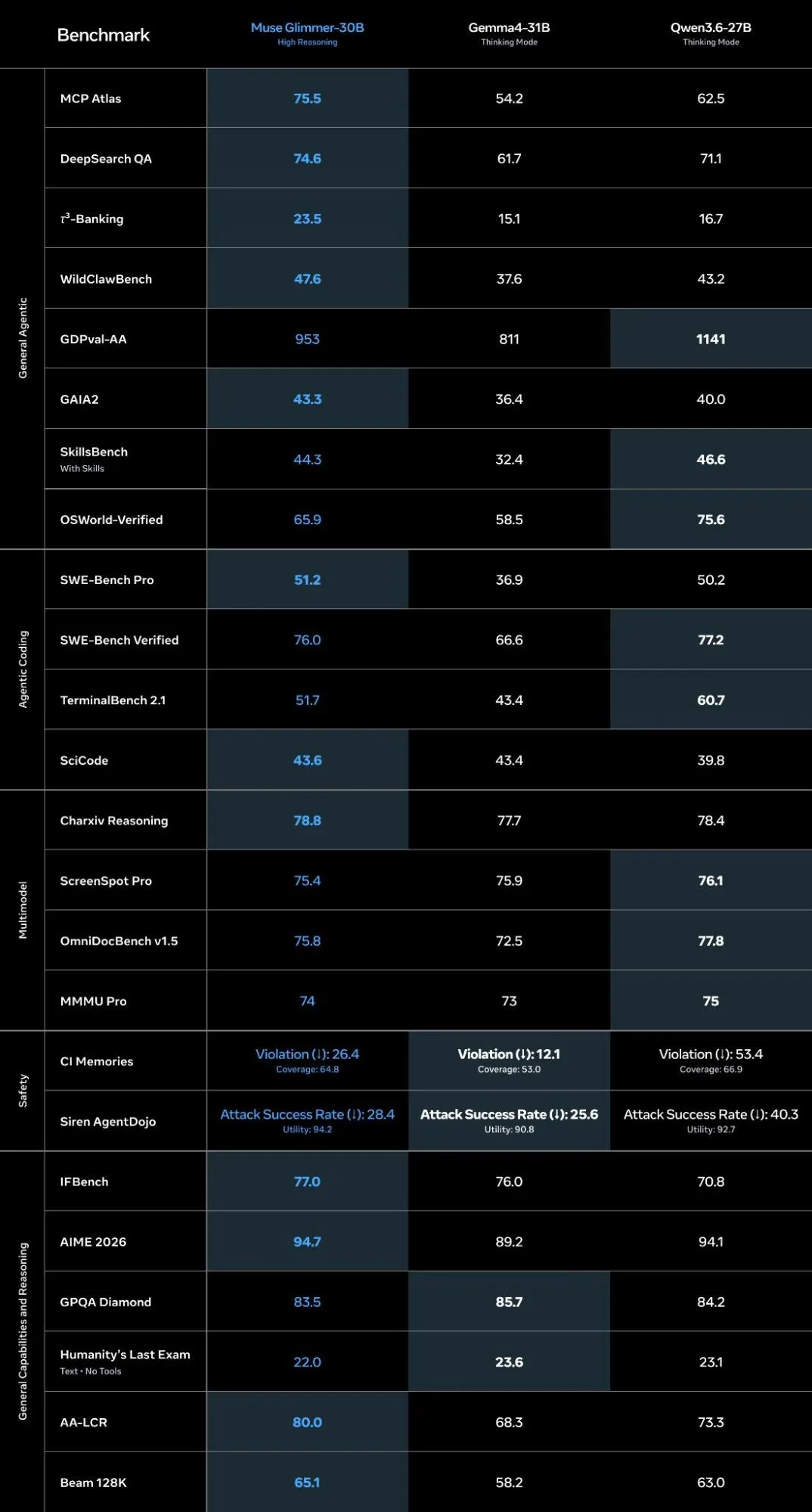
We'll start with the table, because the interesting part is the shape of it. Muse Glimmer leads on the agentic work it was built for:
*For more details about Muse Glimmer evaluations, read the methodology report.
Tool orchestration, agentic search, agentic coding, instruction following and long-context memory are the capabilities a local agent lives on, and that's where the training went.
The full evaluation and benchmark set is in the Meta research blog.
Built for the tool-use loop
The benchmarks above come out of specific training choices, and they show up in the parts of an agent run that usually break.
- Tool calling holds up over long sequences. The model invokes tools with precise schemas across many sequential calls without degrading partway through a workflow, which is the failure mode that turns a promising demo into an unreliable agent.
- Scaffold compatibility. We're spotlighting OpenClaw as a reference integration in this blog, but the model works across other agentic orchestration patterns with day-one partner support.
- It recovers instead of halting. When a tool call fails or returns something unexpected, Muse Glimmer diagnoses the error and retries. Long-horizon runs are mostly a story about what happens after something goes wrong.
- Multimodal perception. Through a dedicated perception encoder, Muse Glimmer accepts interleaved text and images, so an agent can read a screenshot, a chart, or a scanned document as part of its reasoning.
Getting started
Getting started with Muse Glimmer is a relatively simple process. Developers can download the weights from Hugging Face, run it locally through partners like Ollama, LM Studio and Unsloth, deploy it on-device with Llama.cpp and ExecuTorch or serve it at scale with vLLM and SGLang.
- Download from Hugging Face
- Deployment guides
- Deploy with vLLM: Deploy with vLLM for high-throughput, low-latency inference with an OpenAI-compatible API endpoint.
- Deploy with llama.cpp: Run on your machine with llama.cpp, a C/C++ inference engine that supports CPU, mixed CPU/GPU and full GPU execution.
- Deploy with ExecuTorch: Run on mobile phones, tablets and edge devices with ExecuTorch, an on-device inference framework.
To get the most out of Muse Glimmer, we recommend using the correct chat template and following the prompting best practices outlined in the Muse Glimmer prompting guide.
Chat Template
Muse Glimmer uses a structured chat template with explicit role markers. Developers should always apply it with the tokenizer's built-in apply_chat_template method (rather than manually constructing the prompt string). This method inserts the special tokens and turn separators for you:
python
The rendered prompt uses Muse Glimmer's role-tagged format. Each turn opens with <|start|>, names its role, opens the content with <|message|> and ends with <|eot|> (end of turn):
none
To dive deeper into roles, recipients, system prompts setups and tool calling best practices, check out the complete Muse Glimmer prompting guide in our docs.
Reasoning
Muse Glimmer is a reasoning model. Before its final answer it writes a private chain of thought to itself in an assistant to=self turn, then emits the user-facing answer in a separate assistant to=user turn. You don't prompt this into existence, it's built into the format.
Developers can also control how much the model reasons with the reasoning_strength template argument (xhigh, high, medium, or low; defaults to high):
python
These reasoning traces can be long, especially since Muse Glimmer routinely produces multi-thousand-token chains of thought with a default context window of 128K tokens. While the model supports longer contexts, we advise implementing request streaming ("stream": true) so long generations don't hit request timeouts when serving reasoning workloads. Set it too low and the model gets clipped mid-reasoning, before it reaches an answer.
The runtimes outlined in the deployment guide load the released checkpoints (or a quantized version of them) and use the chat format described in this blog by default.
Quantization
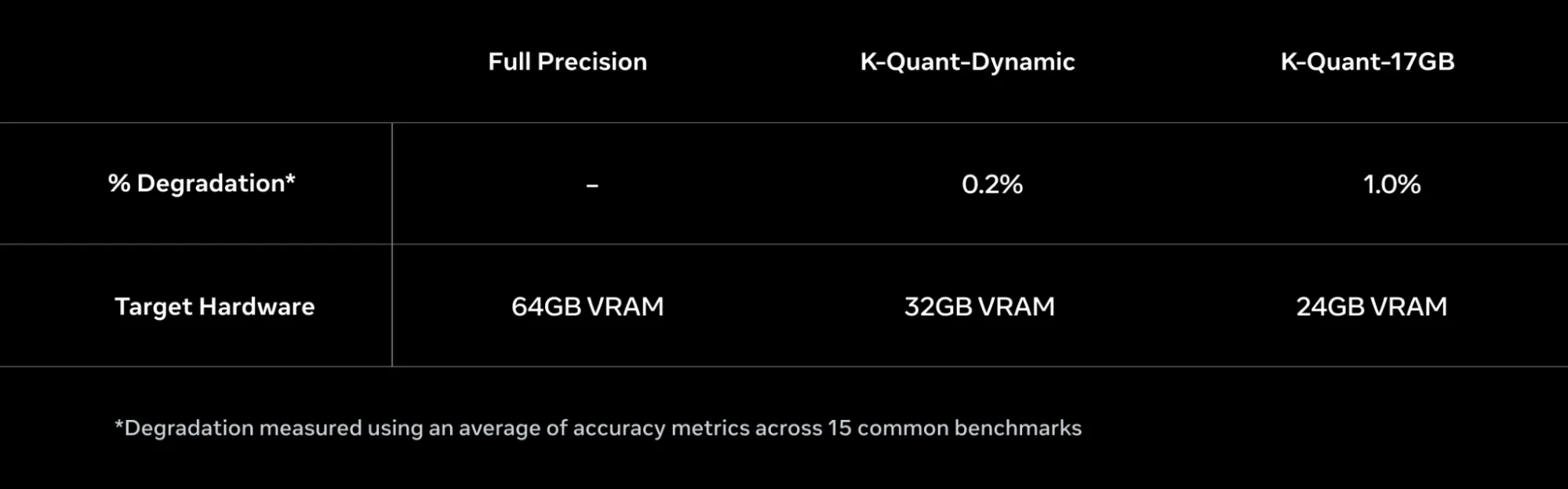
A 30-billion-parameter model at full precision requires a lot of memory, well beyond any consumer GPU. Fitting Muse Glimmer onto accessible hardware meant treating the memory budget as a design constraint from the start.
Quantization brings it down to size. Compressing the weights to roughly 4-bit precision shrinks the language model to under 20 GB, which leaves headroom inside a 24 to 32 GB envelope for everything that runs alongside it: the KV cache, the perception encoder and the speculative decoding drafter. Quantization may reduce model performance compared to precision models, so we recommend validating the checkpoint on your workload before deployment (Muse Glimmer docs – Quantization).
We've also released quantized versions of Muse Glimmer on Hugging Face for ease of deployment, including GGUF k-quants and ExecuTorch builds.
Speculative decoding
Speculative decoding keeps it responsive. Token-by-token generation drags during long reasoning chains, so Muse Glimmer ships with a lightweight drafter model that proposes whole blocks of tokens at once. The main model verifies them in parallel, keeping what's right and correcting the rest. Output quality is identical, memory overhead is small and the drafter is included in the release.
Start at 5 drafted tokens per step, raise it to 8–10 for code, drop to 3–4 for open-ended generation and measure end-to-end latency on your own hardware (Muse Glimmer Docs – Speculative decoding). Read more about the research behind speculative decoding here.
Wire Muse Glimmer into OpenClaw
OpenClaw is the reference harness for Muse Glimmer, and it's the fastest way to see the model do real work.
Install it, then point its model provider at your Muse Glimmer endpoint:
shell
Then hand it something that needs more than one tool:
none
The agent works out the sequence on its own. It decides to gather first and send second, pulls the weather from wttr.in and the headlines from Hacker News with separate fetches, formats the message and schedules the delivery so it lands on time. One prompt, several tools, no step-by-step instructions from you.
It also declines destructive requests. Asked to recursively force-delete its entire ~/.openclaw configuration and data directory, the agent doesn't run the command. It explains what would be lost, asks what's broken, offers to tar a backup first and waits for explicit confirmation before touching anything irreversible. For an agent with shell access to your machine, that behavior matters more than any benchmark score.
Start building today
The Muse Glimmer cookbook is the best place to start when exploring build paths and workflows. Every recipe runs end to end offline and states its precision, server and observed VRAM before you run anything:
- quickstart/ — run the model with a single command
- agentic-fundamentals/ — the tool-use loop: chat template, function calling, the agent loop
- recipes/ — a full agent with structured output, reasoning control and a triage pipeline
- inference-server/ — serve with vLLM, Ollama, LM Studio, SGLang, llama.cpp, Unsloth, or ExecuTorch
- platform/ — deploy on AMD, Arm, Dell, Intel and NVIDIA hardware
- hosted/ — call it through Together AI, Fireworks AI, or OpenRouter instead of running it yourself
Quantized, Muse Glimmer can fit on a single 24–32 GB GPU. No API key, no quota and no request leaving your machine. Every build path loads the same weights and the same chat format, so the agent you prototype on a laptop is the one you serve in production.
We can't wait to see what you build — issues and pull requests are open on the cookbook.
Download Muse Glimmer · Read the docs · Meta AI Developer Center