Build with Muse Spark, now available on Meta Model API

When Meta Superintelligence Labs introduced Muse Spark in April, the response from developers was immediate and consistent: give us a way to build with it.
Muse Spark is one of the most price-efficient, high-intelligence models available for developers to build with. Today, Muse Spark is accessible in public preview on Meta Model API to developers in the US. Meta Model API is self-serve and OpenAI SDK–compatible, so developers can test prompts, compare outputs, and prototype integrations at their own pace.
This post is the developer's guide to getting started with Muse Spark on Meta Model API: how to make your first call, the coding primitives the model is tuned for, and the agentic patterns that get the most out of it. Each technical section maps to a runnable recipe in the Meta Model Cookbook. The research story and the scaling work behind the model live on the AI at Meta blog.
Sign up here and follow along with this post.
TL;DR
- Sign up at dev.meta.ai, create your first API key, and follow along with this post.
- Most agent CLIs are OpenAI-compatible, so connecting is quick. OpenCode also ships with a built-in Meta provider: install it, get a key from the Model API dashboard, run /connect, filter to Meta, and paste your key. Then pick Muse Spark 1-1.
Meet Muse Spark 1.1
The preview model is a step-change over what we showed in April, concentrated in the three areas developers told us matter most:
- End-to-end agentic workflows. Better multi-turn memory and long-context coherence, so your agent holds the thread through long sessions.
- Advanced coding. Stronger generation and debugging, repository-level edits across languages, and more reliable tool calling.
- Native multimodal perception. Image, audio, video and document understanding in a single call, so the model can reason over what it reads and what it sees at the same time.
Here's how Muse Spark stacks up against the best models in its class:
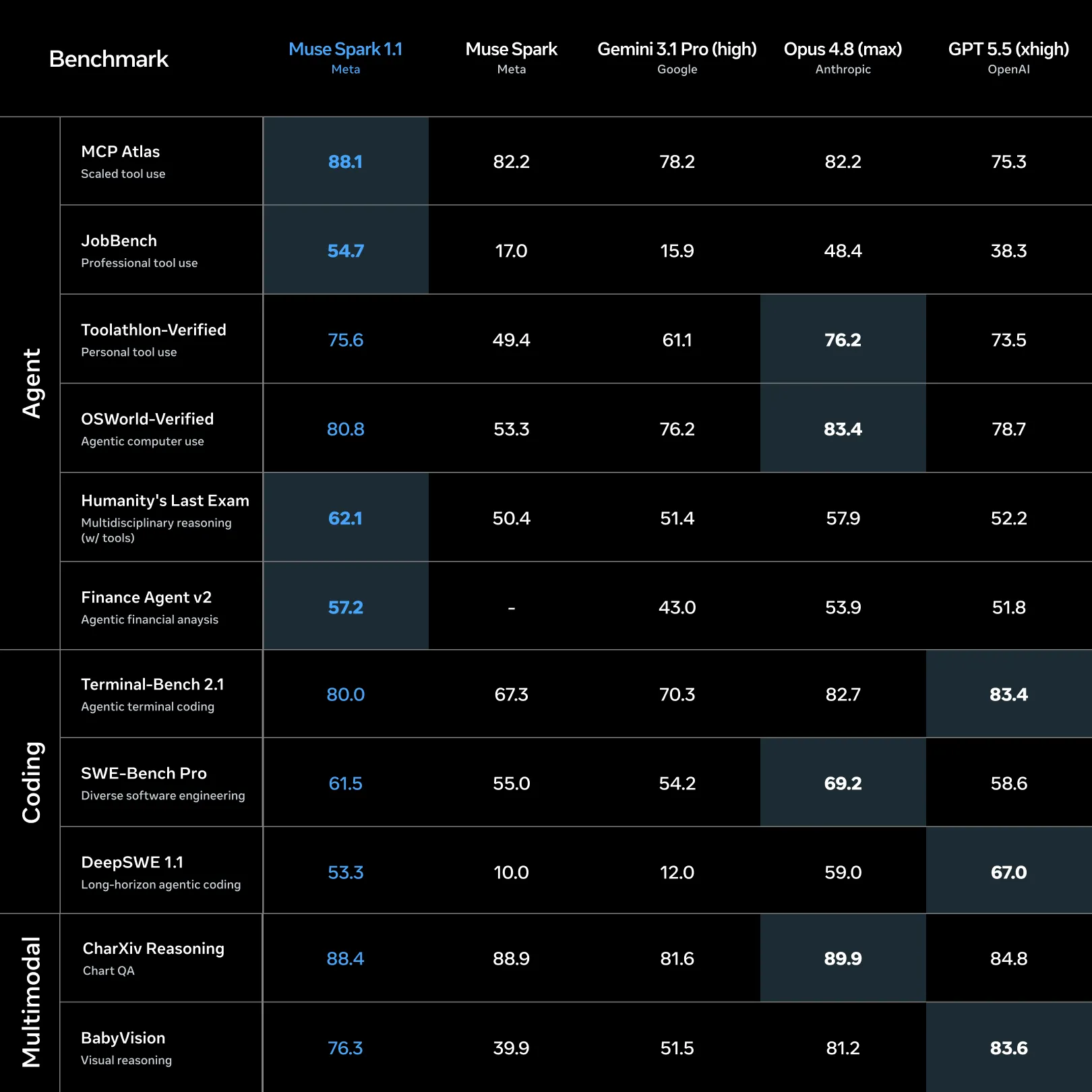
For more details about our evaluations, see our report.
Meta Model API
Pricing
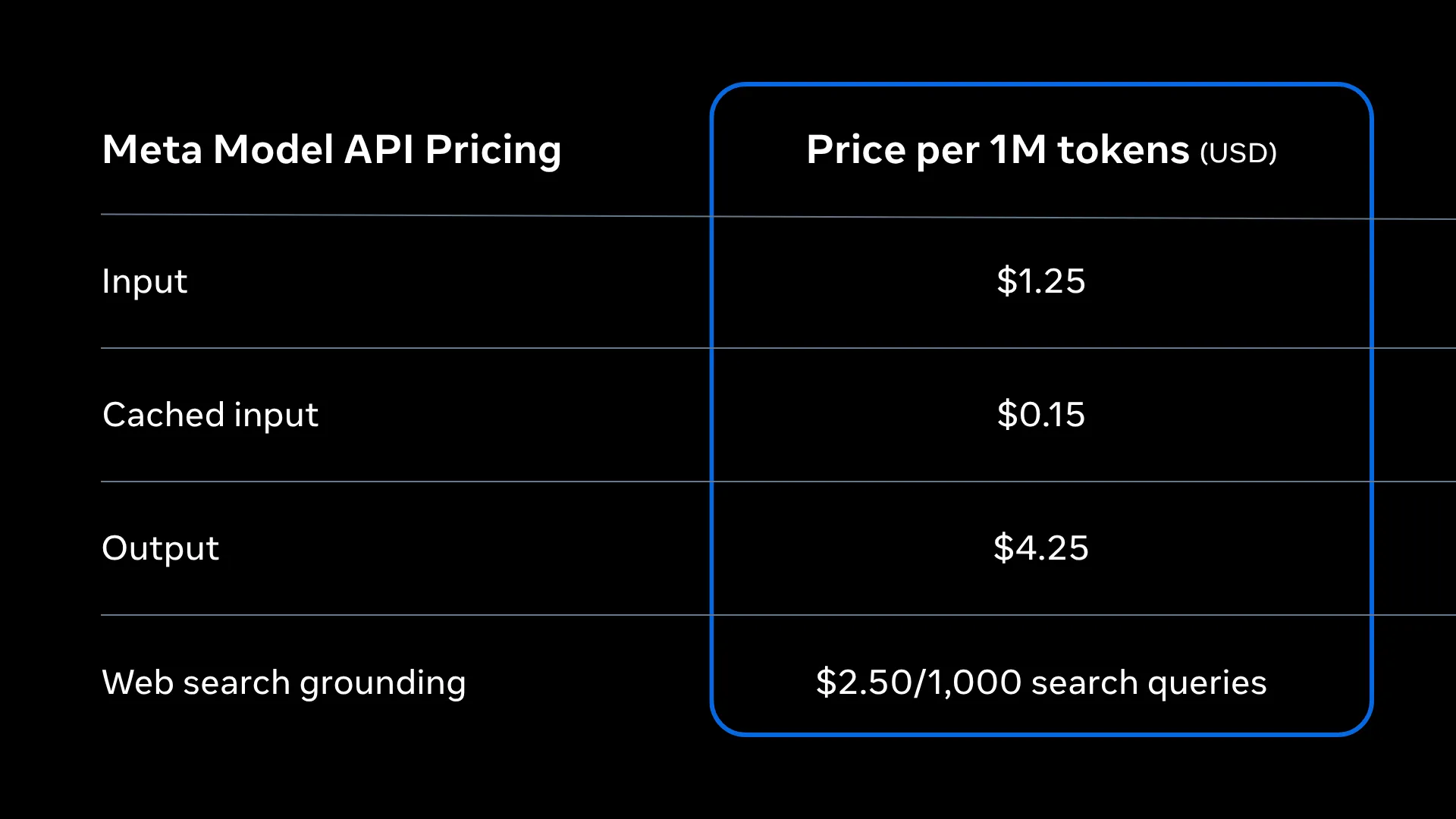
Muse Spark offers developers one of the strongest balances of intelligence and price efficiency available today. Pay-as-you-go pricing starts at $1.25 input/$4.25 output per million tokens.
Search grounding, built in
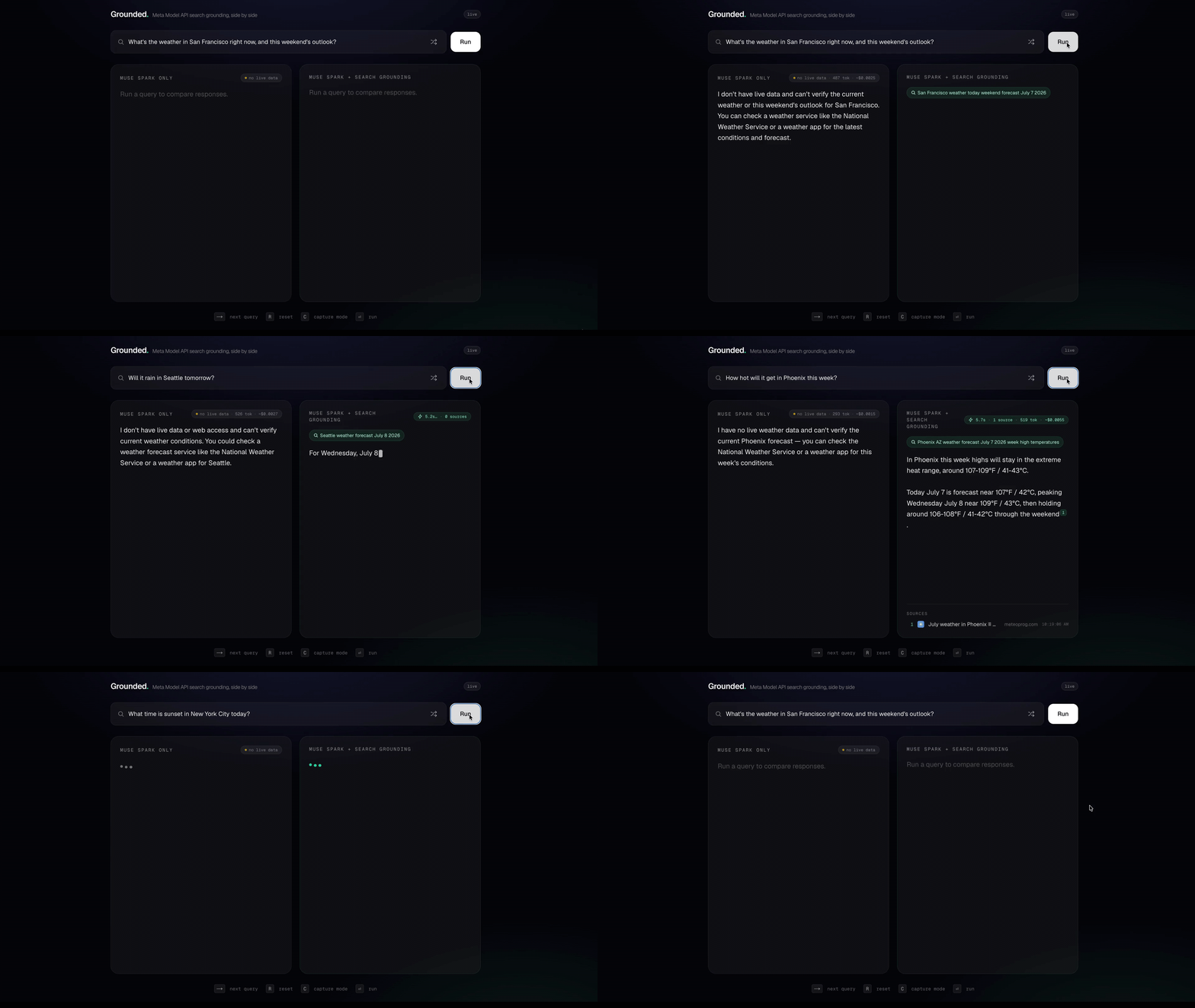
Meta Model API includes built-in web search grounding: real-time, cited answers with no retrieval stack to build or maintain. Add {"type": "web_search"} as a tool on any Responses API call and the model fetches live information, synthesizes an answer and returns inline citations you can surface.
Get started
Muse Spark runs on Meta Model API, which is drop-in compatible with the many tools you already use. Two request-format families cover most stacks over one backend: the OpenAI SDK and OpenAI-compatible tooling through the Chat Completions and Responses formats, and the Anthropic SDK and Claude-oriented tools (such as Claude Code) through the Messages format.
Generate an API key at dev.meta.ai, point your existing OpenAI-compatible client at Model API, keep your code, and set the model to muse-spark-1.1.
Looking to build with coding agents? Getting started with OpenCode is as simple as generating an API key, run /connect and select Meta Model API in terminal, and entering your key.
For the OpenAI-compatible formats, that's three values: base URL api.meta.ai/v1, your MODEL_API_KEY, and model muse-spark-1.1. (Cookbook: Quickstart – Responses)
python
The Anthropic Messages format points at the base host api.meta.ai/v1 and takes your MODEL_API_KEY as the auth token. It manages multi-turn state client-side, so it has no previous_response_id. (Cookbook: Quickstart – Messages)
Three things to know from day one:
- Muse Spark is a reasoning model: it thinks before it answers, and those tokens show up as
usage.completion_tokens_details.reasoning_tokensand are billed as output. Control depth withreasoning_effort(minimal→xhigh) and match effort to the task. - Prefer a
developermessage over thesystemto set tone, format, and standing rules. - Chat Completions is stateless; the Responses API holds state for you via
previous_response_id, and adds built-in tools such asweb_search.
(Streaming and prompt caching round out the fundamentals. See the Cookbook's Streaming Responses and Prompt Caching recipes)
That's the whole setup, whether you let a coding agent drive or write the orchestration yourself. Point OpenCode (or any OpenAI-compatible client) at Muse Spark, or call Model API directly; the only choice left is who owns the run.


Agentic computer-use
Muse Spark's perception reaches past code to any screen. In the computer-use recipe it drives a real Linux desktop from one plain-language goal ("find the Minesweeper game, open it, and play"), with no coordinates and no click-by-click script. It finds the app on an empty desktop, launches it, then plays by looking: screenshot, reason about the board, click, screenshot again.
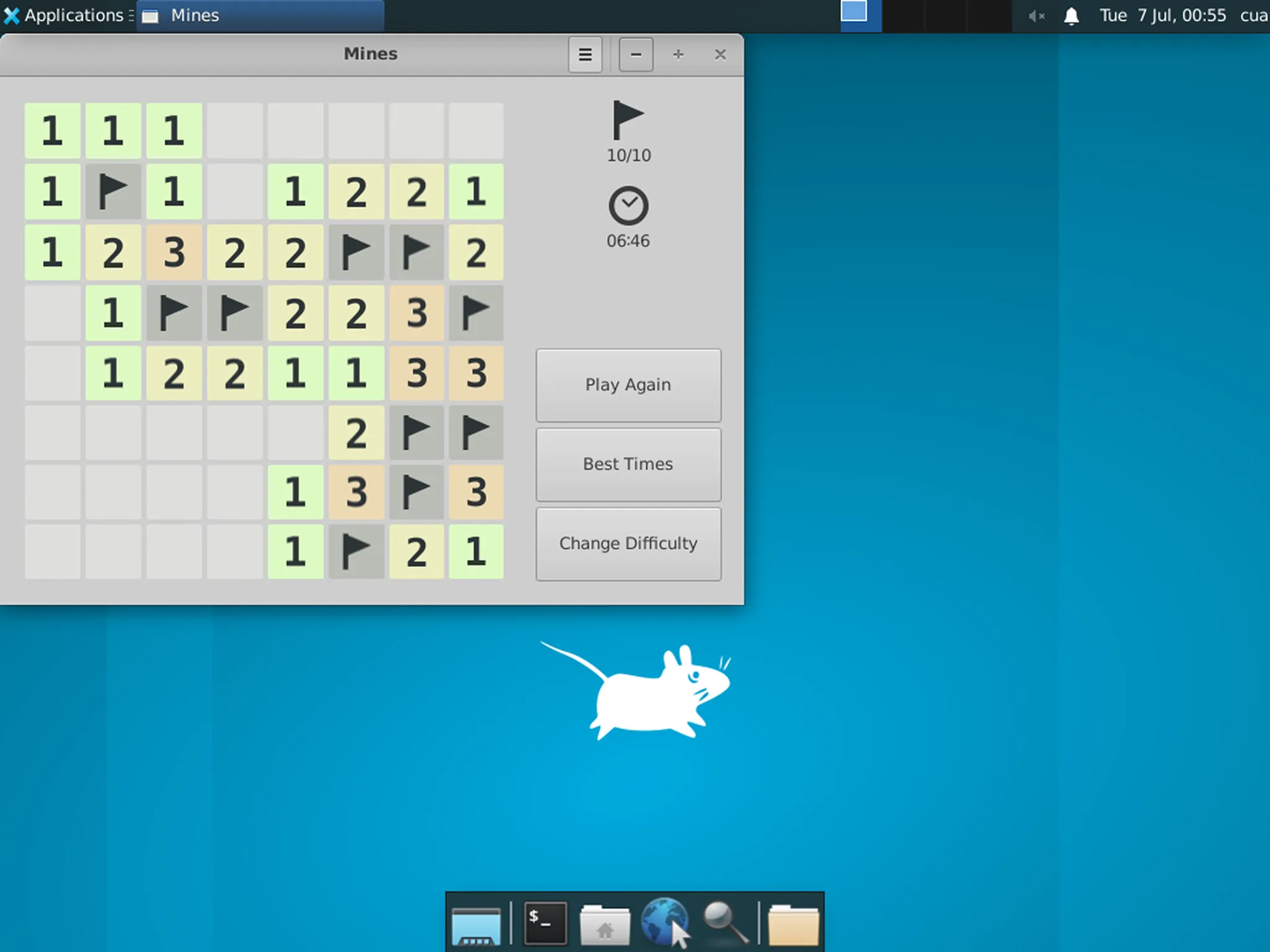
The desktop runs in a throwaway sandbox, so the model never touches your machine: it only sees screenshots and sends back mouse and keyboard actions. The same loop drives any GUI app by swapping the goal. (Cookbook: Computer use)
TL;DR: given a screen and a plain-language goal, Muse Spark operates an app it was never pointed to by reading the pixels.
Compose agents into a team
Agents compose across roles as well as across turns. The multi-agent recipe stands up a four-profile product studio — product manager, backend, frontend, and technical writer, all running muse-spark — that turns a one-line product idea into a working app plus a launch package.
The coordination is the interesting part: specialists negotiate only through durable, threaded comments on a shared Kanban board, work is sequenced by real task dependencies rather than polling, and the product manager is the sole arbiter — it can interview you but has no terminal, so it can't implement anything itself. Every decision is a comment on a task, so the whole run is replayable and auditable end to end.
Defining a seat is declarative: clone a base profile and scope it to the toolset that role is allowed to touch. The product manager gets planning and clarification tools but no file or shell access; the backend engineer gets the tools to actually build.
python
The same idea scales from one agent to several: you define the contract (roles, dependencies, who arbitrates) and a single model fills every seat. (Cookbook: Multi-agent orchestration)
TL;DR: one model, four roles, coordinating through an auditable Kanban board — a one-line idea becomes an app plus its launch copy.
Start with a coding agent
The fastest way to feel it: point a coding agent you already use at Model API and hand it an objective.
Most agent CLIs are OpenAI-compatible, so connecting is quick. OpenCode ships with a built-in Meta provider: install it, get a key from the API dashboard, run /connect, filter to Meta, and paste your key. Then pick Muse Spark 1.1.
No Meta option in your CLI yet? Any OpenAI-compatible CLI has a way to add a custom provider: point it at base URL api.meta.ai/v1, add your API key, and set the model to muse-spark-1.1. Those three fields are all it needs; no built-in dropdown required.
Then give it a failing test and let it run:
shell
Reasoning renders as a dimmed Thought block; tools show as Read, Edit, and bash lines.
On the recipe's sample project, Muse Spark fixes all five planted bugs, averaging 7.6 turns, with pytest as the oracle. (Cookbook: The basic agent loop)
TL;DR: OpenCode has a built-in Meta provider; any other OpenAI-compatible CLI connects by adding a custom provider with the base URL, key, and model. Give the agent an objective check and let it run.
Own the orchestration in code
The same agent loop is a few lines of code. The Responses API holds conversation state for you (previous_response_id) and offers built-in tools such as web_search, so you write the orchestration and let the server carry the thread.
python
It's the same read → reason → act → observe cycle the CLI runs for you. (Prefer stateless Chat Completions? You manage the message list yourself; the Cookbook's tool-calling recipe walks through the wire rules.)
TL;DR: the agent loop is a handful of API calls: dispatch each function_call, feed the output back, and let the Responses API carry the thread via previous_response_id.
Steer the run: sight and context
The harness is the environment: a coding CLI (or your own script) already brings the tools, the agent loop, and a sandbox to run in. Two things are still on you, and they decide how far a run gets: what the model can see, and how its working context is managed.
Muse Spark is multimodal inside the run, so "look at what you built and fix it" becomes a real capability:
- See its own rendered output and fix it. Wired to a Playwright browser tool, the agent opens the page it just wrote, looks at the rendered pixels, and fixes what's wrong, the same self-check a front-end developer runs. The same pattern builds a Three.js game and play-tests it in-browser. (Cookbook: Browser-verified web design)
- Read a screenshot to localize a bug. Hand the agent an error screenshot and it uses the pixels to find the broken component before opening a file, then fixes a footer-overlap bug in a real monorepo and finds a second instance of the same anti-pattern. (Cookbook: Error screenshot fix)
Feeding an image in is a content part of the message: pass a base64 data URL (or a public URL) alongside your text.
python
screenshot_b64 is a base64-encoded PNG. Full runnable: Cookbook: Vision Input.TL;DR: how far a run gets comes down to two things you control inside the harness: what the model can see, and what it keeps in context.
Continue exploring
Two more recipes push the same primitives further:
- Sandboxed autonomy. Given only
runandwrite_fileinside a throwaway Docker container, Muse Spark fixes a SWE-bench bug, choosing all 48 shell commands itself, including digging through git history to find the commit that introduced it. Why it matters: you can hand the agent a container and a goal, not a script. (Cookbook: Sandboxed execution) - One-shot generation. An
AGENTS.mdplus a singlereasoning_effort=xhighprompt produces a complete single-file Three.js game in one pass, with no build-and-fix cycle. Why it matters: for well-scoped work, high reasoning effort can one-shot a whole artifact. (Cookbook: One-shot game dev)
Start building today
Muse Spark is the model behind experiences serving hundreds of millions of people in Meta AI — now in your hands. Pick your path: point a coding agent at api.meta.ai/v1, or write your own against Meta Model API. Either way, it's a two-line change to start.
Get your API key · Read the docs · Browse the Meta Model Cookbook