
This week, Meta launched its first real-time audio perception model, Muse Voice Transcribe, on Meta Model API at just $3.00 per 1000 minutes ($0.18/hour).
Muse Voice Transcribe brings speech-to-text to Meta Model API for the first time. It supports real-time streaming and one-shot transcription, with speaker diarization, voice activity detection and endpointing handled inside the same model.
Core features include:
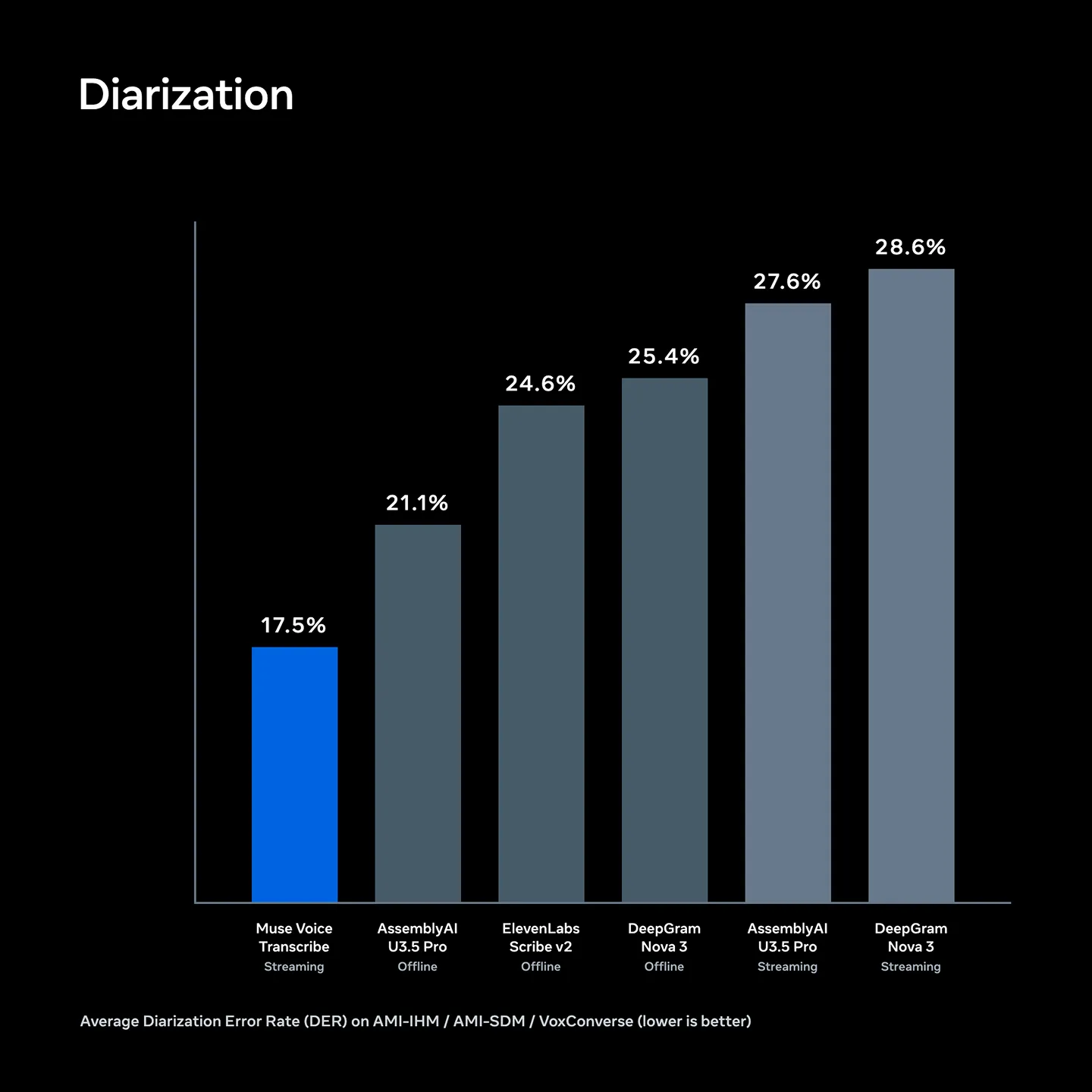
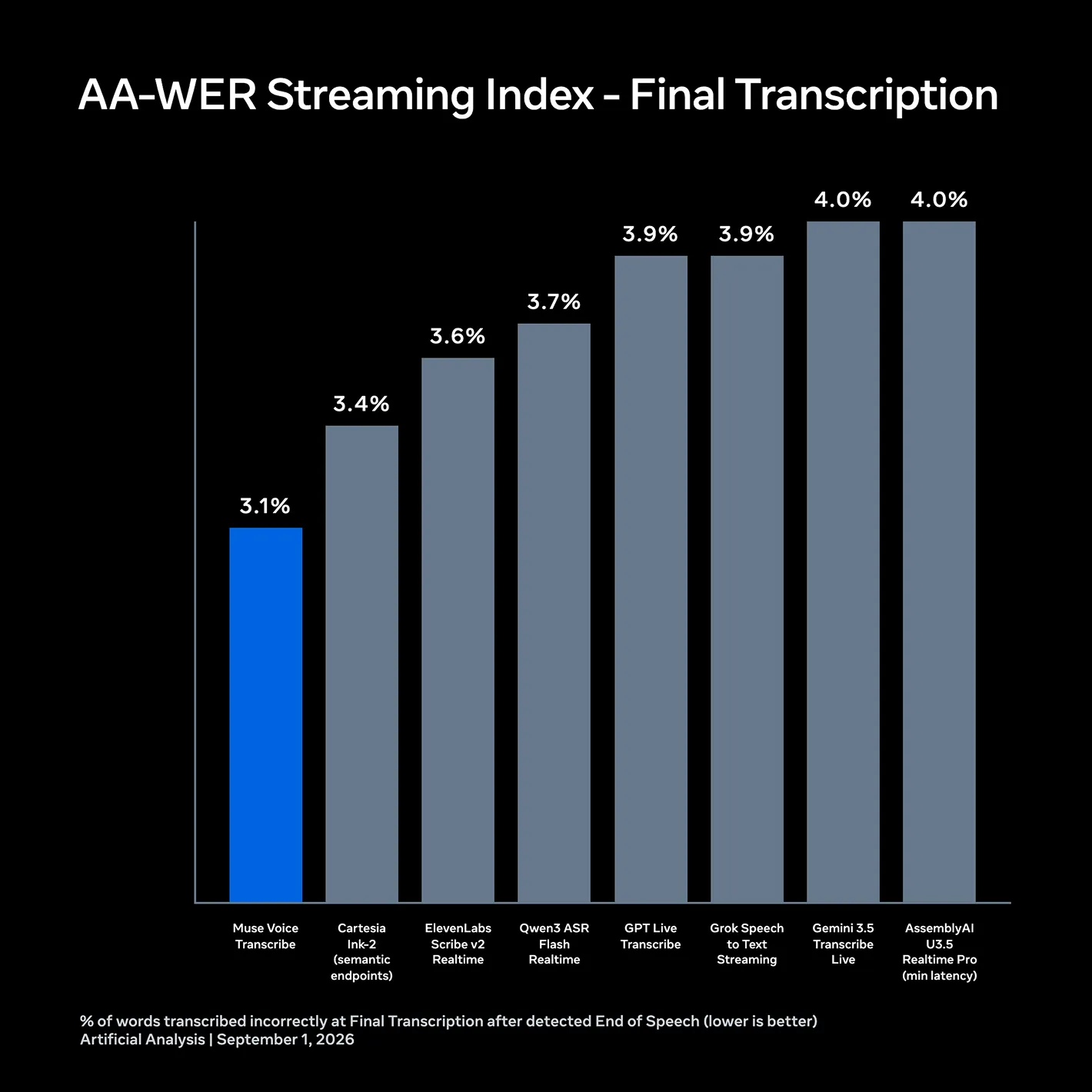
At launch, Muse Voice Transcribe ranks first by word error rate on the Artificial Analysis streaming speech-to-text leaderboard and achieved the lowest average diarization error rate among the APIs evaluated in both streaming and offline settings.
The tables below compare Muse Voice Transcribe with other speech APIs on two core parts of multi-speaker transcription: recognizing words accurately and assigning them to the correct speaker. The first summarizes streaming speech-to-text results from Artificial Analysis. The second compares the diarization error rate across AMI-IHM, AMI-SDM and VoxConverse.
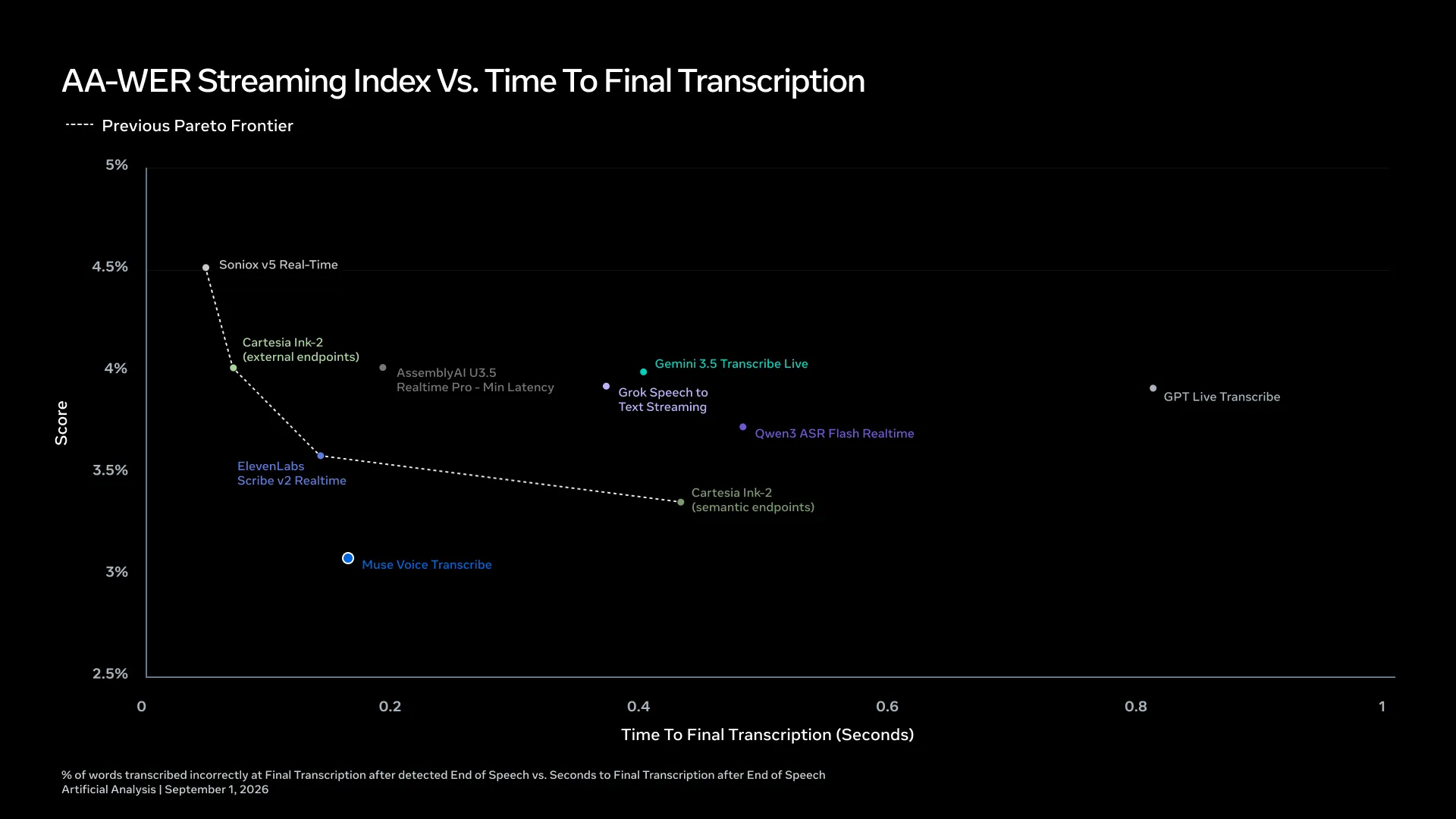
Muse Voice Transcribe also uses adaptive delay to balance speed and accuracy in real time. Instead of waiting a fixed amount of time before finalizing each word, the model uses more audio context for ambiguous words and less when the transcription is clear. This behavior is trained with reinforcement learning to optimize both word error rate (WER) and latency. The result is faster final transcripts while maintaining high accuracy:
These benchmarks provide a common reference point, but developers should also evaluate performance using their own audio, vocabulary, accents and acoustic conditions. To learn more about Muse Voice Transcribe and the research behind it, please visit the Muse Voice Transcribe post on the AI at Meta blog.
Muse Voice Transcribe turns speech into text as it is spoken, and the first words land in realtime, not after the recording ends. You open one WebSocket connection, stream raw audio into it, and read transcripts back while the speaker is still talking. The model also handles punctuation, capitalization, speech-boundary detection and speaker attribution itself, so a working pipeline is one connection rather than a stack of separate model requests.
In this guide, we'll walk through the WebSocket protocol from handshake to session close, then build file, microphone and multi-speaker transcription workflows. Follow along with the Muse Voice Transcribe fundamentals cookbook.
Muse Voice Transcribe turns speech into text across 25+ languages, and the model handles punctuation, speech-boundary detection and speaker attribution for 20+ speakers itself.
There are two ways to use it, and this setup guide demonstrates both:
transcribe_stream.pywss://api.meta.ai/v1/asr/realtimetranscribe_file.pyhttps://api.meta.ai/v1/asr/transcribeshellpip install websockets requestsexport MODEL_API_KEY="<your Model API key>"
Muse Voice Transcribe supports mono 16-bit PCM audio at 24 kHz (engine-native) or 16 kHz. Convert anything else first:
shellffmpeg -i input.mp3 -ac 1 -ar 24000 -sample_fmt s16 sample.wav
Add a recording to the folder and pass its filename to the script.
shellpython transcribe_stream.py sample.wav
nonesession 89465FD9A818F4B89CBA15091C4A4C1BCI fixed the bug. By fixed, I mean I can no longer reproduce it.
Watch it live and the transcript builds and revises itself: I fixed the bug → I fixed the bug. By fixed → I fixed the bug. By fixed, I mean I can no → I fixed the bug. By fixed, I mean I can no longer reproduce it.
Partials are cumulative — each one replaces the last, so render in place rather than appending. The final: true frame is the completion signal.
What most developers will want to test first is how to transcribe from their device. First, run the transcribe_stream example:
shellpip install sounddevicepython transcribe_stream.py --mic
This example runs in ENDPOINTING mode so the model finds turn boundaries instead of waiting for you to declare them, and it drops the pacer, because a microphone already produces audio in real time.
shellpython transcribe_stream.py meeting.wav --mode DIARIZATION
none[A]turn 0: What do we got? Let's see, a couple of different health trackers...[B]turn 1: But first, did they even test this? I have one for YouTube.
The turn lifecycle is speechStart → partials → speaker → speechEnd → speechComplete. A speaker event labels the span before it, and speechComplete arrives asynchronously, so you correlate by turnId rather than by arrival order. Diarization covers non-overlapping speech.
shellpython transcribe_file.py interview.wav --mode DIARIZATION
none[ 1.52s] A: How is the weather?[ 5.90s] B: It is raining.
One HTTP POST, one JSON response carrying the whole transcript plus a turns array. Two differences from the streaming endpoint catch people out: the credential goes in an Authorization header rather than inside the handshake, and there is no pacing — you upload as fast as your connection allows.
Speaker labels are bare letters on both endpoints, so a turn carries "speaker": "A", not speaker_a.
The mode field decides who finds the boundaries of an utterance.
PUSH_TO_TALK (default)ENDPOINTINGDIARIZATIONBoth endpoints share these three names, and PUSH_TO_TALK is the default on each. Mode is fixed at the handshake and cannot change mid-session. Not every model serves every mode, and asking for one it does not serve is rejected before any audio is accepted.
Both scripts take two optional hints. Repeat either flag to pass several.
shellpython transcribe_stream.py standup.wav --keywords Anaya --keywords Kolkatapython transcribe_file.py interview.wav --language-bias english
--keywords populates the endpoint's keywords parameter — use it for names, jargon, and product words the model would otherwise mis-hear. --language-bias populates languageBias — use it when you already know the language. Both nudge the model rather than constrain it, so neither guarantees an exact spelling.
The Voice CUA Chess demo turns a spoken command such as Move E2 to E4 into a safe, verifiable computer action.
Muse Voice Transcribe drives the voice interface with ENDPOINTING (automatic voice activity detection), vocabulary biasing (recognizing "B4" instead of "before"), and partial transcripts for responsiveness. A deterministic local parser turns the completed transcript into a single move or a rejection.
Create a Meta Model API key, then run:
shellgit clone https://github.com/meta-models/meta-model-cookbook.gitcd meta-model-cookbook/06_muse_voice/02_voice_chess_cuapython3.12 -m venv .venvsource .venv/bin/activatepip install -e .export MODEL_API_KEY="<your Meta Model API key>"voice-chess --request-permissions
Allow the terminal or Python host under System Settings > Privacy & Security > Microphone, Accessibility, and Screen Recording. The sample uses muse-voice-transcribe-1.0 at wss://api.meta.ai/v1/asr/realtime.
Keep one visible Apple Chess window with White at the bottom. Voice Chess activates it, or launches it when absent. Validate without posting input, then execute:
shellvoice-chess
Say Move E2 to E4. Stop with Control-C, which never quits Chess.
Sign up today and experiment, and see how Muse Voice Transcribe can help you build advanced voice agents at $0.18 per hour of transcription.
We can't wait to see what you build — issues and pull requests are welcome on our cookbook.
Build with Muse Voice Transcribe · Read the docs · AI Developer Center