
Today we’re excited to bring Muse Code out of beta with the following new features and additions:
Now, Muse Code can handle even more complex multi-session and multi-agent engineering tasks and support a broader range of ways to build.
Install Muse Code in macOS or Linux with a single command and sign in with your Meta Model API account:
curl -fsSL https://dev.meta.ai/install.sh | bash
Your sessions can now deliver messages to each other. When a change in one session affects what another is building, that session can pass a warning across. When one session settles a question another is blocked on, it can send the answer instead of you having to retype between terminals.
Messages travel over a Unix socket between processes owned by you, so nothing crosses the network. The agent does the sending: it discovers peers and writes the message itself through two built-in tools.
Workflow in Muse Code allows you to orchestrate large teams of subagents to solve complex engineering tasks quickly. The feature turns a big task into a coordinated team of agents that can review or build in parallel while you watch and steer from one control room. Say “use a workflow” to initiate this, and use effort ultra to automatically trigger workflows more frequently.
These focused agents running in parallel can be viewed in /workflows. It shows live progress and lets you stop, restart, or cancel. Completed runs return one final result, and workflows you like can be saved for the future and reused.
In your session, you can now rewind with double Esc. This allows you to roll back your conversation history to an earlier point from your session. Muse Code will only offer you safe rewind points based on the event log. Pick a previous point in the conversation, and confirm before any work is undone.
Muse Code is now programmable. The SDK gives you the engine behind the CLI – sessions, tools, and permission control – as a TypeScript library. Your program spawns a local muse host and talks to it over the Muse Session Protocol (MSP), an open protocol over standard I/O: no server and no network, with everything on your machine.
Start a session in any workspace, stream the agent's answer, decide its permission requests from your own code, and reload the session later with its state intact. Types are generated from the protocol schema, so your build breaks clearly if you drift from the engine. The quickstart is executable (the doc is the program) and a machine-readable schema allows you to generate clients in any language. See more in the SDK repository.
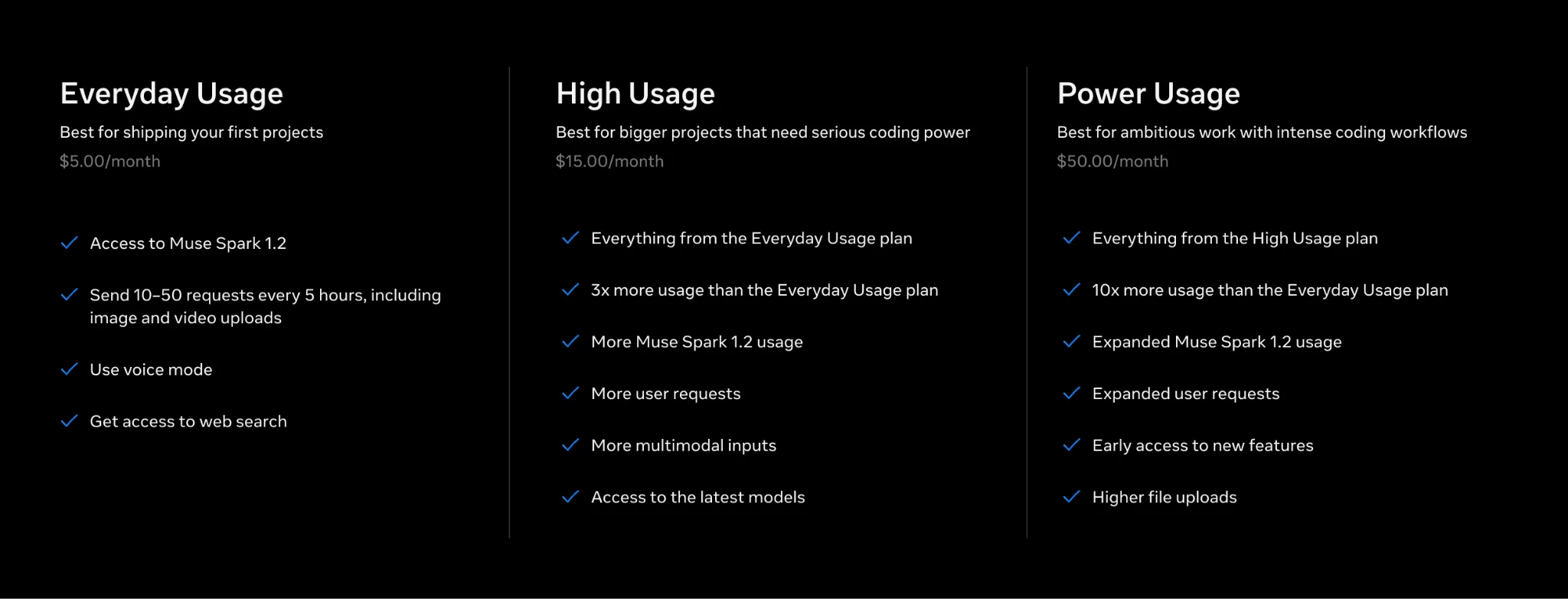
Developers can now get started with a monthly subscription plan for predictable pricing and increased control over usage. The following three subscription options are available today for users to start creating, granting more affordable Meta Model API usage than pay-as-you-go pricing.
Docs and cookbooks are available in dev.meta.ai. We’re excited to see what you build!