MultimodalAgentsTool calling
Build an Intelligent Browser Agent with Llama 3.2This project provides a comprehensive guide to creating an AI-powered browser agent capable of autonomously navigating and interacting with websitesRead more

Introduction

This project provides a comprehensive guide to creating an AI-powered browser agent capable of autonomously navigating and interacting with websites. By leveraging the capabilities of Llama 3.2 Vision, Playwright, and Together AI, this agent can perform tasks seamlessly while understanding both visual and textual content.

Features:

  • Visual understanding: Utilizes screenshots for visual comprehension of web pages.
  • Autonomous navigation: Capable of navigating and interacting with web elements.
  • Natural-language instructions: Executes tasks based on natural-language commands.
  • Persistent session management: Maintains browser sessions for continuous interaction.

Overview

The Intelligent Browser Agent is built on a modular architecture that integrates multiple technologies to enable its capabilities. The high-level architecture is illustrated below.

Intelligent Browser Agent mermaid diagram

Prerequisite for running the Notebook

Before getting started, please make sure to set up Together.ai and get an API key from here.

Technical implementation

Step 1: Environment setup

The project begins with setting up the environment. This includes installing necessary libraries such as Playwright for browser automation and Together AI for leveraging Llama 3.2 Vision capabilities.

Step 2: Browser automation with playwright

Playwright is used to control the browser. It provides a high-level API to automate browser interactions such as clicking, typing, and navigating through web pages.

Step 3: Task execution with Llama 3.2 Vision

Llama 3.2 Vision is used for understanding both textual and visual content on web pages. It processes screenshots of the web pages to comprehend their layout and identify actionable elements.

Step 4: Structured prompting for task guidance

The project employs structured-prompting techniques to guide the Large Language Model (LLM) in task execution. This involves crafting specific prompts that instruct the LLM how to interact with the web page based on the task at hand.

Step 5: Persistent session management

To enable continuous interaction, the agent maintains browser sessions. This is crucial for tasks that span multiple steps or require logging into websites.

Example use cases

  • Searching for a product on Amazon: The agent can navigate to Amazon, search for a product based on a user's description, and identify the product with the best reviews or the cheapest price.
  • Finding the cheapest flight to Tokyo: By interacting with travel websites, the agent can search for flights to Tokyo, compare prices across different airlines, and recommend the cheapest option.
  • Purchasing tickets for an event: The agent can navigate to ticketing websites, search for available tickets for a specified event, such as the next Warriors game, and complete the purchase.

Sequence diagram for task execution

The Intelligent Browser Agent is built on a modular architecture that integrates multiple technologies to enable its capabilities. The high-level architecture is illustrated below.
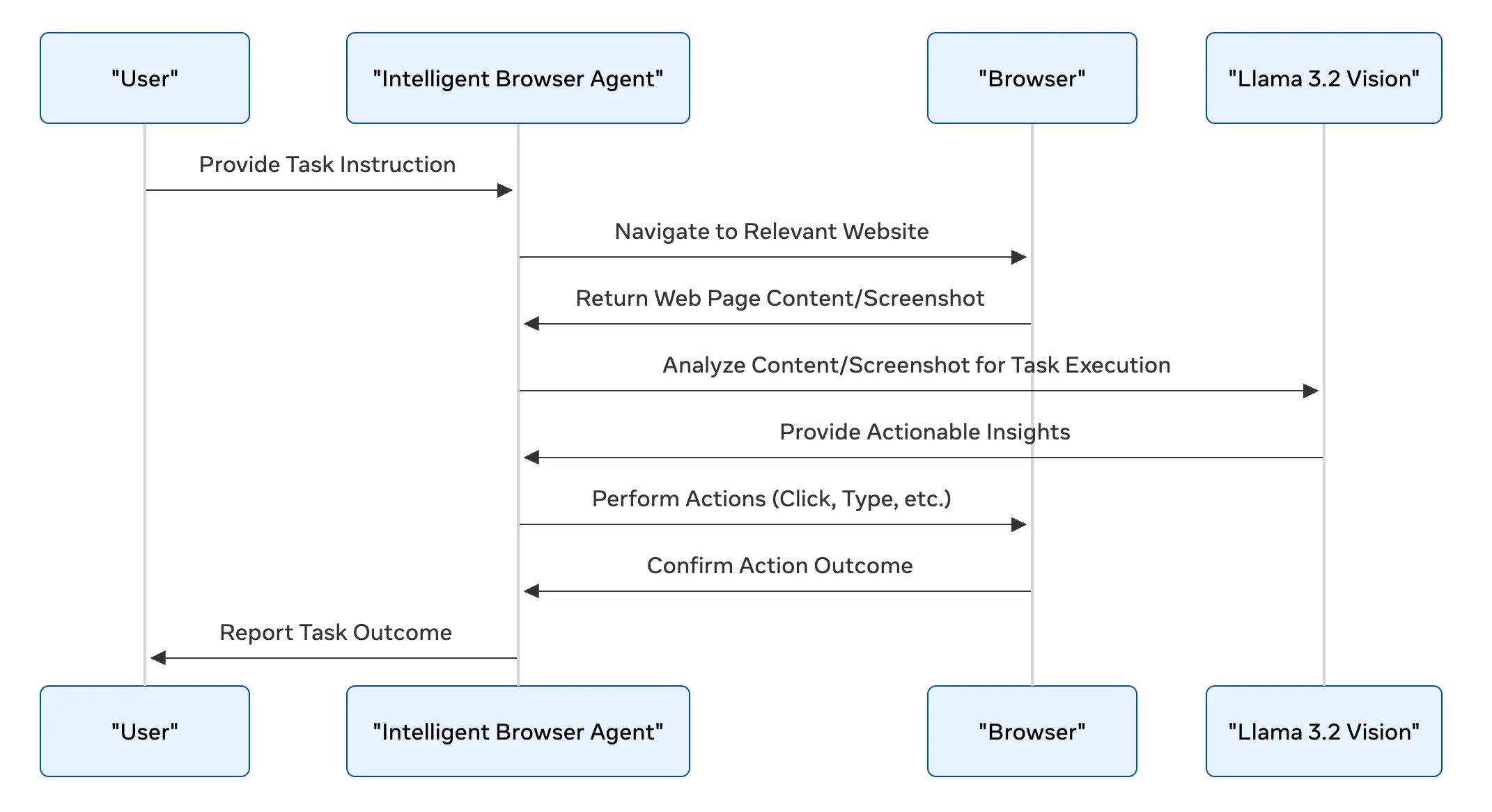

Sequence mermaid diagram

Conclusion

The Intelligent Browser Agent represents a significant step forward in automating web-based tasks. By combining the strengths of AI vision, natural-language processing, and browser automation, it offers a powerful tool for both personal and professional applications. Future enhancements could include expanding its ability to handle more complex tasks, improving its accuracy in understanding visual content, and integrating it with other AI services for broader functionality.

See a detailed explanation and demo video here.

Meta blue bg
Stay up-to-date

Our latest updates delivered to your inbox

Subscribe to our newsletter to keep up with the latest AI updates, releases and more.

Meta
Products
Models
Documentation
Resources
Community
Terms & policies