
Introduction
In this blog post, we explore how to build an email agent powered by Llama 3.1 8B running locally via Ollama. The goal is to create a basic agent with custom tool calling natively supported in Llama 3.1 and eventually cover all components of a production-ready agent app. We'll use Gmail as an example, but any email client API can be used instead.
Overview
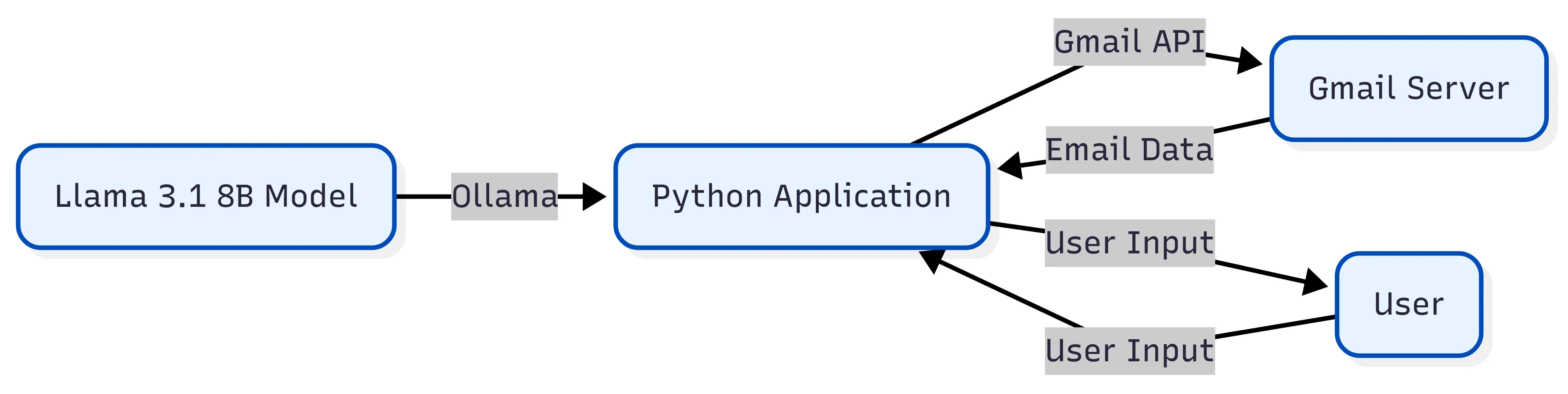
The email agent is built using a modular architecture, with the following components:
- Llama 3.1 8B model running locally via Ollama
- Gmail API for email interactions
- Python application for integrating the Llama model with the Gmail API
Installing required packages
To start, create a Conda or virtual environment:
bash
or
bash
Then, install the required Python libraries:
bash
Enabling Gmail API
To use the Gmail API, you need to enable it in the Google Cloud Console and create credentials for your application. Follow these steps:
- Create a project in the Google Cloud Console.
- Navigate to the API Library page and search for the Gmail API.
- Click on the result, then click on the "Enable" button.
- Create credentials for your application by clicking on the "Create Credentials" button.
- Select "OAuth client ID" and choose "Other".
- Enter a name for your client ID and your authorized redirect URI.
- Download the JSON key file and rename it to
credentials.json.
Running the email agent
To run the email agent, copy the credentials.json file to the email_agent folder and run:
bash
The first time you run it, you'll be prompted to authorize the application. Follow the instructions to complete the authorization process.
Technical Implementation Details
The email agent uses a combination of natural language processing (NLP) and API integration. The Llama 3.1 8B model processes user input and generates responses. The Gmail API is used to interact with the user's email account.
The Python application integrates the Llama model with the Gmail API using the following steps:
- User input is processed by the Llama model to determine the intent.
- Based on the intent, the application calls the relevant Gmail API endpoint to retrieve or send email data.
- The email data is then processed by the Llama model to generate a response.
- The response is returned to the user.
Currently Implemented Features
The email agent currently supports the following features:
- Search for emails and attachments
- Get email detail
- Reply to a specific email
- Forward an email
- Get summary of a PDF attachment
- Draft and send an email
Conclusion
In this post, we explored how to build an email agent powered by Llama 3.1 8B running locally via Ollama. We covered the architectural overview, installing required packages, enabling the Gmail API, running the email agent, and technical implementation details. The email agent currently supports several features, and we plan to continue developing it to cover all components of a production-ready agent app.

Our latest updates delivered to your inbox
Subscribe to our newsletter to keep up with the latest AI updates, releases and more.