DocumentLens: Extract multimodal data from documents using Llama
Use casesMultimodalRAG
DocumentLens: Extract multimodal data from documents using LlamaBuild a tool to streamline the extraction of text, tables, images, charts into JSON, SQL/vector databases and Excel spreadsheetsRead more
DocumentLens utilizes Llama to extract structured data from rich documents and store it in various machine-readable formats like JSON, SQL and vector databases. It is designed to handle complex documents with high accuracy and provide flexible configuration options to tailor extraction tasks to specific needs.
Key Features
Text Extraction: Extract and structure main text, titles, captions, etc.
Table Extraction: Convert complex tables into structured data formats.
Image Extraction: Extract images with contextual descriptions and captions.
Chart Extraction: Convert charts and graphs into structured JSON data.
Multiple Output Formats: JSON, CSV, Excel, and SQL database storage.
Vector Search Capabilities: Semantic search across extracted content.
Architecture
The architecture of DocumentLens is modular, comprising several core components that work together to achieve the desired functionality.
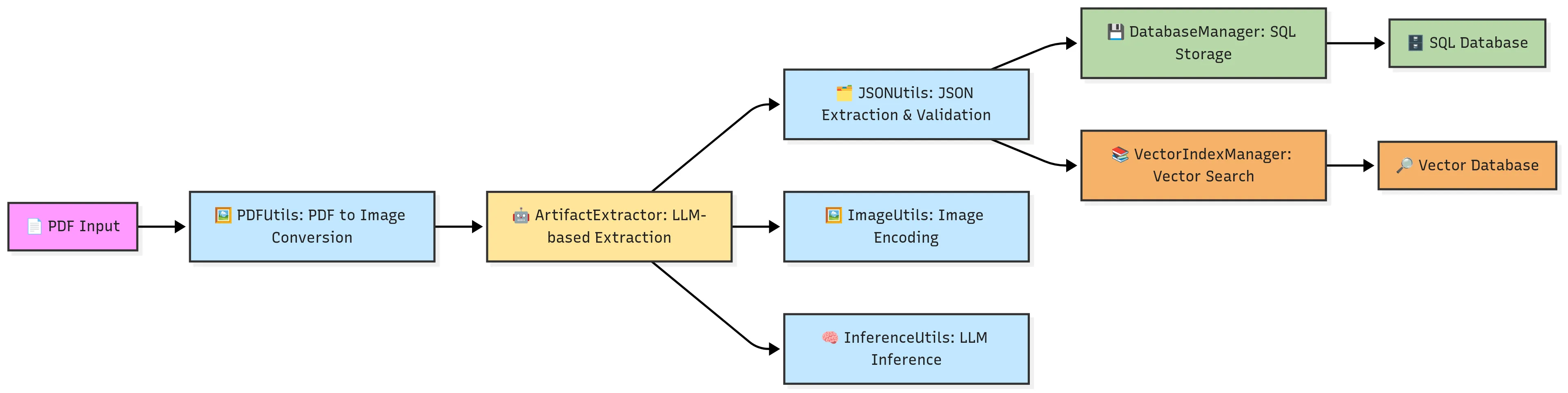
Core Components
RequestBuilder: Builds inference requests for LLMs with image and text content.
ArtifactExtractor: Extracts structured data from documents using configurable prompts.
PDFUtils: Handles PDF processing and page extraction as images.
InferenceUtils: Manages LLM inference with support for vLLM and OpenAI-compatible APIs.
JSONUtils: Handles JSON extraction and validation from LLM responses.
ImageUtils: Utility functions for image encoding and processing.
Installation and Setup
To get started with DocumentLens, follow these steps:
from src.structured_extraction importArtifactExtractor
from src.utils importPDFUtils
# Extract pages from a PDF
pages =PDFUtils.extract_pages("document.pdf")
# Process specific pages
for page in pages[10:20]:
artifacts =ArtifactExtractor.from_image(
page["image_path"],
["text","tables"]
)
# Custom processing of artifacts...
Querying the Database
python
from src.json_to_sql importDatabaseManager
# Query all text artifacts
text_df =DatabaseManager.sql_query(
"sqlite3.db",
"SELECT * FROM document_artifacts WHERE artifact_type = 'text'"
)
# Query tables containing specific content
revenue_tables =DatabaseManager.sql_query(
"sqlite3.db",
"SELECT * FROM document_artifacts WHERE artifact_type = 'table' AND table_info LIKE '%revenue%'"
)
Note: The SQLite3 database engine is bundled with the sqlite3 Python package.
Configuration
The recipe is configured via src/config.yaml. Key configuration options include model configuration, inference parameters, database configuration, and artifact configuration.