Merging the tokenizers
To merge the tokenizers, we need to combine the original Llama tokenizer with the new language tokenizer. This involves adding new tokens to the original tokenizer without disturbing its original vocabulary.
Step 1: Load the original Llama tokenizer
First, we load the original Llama tokenizer and its vocabulary.
python
Step 2: Load the new language tokenizer
Next, we load the new language tokenizer--in this case, Hindi--and its vocabulary.
python
Step 3: Merge the tokenizers
We then merge the two tokenizers by adding the new tokens to the original tokenizer.
python
The extend_tokenizer.py script appends the new tokens to the original tokenizer's vocabulary and saves the extended tokenizer.
Step 4: Verify the merged tokenizer
We verify that the merged tokenizer works as expected by testing it on a text sample.
python
Output:
python
RAFT: Retrieval Augmented Fine-Tuning
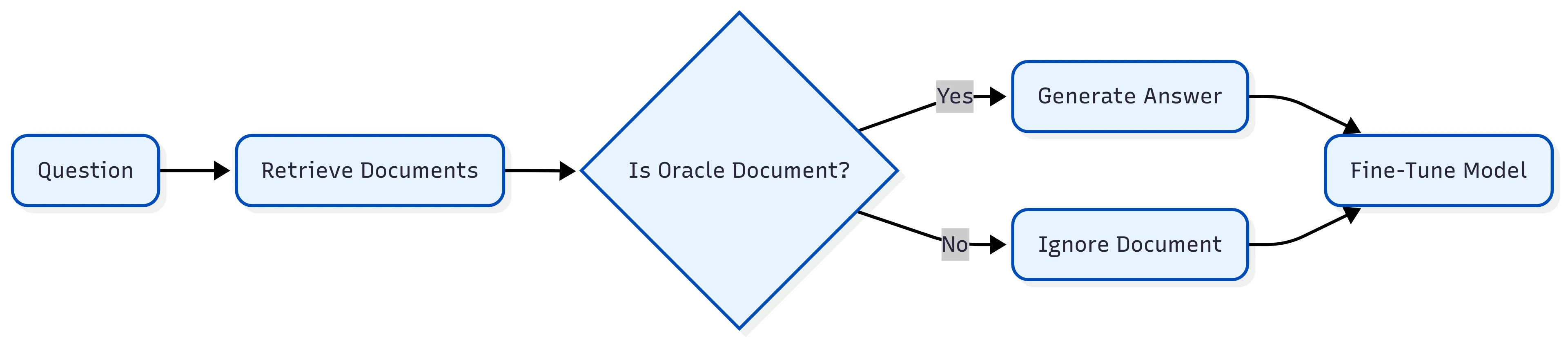
RAFT is a technique that combines fine-tuning with Retrieval Augmented Generation (RAG) to better utilize custom domain text data. RAFT teaches the model to differentiate between oracle documents (D*) that contain the answer to a question and distractor documents (Di) that do not.
RAFT architecture
Fine-tuning Llama for the new language
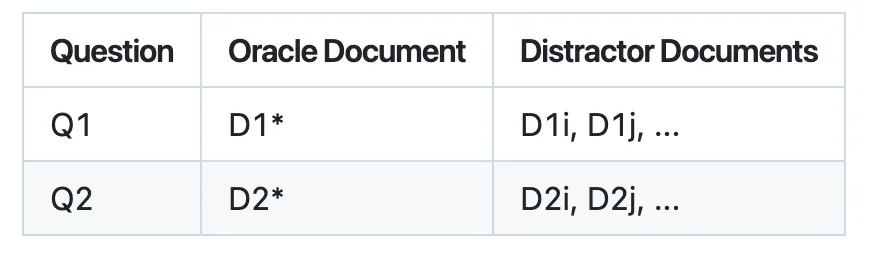
To fine-tune Llama for the new language, we need to prepare a dataset with questions, oracle documents, and distractor documents.
Step 1: Prepare the dataset
We prepare a dataset with the following format:
Step 2: Fine-tune Llama using RAFT
We fine-tune Llama using the RAFT technique, which involves training the model to differentiate between oracle documents and distractor documents.