Meta Global AI Developer Hackathon. $1M in prizes.Get notified
AgentsIntegrationsTool calling
Tool Calling with Llama: Enhancing AI Capabilities101- and 201-level tutorials for tool calling and agentic workflows.Read more

Introduction

The emergence of Large Language Models (LLMs), such as Llama, has revolutionized the field of natural language processing. One of the key features that make LLMs, such as Llama, particularly useful is their ability to perform "tool calling." Tool calling refers to the model's ability to identify when it needs to use an external tool or service to accomplish a task and then execute that tool with the appropriate parameters. In this blog, we explore the concept of tool calling with Llama, its technical implementation, and its applications.

Understanding tool calling

Tool calling is a mechanism that enables Llama to interact with external tools and services. This is particularly useful when the model is faced with a task that requires specific functionality not inherent in the model itself, such as accessing real-time data, performing complex computations, or interacting with external APIs.

Overview

The architecture for implementing tool calling with Llama involves several components:

  1. Llama model: The core LLM that processes user inputs and determines when tool calling is necessary.
  2. Tool registry: A registry of available tools that the Llama model can call upon. Each tool is associated with a specific function or service.
  3. Tool-calling mechanism: The mechanism by which Llama identifies the need for a tool, selects the appropriate tool from the registry, and executes it with the required parameters.

Technical implementation

To implement tool calling with Llama, the following steps are involved:

Step 1: Defining tools

Identify and define the tools that can be used by Llama. This involves specifying the tool's functionality, input parameters, and output format.

Step 1: Integrating tools with Llama

Modify the Llama model to recognize when a tool is needed and to select the appropriate tool from the registry.

Step 1: Executing tools

Implement the logic to execute the selected tool with the required parameters.

The following Mermaid diagram illustrates the tool calling process:

Tool calling with Llama marmaid diagram

Example use cases: Google calendar assistant

One practical application of tool calling with Llama is building a Google Calendar assistant. The assistant can use tool calling to interact with the Google Calendar API to schedule meetings, retrieve calendar events, and more.

Step-by-step implementation

  1. Define the tool: Define a tool for interacting with the Google Calendar API. This includes specifying functions for creating events, retrieving events, and deleting events.
  2. Integrate with Llama: Modify the Llama model to use the Google Calendar tool when a user requests calendar-related actions.
  3. Execute the tool: Implement the logic to execute the Google Calendar tool with the required parameters, such as event details or calendar IDs.

The following sequence diagram illustrates the interaction between the user, Llama, and the Google calendar API:
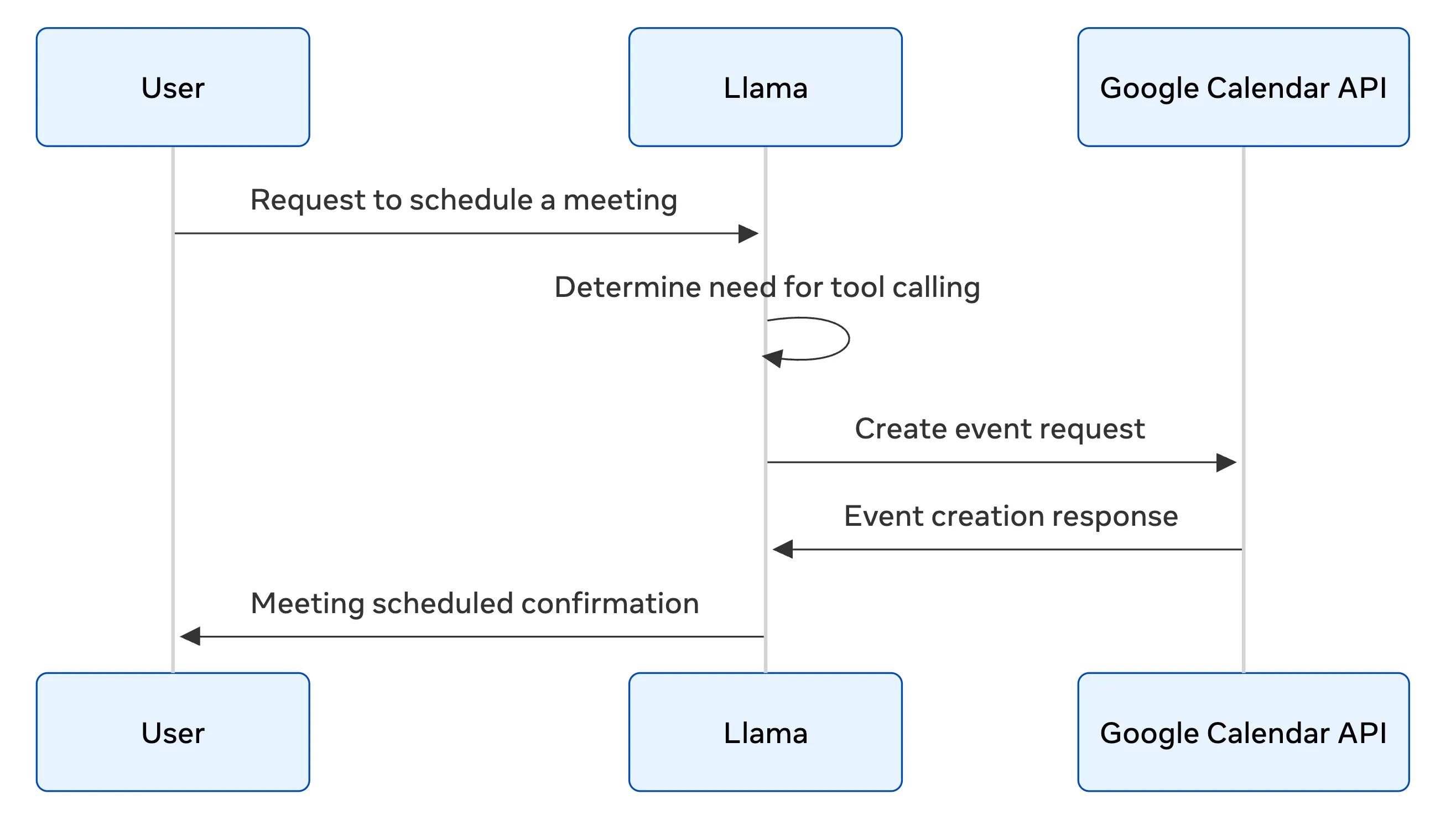

Tool calling with Llama mermaid diagram

Conclusion

Tool calling with Llama enhances the model's capabilities by allowing it to interact with external tools and services. This opens up a wide range of applications, from personal assistants to complex enterprise solutions.

As the technology continues to evolve, we can expect to see more sophisticated tool calling mechanisms, broader tool registries, and more seamless integrations with various services and APIs.

Related Resources

  • Email agent: An example implementation of an email-automation agent using Llama.
  • Customer-service chatbots: Customer service chatbot implementations using Llama.
  • Agents: Autonomous agent implementations with a Llama integration.

Meta blue bg
Stay up-to-date

Our latest updates delivered to your inbox

Subscribe to our newsletter to keep up with the latest AI updates, releases and more.

Meta
Products
Models
Documentation
Resources
Community
Terms & policies